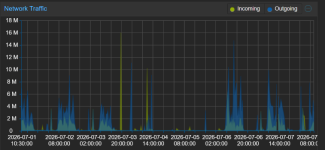
We are running Promox 9.1.4 with 3 nodes and ceph cluster.
One particular VM is giving issues, it's a Windows 2025 Datacenter VM with DFS as serverrole.
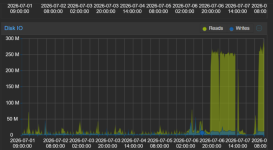
It seems that the virtio drivers (0.1.271) crashes out, on the summary page of promox we see certain Disk I/O read spikes during this period.
We stop this behaviour just by rebooting the VM.
However we cannot backtrack to which process is causing this, not in proxmox, nor our monitoring software or just plain windows event logs.
We have doubled checked our setup, scheduled tasks and if there is any other software that can cause this issue. But have found none.
What are any steps I can take further in promox regarding these crashes?
One particular VM is giving issues, it's a Windows 2025 Datacenter VM with DFS as serverrole.
It seems that the virtio drivers (0.1.271) crashes out, on the summary page of promox we see certain Disk I/O read spikes during this period.
We stop this behaviour just by rebooting the VM.
However we cannot backtrack to which process is causing this, not in proxmox, nor our monitoring software or just plain windows event logs.
We have doubled checked our setup, scheduled tasks and if there is any other software that can cause this issue. But have found none.
What are any steps I can take further in promox regarding these crashes?