Ceph constantly adding PG

Nhoague

Renowned Member
Sep 29, 2012
123
4
83
47
Colorado, USA
Hello!

Quick recap: I have 5 hosts, 5 x 4TB (enterprise SSD, Micron Pro) per host with Ceph on its own 10Gbp network. All has been running great for about 6 months.

Last night I had a server host kernel panic. I rebooted the host. All came up just fine, cluster returned to HEALTH_OK within minutes, and the rebalancing begun. Now I think it had started to rebalance prior to me getting to the host, but when the existing PGs came alive on the rebooted host, the rebalance appeared to go pretty quick.

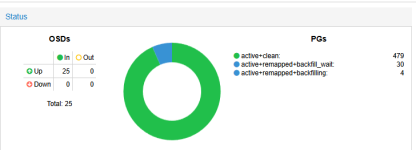
Almost 12 hours later, and its still rebalancing. However, I started with 256 PG, and now its up to 344.
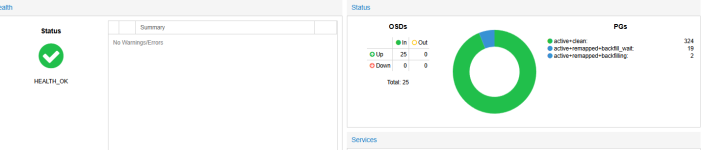
1782146268982.png

Watching the logs, I don't see any issues about hardware failure, or stuck PG. Would that status here show me a stuck PG? Is it just doing its thing, and will continue to grow PG until it feels it is happy? Why was 256 ok for the longest time, but last night started growing? Did it just not want to / need to?

1782146347505.png

One thing that to note, the misplaced objects, will drop to about 427k, and then something happens and its back to 490k and works its way down.

Much appreciated for your input!
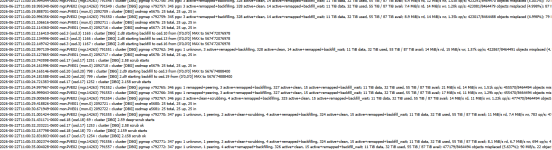
 
Update: I was able to catch it when the PG jumped another one and this is in the logs.

1782147744128.png

1782147751091.png

Appears to me it just wants to make more PG? <shrug>

Thanks!
 
I see this:

root@PVE01:~# ceph balancer status
{
"active": true,
"last_optimize_duration": "0:00:00.000217",
"last_optimize_started": "Mon Jun 22 11:29:39 2026",
"mode": "upmap",
"no_optimization_needed": true,
"optimize_result": "Too many objects (0.055091 > 0.050000) are misplaced; try again later",
"plans": []
}
root@PVE01:~#
1782149489815.png

Ideas? Thank you!
 
You just gave me some relief! I'm sitting here for hours watching it saying how high is it going to go!? You are right:

root@PVE01:~# ceph osd pool autoscale-status
POOL SIZE TARGET SIZE RATE RAW CAPACITY RATIO TARGET RATIO EFFECTIVE RATIO BIAS PG_NUM NEW PG_NUM AUTOSCALE BULK
.mgr 226.5M 3.0 89424G 0.0000 1.0 1 on False
CEPH01 11037G 3.0 89424G 0.3703 1.0 512 on False
root@PVE01:~#

Interesting it doesnt show in the GUI the 512 PG, it still only shows 256. Maybe when its done? I dunno?! haha

Ok so at best, it is doing its thing and I just gotta trust it!
 
The Ceph auto scale shows that it is trying to scale to 512 but for a variety of reasons it is not increasing the pg automatically, probably because you have too few OSD for it to do that. You can probably manually increase it to 512 or increase the PG per OSD setting.
 
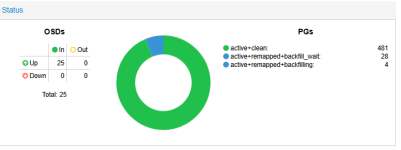
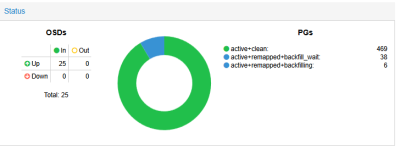
Ok, it has reached 512 PG in the pools, optimal still shows 256. But, it just feels like its cycling. It hasn't progressed or these havent gone down?

1782222525874.png

How can I throttle the rebalance, as it is affecting VM performance a bit. Or restart it so it can get past this?

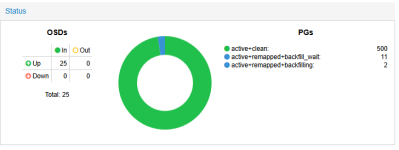
Now, within minutes its showing this:

1782222721818.png

But, I bet it drops back to 479. Why?

Any input is appreciated! Thank you!
 
This looks a lot like the autoscaler doing its thing. Was there any config change before all of this?

Check the <NODE> → Ceph → Pool menu to see what is configured there.
Possible reasons could be that one of the "target_*" options was set. Or that the pool grew in size large enough, to warrant a change in the number of PGs. If no "target_*" is set, the autoscaler will decide upon the current usage of the pool if another pg_num would be better.

If the pg_num changes, and in this case, increases, the data is split into the new larger number of PGs. That affects the data distribution of the CRUSH algorithm. Therefore you will see PGs backfilling and waiting to be backfilled. Which is part of the process of being moved to another OSD.

But all PGs are active and none are in any reduced state. So from a data availability and redundancy point of view, everything is absolutely fine and Ceph is doing what it is meant to do :-)
 
  • Like
Reactions: Nhoague
Hello! There were no config changes that I made, however, I had a node kernel panic and I had to reboot it. By the time I got to it, probably 45 min, I suspect the other nodes started rebalancing? So then when this node came online, is it basically rebuilding as a RAID would? From beginning -> end? That reboot or the rebuilding caused the PG to grow to 512 from 256. Is it fighting itself cause optimal is still 256?

Node - Ceph - Pool shows:

1782227820523.png

If I click on the CEPH01, target is not set.

I do remember when I built this cluster, it was 64, then after restoring a few VMs to it, it went to 128, and both numbers in pools matched.

I do agree, overall data redundancy and availability is good! However, slower, to be expected.

I just wish ceph would tell me I'm fine and be patient! haha Thank you for your answer, it is relieving!
 
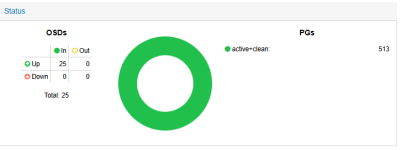
Thank you everyone who replied! It's full and back to normal!

1782237732860.png

I keep trying to think of ceph in terms of a RAID in that, why did it rebuild 33 TB when only one node was affected, but the PG really clicked that it rebuilt the entire cluster.

Just ceph doing what ceph wants to do. Dang this lil experience proved to be just that. Pretty freaking cool! When I was building this we tested the theoretical things, pulling power, pulling disks, etc. But never really thought of "expanding the PG" haha Makes total sense.
 
On a side note, while geeking out ... Take a look at this:

During rebuild:
1782238002296.png

Using SNMP to watch my CEPH switches, I've seen them hit 2G before, but never really hammering them. We have Micron 5400 Pro disks, and our performance is great! Just curious what kind of operations yall are doing that saturates a 10G network!?

Normal operation:
1782238741298.png

Thanks again!
 
Interesting. Most likely caused by some changes in the space usage of the pool. Even though the ceph osd pool autoscale-status output posted is useless as it is not formatted as code, I suspect that there is not target_ratio configured for the pool.
Given that you have 25 OSDs and one pool (we can ignore the .mgr with its 1 PG), you most likely have around 60 PGs per OSD right now? Visible in the OSD sub menu.

If you set the target_ratio of the CEPH01 pool to any value (only one, therefore always 100%), but I would suggest 1.0, you tell the autoscaler that you expect this pool to consume all the space in the pool. Then it can make a better calculation regarding how many PGs are best and do one final rebalance without having to rely on the space usage of the pool.

It is possible that the optimal number of PGs is too close to the current one, and it won't change anything by itself. Then you can manuall set the number of PGs on the pool manually to the recommended optimal one.

Having a good number of PGs per OSD can improve overall performance and recovery speed in case an OSD fails.

If the number of OSDs changes, the autoscaler will calculate a new optimal pg_num. Or if you have another pool and configure the target_ratios of both accordingly to your expectations.
 
Yea dont judge, haha how do you paste as code? I try clicking the inline code, or the code formatter, and I paste and it looks like caca. <shrug>

Nvmnd ... I figured it out. Bam!

root@PVE01:~# ceph osd pool autoscale-status
POOL SIZE TARGET SIZE RATE RAW CAPACITY RATIO TARGET RATIO EFFECTIVE RATIO BIAS PG_NUM NEW PG_NUM AUTOSCALE BULK
.mgr 228.1M 3.0 89424G 0.0000 1.0 1 on False
CEPH01 10974G 3.0 89424G 0.3682 1.0 512 on False
root@PVE01:~#

Yes, correct ~60 PG / host!

All makes sense, kinda, but I'm definitely not inclined to make any changes now that its happy!