

W warner_k Member Jul 9, 2022 24 0 6 73 Netherlands Yesterday at 12:27 #1 I have ProxMox VE 9.2.3 running and in the leftmost pane i lost my data disk where all VM's are on. The data disk is partition sda3 from my 1TB disk and is a LVM-Thin. How to get it back in the list?
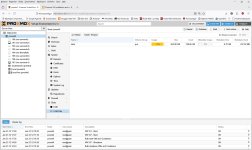
I have ProxMox VE 9.2.3 running and in the leftmost pane i lost my data disk where all VM's are on. The data disk is partition sda3 from my 1TB disk and is a LVM-Thin. How to get it back in the list?
cheiss Proxmox Staff Member Staff member Dec 5, 2022 1,259 468 93 Vienna, Austria c8h4.io Yesterday at 13:18 #2 Hi, can you provide the output of cat /etc/pve/storage.cfg? Did you edit any storages? And/or edit configuration files manually?
Hi, can you provide the output of cat /etc/pve/storage.cfg? Did you edit any storages? And/or edit configuration files manually?
W warner_k Member Jul 9, 2022 24 0 6 73 Netherlands Yesterday at 14:21 #3 cat /etc/pve/storage.cfg dir: local path /var/lib/vz content iso,vztmpl,backup lvmthin: local-lvm thinpool data vgname pve content rootdir,images
cat /etc/pve/storage.cfg dir: local path /var/lib/vz content iso,vztmpl,backup lvmthin: local-lvm thinpool data vgname pve content rootdir,images
W warner_k Member Jul 9, 2022 24 0 6 73 Netherlands Yesterday at 14:25 #5 I see that it is not a separate disk, it is shown in local-lvm. Sorry, my misunderstanding
bbgeek17 Distinguished Member Nov 20, 2020 6,671 2,621 278 Blockbridge www.blockbridge.com Yesterday at 17:46 #6 Hey @warner_k , you can mark the thread as SOLVED by editing the first message and selecting the appropriate subject prefix. Cheers Blockbridge : Ultra low latency all-NVME shared storage for Proxmox - https://www.blockbridge.com/proxmox
Hey @warner_k , you can mark the thread as SOLVED by editing the first message and selecting the appropriate subject prefix. Cheers Blockbridge : Ultra low latency all-NVME shared storage for Proxmox - https://www.blockbridge.com/proxmox