Re-IP'd Hosts to a new network ssh finds old IP's and won't connect between hosts

Palathius

Member
Apr 15, 2023
2
0
6
Canada
www.indicina.ca
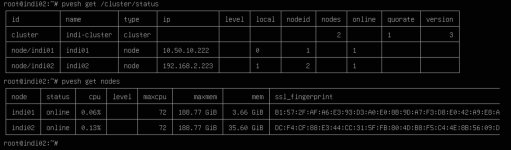
I recently did a network upgrade for my office. We installed new switches and wanted to consolidate and re-ip to a 10.50.x.x. from a 192.168.x.x numbered IPv4 network. Everything appeared to go fine up until we got the two node development proxmox cluster. We changed the IPs fine, the cluster we had some tweaking to do but ultimately it appeared to be working fine. Then we did a pve cluster status and it shows node2 is reporting the old IP, even though the cluster nodes all report the correct 10.50.x.x IPs.

What is also weird and we can't find a resolution for it so far is when we use the UI to open a shell on node 2 ssh complains there is no route and details the old IP address not the new one. For the life of us we can't find any remaining fragments of text in any config files or DNS cache or anything that would retain this information but for some reason SSH is stuck on the old IP.

I've attached two images the first showing the cluster status, the second showing the ssh banner when we try to open node 2's shell from node 1.

We are running 9.2.3 and performed all upgrades prior to changing the IP's, so we are as up to date as possible, as of the writing of this thread.
 

Attachments

  • PVE Cluster Status.jpg
    PVE Cluster Status.jpg
    189.7 KB · Views: 2
  • PVE Shell access from Node 1 to Node 2.jpg
    PVE Shell access from Node 1 to Node 2.jpg
    94.4 KB · Views: 2
Hi @Palathius, welcome to the forum
the cluster we had some tweaking to do but ultimately it appeared to be working fine
It would be great if you mentioned more details on the steps you took to change PVE networking, in particular "tweaking".

There is an orderly process to this, and it sounds like you may have missed a step. You may want to check /etc/pve/corosync.conf


Blockbridge : Ultra low latency all-NVME shared storage for Proxmox - https://www.blockbridge.com/proxmox
 
Here is a synopsis of what we did as part of our Re-IP exercise.


Proxmox Cluster IP Migration Summary

Environment
  • Proxmox VE 9.2.3
  • Two-node cluster:
    • indi01
    • indi02
Original Management Network
  • indi01: 192.168.2.222
  • indi02: 192.168.2.223
  • Gateway: 192.168.2.1

New Management Network
  • indi01: 10.50.10.222
  • indi02: 10.50.10.223
  • Gateway: 10.50.10.1

Files Modified
  1. /etc/network/interfaces
    • Updated management IP addresses.
    • Updated default gateway.
  2. /etc/hosts
    • Updated hostname-to-IP mappings for both cluster nodes.
  3. /etc/pve/corosync.conf
    • Updated:
      • ring0_addr: 192.168.2.222 → 10.50.10.222
      • ring0_addr: 192.168.2.223 → 10.50.10.223
    • Incremented:
      • config_version: 2 → config_version: 3
Initial Migration Procedure
  1. Updated the network configuration files on both nodes.
  2. Updated /etc/hosts on both nodes.
  3. Updated /etc/pve/corosync.conf.
  4. Rebooted both cluster nodes.
  5. Verified both nodes came online using their new IP addresses.
  6. Verified node-to-node ICMP connectivity using both IP addresses and hostnames.

Commands Executed During Troubleshooting

Verification:
  • getent hosts indi01
  • getent hosts indi02
  • pvecm status
  • pvecm nodes
  • corosync-cfgtool -s
  • corosync-cmapctl | grep members
  • corosync-cmapctl | grep ring0_addr
  • pvesh get /cluster/status
  • pvesh get /nodes
Cluster Recovery Actions
  • systemctl restart corosync
  • pvecm expected 1
  • systemctl restart corosync
  • pvecm status

Certificate / Service Refresh Attempts
  • pvecm updatecerts --force
  • systemctl restart pve-cluster
  • systemctl restart pvedaemon
  • systemctl restart pveproxy
These steps were executed multiple times during troubleshooting but did not resolve the issue described below.


Current Verified State

Corosync Runtime
  • corosync-cmapctl | grep members
returns:
  • runtime.members.1.ip = 10.50.10.222<br>runtime.members.2.ip = 10.50.10.223
and
corosync-cmapctl | grep ring0_addr
returns:
  • 10.50.10.222<br>10.50.10.223

Hostname Resolution
  • getent hosts indi02
returns:
  • 10.50.10.223 indi02.dglab.local indi02
Cluster Status
pvecm status
  • Quorum restored
  • Both nodes online
  • Corosync healthy

Issue Remaining
pvesh get /cluster/status
returns:
  • node/indi01 -&gt; 10.50.10.222<br>node/indi02 -&gt; 192.168.2.223
even though:
  • Corosync runtime reports 10.50.10.223
  • Hostname resolution reports 10.50.10.223
  • Node-to-node connectivity is working on 10.50.10.x

Operational Impact

Cross-node management functions continue attempting to connect to the old address:
  • ssh: connect to host 192.168.2.223 port 22: No route to host
Examples include:
  • Opening a shell on indi02 from the indi01 GUI
  • Other node-to-node management operations routed through the Proxmox management layer

Additional Investigation Performed


Reviewed:
/etc/hosts<br>/etc/pve/corosync.conf<br>/etc/pve/.members<br>/etc/pve/nodes<br>/etc/pve/priv
and verified:
  • No remaining references to 192.168.2.223 were found in the active Corosync configuration.
  • Corosync runtime reflects only the new 10.50.10.x addresses.
  • The stale address appears to originate from data returned through:
pvesh get /cluster/status
which remains inconsistent with the Corosync runtime state.