

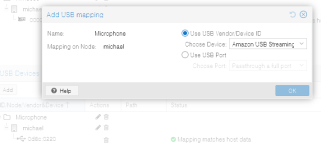
Hi guys, got a head scratcher here. Got a USB microphone, specifically this one from Amazon. Want to use it on my Windows 10 VM in Proxmox, but there is no input signal at all coming from it. I am passing through with the mapping shown below. ProxMox has no issue seeing it.
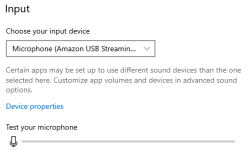
In Windows, it again shows up and is identified correctly. But no matter what I do, there is no sound input at all.
Other troubleshooting info:
Feels like something stupid. There aren't really any options or flags for passing through a USB device, so I'm not sure what is configured incorrectly?
Here is the VM config:
Thanks in advance for any help!
In Windows, it again shows up and is identified correctly. But no matter what I do, there is no sound input at all.
Other troubleshooting info:
- It works fine on other computers, even a Power Mac G5 running Mac OS X Leopard
- Up until buying this microphone, I was using an older USB microphone and it worked perfectly fine in the same VM. Zero issues at all passing it through.
Feels like something stupid. There aren't really any options or flags for passing through a USB device, so I'm not sure what is configured incorrectly?
Here is the VM config:
Code:
agent: 1
bios: ovmf
boot: order=scsi0;ide0;net0
cores: 10
cpu: host,flags=-md-clear
efidisk0: R620:vm-107-disk-1,efitype=4m,ms-cert=2023k,pre-enrolled-keys=1,size=1M
hostpci0: mapping=RTX3050,pcie=1,x-vga=1
ide0: none,media=cdrom
machine: pc-q35-9.2+pve1
memory: 32768
meta: creation-qemu=9.2.0,ctime=1754708820
name: Win10-LTSC
net0: virtio=BC:24:11:1C:F0:2C,bridge=vmbr1,firewall=1
numa: 1
ostype: win10
scsi0: R620:vm-107-disk-0,cache=writeback,iothread=1,size=500G
scsihw: virtio-scsi-single
smbios1: uuid=f011bdd8-54b7-4d0c-981f-6c347d780dc8
sockets: 2
usb0: mapping=Microphone
usb1: host=1-1.5
vga: none
vmgenid: ef66cea5-97d0-4a34-addf-cd683b125c85
Thanks in advance for any help!
