[SOLVED] PVE loses network connection after kernel upgrade to proxmox-kernel-7.0.0-3-pve

Psilospiral

Well-Known Member
Jun 25, 2019
48
13
48
54
Greetings Forum,

Running PVE 9.1.9 on a Dell T630 & a Dell T620. After a recent upgrade, no network connection. When booting into proxmox-kernel-6.17.13-6-pve from GRUB, network functions normally.

When booting proxmox-kernel-7.0.0-3-pve, 'ip a' shows 'nic0' DOWN. 'ip link set nic0 up' brings it UP, but no connection and is no longer UP after a reboot.

Has anybody experienced this with the upgrade to kernel-7?
 
Hard to say without any logs/journals/config, but maybe 7.0.x names the interface(s) in a different way.
If for example 6.17.x names an interface eth0 and that eth0 name is used in the configurations, it won't work if 7.0.x names it nic0.
If so, either change the config so it uses nic0 instead of the old interface name, or use interface-pinning to keep the old name.
See: https://pve.proxmox.com/pve-docs/chapter-sysadmin.html#network_override_device_names
 
Last edited:
as the previous poster already said, logs of the boot as well as an overview of the network configuration would be interesting:

Code:
journalctl -b > syslog.txt

cat /etc/network/interfaces
cat /etc/network/interfaces.d/sdn
 
as the previous poster already said, logs of the boot as well as an overview of the network configuration would be interesting:

Code:
journalctl -b > syslog.txt

cat /etc/network/interfaces
cat /etc/network/interfaces.d/sdn
Stefan & daanw, thank you for responding. syslog.txt attached from a boot into kernel-6.17.13-6-pve. (I cannot ssh in to capture output when booting into kernel-7*, but can capture terminal screenshots via iDRAC if needed.)

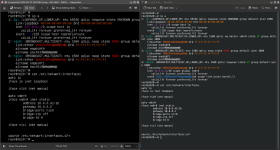
Attached is an image of 'ip a' and /etc/network/interfaces from kernel-7.0.0-3-pve (on the left) and kernel-6.17.13-6-pve (on the right) for comparison. Both identify nic0 & nic1, but the boot into kernel-7 has no vmbr interface entry.

Code:
root@t620:~# stat /etc/network/interfaces.d/sdn
stat: cannot statx '/etc/network/interfaces.d/sdn': No such file or directory

Server's NIC is set to 10.0.0.41/16, 10.0.0.2 gateway
 

Attachments

  • screenshot.2026.05.27.162706-3.png
    screenshot.2026.05.27.162706-3.png
    526.2 KB · Views: 14
  • syslog.txt
    syslog.txt
    182.1 KB · Views: 10
I cannot ssh in to capture output when booting into kernel-7*, but can capture terminal screenshots via iDRAC if needed.
You can get the bootlog from a previous 7.* boot with journalctl -b -1 (or -2, -3, etc.). Please post that.
 
Last edited:
Hello, I seem to have the same issue. Updated Proxmox from 8 to 9 and one of my two servers ended up not having a functioning network connection afterwards.
Code:
ip a
does list the onboard nic which was used before as eno1 but vmbr0 does not appear. In addition eno1 is marked down.

I checked
Code:
/etc/network/interfaces
but it did not look suspicious to me. It lists eno1 as bridge-ports for vmbr0.

My machine is running kernel 6.8.12-25-pve on pve 9.2.2 - unfortunately I do not know which kernel was running before the update while I was still on 8.x.

Code:
/etc/network/interfaces.d/
is empty.

I am currently fighting some issues to get a usb thumb drive working to get text versions of the logs. If screenshots would help, let me know.

Kind regards
Max
 
Attached is an image of 'ip a' and /etc/network/interfaces from kernel-7.0.0-3-pve (on the left) and kernel-6.17.13-6-pve (on the right) for comparison. Both identify nic0 & nic1, but the boot into kernel-7 has no vmbr interface entry.

Hello, I seem to have the same issue. Updated Proxmox from 8 to 9 and one of my two servers ended up not having a functioning network connection afterwards.


Is there any error output when running ifreload -avd ?

This creates quite a bit of output, so it might be best to boot the failing kernel, run the command and save it into a text file, reboot into the working kernel and then download the resulting logs / reports.
 
Hi Stefan,
when I try to run ifreload -avd I get permission denied (logged in as root). This seems strange to me.

By the way here are the outputs of ip a
Code:
1: lo: <LOOPBACK,UP,LOWER_UP> mtu 65536 qdisc noqueue state UNKNOWN group default qlen 1000
    link/loopback 00:00:00:00:00:00 brd 00:00:00:00:00:00
    inet 127.0.0.1/8 scope host lo
       valid_lft forever preferred_lft forever
    inet6 ::1/128 scope host noprefixroute
       valid_lft forever preferred_lft forever
2: eno1: <BROADCAST,MULTICAST> mtu 1500 qdisc noop state DOWN group default qlen 1000
    link/ether c8:**:**:**:**:** brd ff:ff:ff:ff:ff:ff
    altname enp9s0
    altname enxc87f5400c838

and cat /etc/network/interfaces
Code:
# network interface settings; autogenerated
# Please do NOT modify this file directly, unless you know what
# you're doing.
#
# If you want to manage parts of the network configuration manually,
# please utilize the 'source' or 'source-directory' directives to do
# so.
# PVE will preserve these directives, but will NOT read its network
# configuration from sourced files, so do not attempt to move any of
# the PVE managed interfaces into external files!

auto lo
iface lo inet loopback

iface eno1 inet manual

auto vmbr0
iface vmbr0 inet static
    address 10.241.1.113/24
    gateway 10.0.10.8
    bridge-ports eno1
    bridge-stp off
    bridge-fd 0

# source /etc/network/interfaces.d/*

I compared them to the other server that is running fine and besides the naming of the interface I could not spot a difference.

Kind regards
Max
 
Last edited:
when I try to run ifreload -avd I get permission denied (logged in as root). This seems strange to me.

This is very odd...

can you post the output of

Code:
which ifreload
stat /usr/sbin/ifreload
apt-cache policy ifupdown2
 
This is very odd...

can you post the output of

Code:
which ifreload
stat /usr/sbin/ifreload
apt-cache policy ifupdown2

which ifreload does not return anything

here is the output of stat /usr/sbin/ifreload
Code:
  File: /usr/sbin/ifreload -> ../share/ifupdown2/ifupdown2
  Size: 28            Blocks: 0          IO Block: 4096   symbolic link
Device: 252,1    Inode: 148057      Links: 1
Access: (0777/lrwxrwxrwx)  Uid: (    0/    root)   Gid: (    0/    root)
Access: 2026-05-28 15:40:44.333912993 +0200
Modify: 2026-01-22 22:11:27.000000000 +0100
Change: 2026-05-22 17:38:12.675072859 +0200
 Birth: 2026-05-22 17:38:12.668072834 +0200

and apt-cache policy ifupdown2
Code:
ifupdown2:
  Installed: 3.3.0-1+pmx12
  Candidate: 3.3.0-1+pmx12
  Version table:
 *** 3.3.0-1+pmx12 500
        500 http://download.proxmox.com/debian/pve trixie/pve-no-subscription amd64 Packages
        100 /var/lib/dpkg/status
     3.3.0-1+pmx11 500
        500 http://download.proxmox.com/debian/pve trixie/pve-no-subscription amd64 Packages
     3.3.0-1+pmx10 500
        500 http://download.proxmox.com/debian/pve trixie/pve-no-subscription amd64 Packages
     3.3.0-1+pmx9 500
        500 http://download.proxmox.com/debian/pve trixie/pve-no-subscription amd64 Packages
     3.3.0-1+pmx8 500
        500 http://download.proxmox.com/debian/pve trixie/pve-no-subscription amd64 Packages
     3.3.0-1+pmx7 500
        500 http://download.proxmox.com/debian/pve trixie/pve-no-subscription amd64 Packages
     3.0.0-1.3 500
        500 http://ftp.de.debian.org/debian trixie/main amd64 Packages

I attached the output of journalctl -b > syslog.txt, too.
When I monitored the boot of the boot of the machine I saw apparmor failing to start which I could verify via systemctl status apparmor.service.

Might all of this point into the direction of a failed upgrade?

Thanks
Max
 

Attachments

Seems like systemd-udev-settle.service is failing, which in turn causes ifupdown2-pre to fail. This is usually caused by some piece of hardware / driver failing to initialize.

Code:
May 28 10:20:49 t620 systemd[1]: ifupdown2-pre.service: Main process exited, code=exited, status=1/FAILURE
May 28 10:20:49 t620 systemd[1]: ifupdown2-pre.service: Failed with result 'exit-code'.
May 28 10:20:49 t620 systemd[1]: Failed to start ifupdown2-pre.service - Helper to synchronize boot up for ifupdown.
May 28 10:20:49 t620 systemd[1]: Dependency failed for networking.service - Network initialization.
May 28 10:20:49 t620 systemd[1]: networking.service: Job networking.service/start failed with result 'dependency'.
May 28 10:20:49 t620 systemd[1]: systemd-udev-settle.service: Main process exited, code=exited, status=1/FAILURE
May 28 10:20:49 t620 systemd[1]: systemd-udev-settle.service: Failed with result 'exit-code'.
May 28 10:20:49 t620 systemd[1]: Failed to start systemd-udev-settle.service - Wait for udev To Complete Device Initialization.

This seems to be caused by an issue with initializing a drive which I suppose is a Fusion-io ioDrive (? - never heard before):

Code:
May 28 10:18:55 t620 kernel: <6>fioinf Fusion-io 1.65TB ioScale2 0000:05:00.0: probed fct0
May 28 10:18:55 t620 kernel: <6>fioinf Fusion-io 1.65TB ioScale2 0000:05:00.0: sector_size=512
May 28 10:18:55 t620 kernel: <6>fioinf Fusion-io 1.65TB ioScale2 0000:05:00.0: setting channel range data to [2 .. 4095]
May 28 10:18:55 t620 kernel: <6>fioinf Fusion-io 1.65TB ioScale2 0000:05:00.0: ***************************************************
May 28 10:18:55 t620 kernel: <6>fioinf Fusion-io 1.65TB ioScale2 0000:05:00.0: *** unclean shutdown detected, re-scanning log. ***
May 28 10:18:55 t620 kernel: <6>fioinf Fusion-io 1.65TB ioScale2 0000:05:00.0: *** this may take several minutes.              ***
May 28 10:18:55 t620 kernel: <6>fioinf Fusion-io 1.65TB ioScale2 0000:05:00.0: ***************************************************

Code:
May 28 10:18:50 t620 kernel: ------------[ cut here ]------------
May 28 10:18:50 t620 kernel: Unpatched return thunk in use. This should not happen!
May 28 10:18:50 t620 kernel: WARNING: arch/x86/kernel/cpu/bugs.c:3736 at __warn_thunk+0x10/0x20, CPU#6: (udev-worker)/910
May 28 10:18:50 t620 kernel: Modules linked in: ipmi_ssif(+) iomemory_vsl(OE+) mgag200(+) dell_smbios ghash_clmulni_intel dell_wmi_descriptor platform_profile acpi_power_meter aesni_intel ipmi_si dcdbas mei_me acpi_ipmi joydev input_leds rapl ipmi_devintf pcspkr mei intel_cstate mac_hid ipmi_msghandler zfs(PO) spl(O)
 msr vhost_net vhost vhost_iotlb tap efi_pstore nfnetlink dmi_sysfs ip_tables x_tables autofs4 btrfs libblake2b xor raid6_pq dm_thin_pool dm_persistent_data dm_bio_prison dm_bufio hid_generic usbkbd usbmouse usbhid uas hid usb_storage mpt3sas igb ahci ehci_pci libahci ioatdma raid_class lpc_ich i2c_algo_bit ehci_hcd
scsi_transport_sas dca wmi
May 28 10:18:50 t620 kernel: CPU: 6 UID: 0 PID: 910 Comm: (udev-worker) Tainted: P           OE       7.0.0-3-pve #1 PREEMPT(lazy)
May 28 10:18:50 t620 kernel: Tainted: [P]=PROPRIETARY_MODULE, [O]=OOT_MODULE, [E]=UNSIGNED_MODULE
May 28 10:18:50 t620 kernel: Hardware name: Dell Inc. PowerEdge T620/0F5XM3, BIOS 2.9.0 12/06/2019
May 28 10:18:50 t620 kernel: RIP: 0010:__warn_thunk+0x10/0x20
May 28 10:18:50 t620 kernel: Code: ff c3 cc cc cc cc 0f 1f 40 00 90 90 90 90 90 90 90 90 90 90 90 90 90 90 90 90 0f 1f 44 00 00 55 48 89 e5 48 8d 3d 10 97 66 02 <67> 48 0f b9 3a 5d 31 ff c3 cc cc cc cc 0f 1f 00 90 90 90 90 90 90
May 28 10:18:50 t620 kernel: RSP: 0018:ffffcc0ccfe3f918 EFLAGS: 00010246
May 28 10:18:50 t620 kernel: RAX: 0000000000000000 RBX: ffffffffc072b010 RCX: 0000000000000000
May 28 10:18:50 t620 kernel: RDX: 0000000000000000 RSI: 0000000000000000 RDI: ffffffffa55faa30
May 28 10:18:50 t620 kernel: RBP: ffffcc0ccfe3f918 R08: 0000000000000000 R09: 0000000000000000
May 28 10:18:50 t620 kernel: R10: ffff8886c7be7780 R11: 0000000000000000 R12: 0000000000000000
May 28 10:18:50 t620 kernel: R13: 0000000000000000 R14: ffffcc0ccfe3f998 R15: ffffffffc12f55c0
May 28 10:18:50 t620 kernel: FS:  00007020d284d9c0(0000) GS:ffff889e39a8f000(0000) knlGS:0000000000000000
May 28 10:18:50 t620 kernel: CS:  0010 DS: 0000 ES: 0000 CR0: 0000000080050033
May 28 10:18:50 t620 kernel: CR2: 00007020d13484c0 CR3: 000000012ee54004 CR4: 00000000001706f0
May 28 10:18:50 t620 kernel: Call Trace:
May 28 10:18:50 t620 kernel:  <TASK>
May 28 10:18:50 t620 kernel:  warn_thunk_thunk+0x16/0x30
May 28 10:18:50 t620 kernel:  init_fio_driver+0x52/0x110 [iomemory_vsl]
May 28 10:18:50 t620 kernel:  ? ____versions+0x33f2dfa46d60/0x33f2dfa46d60 [iomemory_vsl]
May 28 10:18:50 t620 kernel:  do_one_initcall+0x5f/0x350
May 28 10:18:50 t620 kernel:  do_init_module+0x97/0x290
May 28 10:18:50 t620 kernel:  load_module+0x1eab/0x2150
May 28 10:18:50 t620 kernel:  init_module_from_file+0xfd/0x160
May 28 10:18:50 t620 kernel:  ? init_module_from_file+0xfd/0x160
May 28 10:18:50 t620 kernel:  idempotent_init_module+0x110/0x300
May 28 10:18:50 t620 kernel:  __x64_sys_finit_module+0x73/0xf0
May 28 10:18:50 t620 kernel:  x64_sys_call+0xe2e/0x2390
May 28 10:18:50 t620 kernel:  do_syscall_64+0x11c/0x14e0
May 28 10:18:50 t620 kernel:  ? switch_fpu_return+0x62/0x100
May 28 10:18:50 t620 kernel:  ? do_syscall_64+0x311/0x14e0
May 28 10:18:50 t620 kernel:  ? count_memcg_events+0xeb/0x190
May 28 10:18:50 t620 kernel:  ? handle_mm_fault+0x254/0x370
May 28 10:18:50 t620 kernel:  ? do_user_addr_fault+0x2f8/0x820
May 28 10:18:50 t620 kernel:  ? irqentry_exit+0xb2/0x600
May 28 10:18:50 t620 kernel:  ? exc_page_fault+0x92/0x1c0
May 28 10:18:50 t620 kernel:  entry_SYSCALL_64_after_hwframe+0x76/0x7e
May 28 10:18:50 t620 kernel: RIP: 0033:0x7020d2b1a7b9
May 28 10:18:50 t620 kernel: Code: ff c3 66 2e 0f 1f 84 00 00 00 00 00 0f 1f 44 00 00 48 89 f8 48 89 f7 48 89 d6 48 89 ca 4d 89 c2 4d 89 c8 4c 8b 4c 24 08 0f 05 <48> 3d 01 f0 ff ff 73 01 c3 48 8b 0d 27 66 0d 00 f7 d8 64 89 01 48
May 28 10:18:50 t620 kernel: RSP: 002b:00007fff19481a68 EFLAGS: 00000246 ORIG_RAX: 0000000000000139
May 28 10:18:50 t620 kernel: RAX: ffffffffffffffda RBX: 00005b3f2ac41dd0 RCX: 00007020d2b1a7b9
May 28 10:18:50 t620 kernel: RDX: 0000000000000000 RSI: 00007020d211244d RDI: 000000000000003c
May 28 10:18:50 t620 kernel: RBP: 0000000000000000 R08: 0000000000000000 R09: 00005b3f2ab55c30
May 28 10:18:50 t620 kernel: R10: 0000000000000000 R11: 0000000000000246 R12: 00007020d211244d
May 28 10:18:50 t620 kernel: R13: 0000000000020000 R14: 00005b3f2ac41ec0 R15: 0000000000000000
May 28 10:18:50 t620 kernel:  </TASK>
May 28 10:18:50 t620 kernel: ---[ end trace 0000000000000000 ]---
 
Code:
May 28 10:18:50 t620 kernel: iomemory_vsl: module verification failed: signature and/or required key missing - tainting kernel

Seems somebody ran into this already before:
 
I checked my bootlog and it looks like ifupdown2 starts just fine.

systemd-udev-settle starts fine, too - except for some warning about zfs import because it deprecated.

The apparmor stuff seems upset
Code:
May 28 15:51:19 pfvm-testmaster apparmor.systemd[1358]: Failed to load policy-features from '/usr/share/apparmor-features/features': No such file or directory
May 28 15:51:19 pfvm-testmaster apparmor.systemd[1339]: Error: At least one profile failed to load
May 28 15:51:19 pfvm-testmaster systemd[1]: apparmor.service: Main process exited, code=exited, status=1/FAILURE
May 28 15:51:19 pfvm-testmaster systemd[1]: apparmor.service: Failed with result 'exit-code'.
May 28 15:51:19 pfvm-testmaster systemd[1]: Failed to start apparmor.service - Load AppArmor profiles.
...
May 28 15:51:19 pfvm-testmaster lxc-apparmor-load[1545]: Failed to load policy-features from '/usr/share/apparmor-features/features': No such file or directory
...
May 28 15:51:19 pfvm-testmaster lxc-apparmor-load[1548]: Failed to load policy-features from '/usr/share/apparmor-features/features': No such file or directory
...
May 28 15:51:19 pfvm-testmaster lxc-apparmor-load[1551]: Failed to load policy-features from '/usr/share/apparmor-features/features': No such file or directory

I filtered the log for 'failed' and besides the ones mentioned here I could not find a lot of interesting stuff. What else could I look for?

Max
 
which ifreload does not return anything

here is the output of stat /usr/sbin/ifreload
Code:
  File: /usr/sbin/ifreload -> ../share/ifupdown2/ifupdown2
  Size: 28            Blocks: 0          IO Block: 4096   symbolic link
Device: 252,1    Inode: 148057      Links: 1
Access: (0777/lrwxrwxrwx)  Uid: (    0/    root)   Gid: (    0/    root)
Access: 2026-05-28 15:40:44.333912993 +0200
Modify: 2026-01-22 22:11:27.000000000 +0100
Change: 2026-05-22 17:38:12.675072859 +0200
 Birth: 2026-05-22 17:38:12.668072834 +0200

and apt-cache policy ifupdown2
Code:
ifupdown2:
  Installed: 3.3.0-1+pmx12
  Candidate: 3.3.0-1+pmx12
  Version table:
 *** 3.3.0-1+pmx12 500
        500 http://download.proxmox.com/debian/pve trixie/pve-no-subscription amd64 Packages
        100 /var/lib/dpkg/status
     3.3.0-1+pmx11 500
        500 http://download.proxmox.com/debian/pve trixie/pve-no-subscription amd64 Packages
     3.3.0-1+pmx10 500
        500 http://download.proxmox.com/debian/pve trixie/pve-no-subscription amd64 Packages
     3.3.0-1+pmx9 500
        500 http://download.proxmox.com/debian/pve trixie/pve-no-subscription amd64 Packages
     3.3.0-1+pmx8 500
        500 http://download.proxmox.com/debian/pve trixie/pve-no-subscription amd64 Packages
     3.3.0-1+pmx7 500
        500 http://download.proxmox.com/debian/pve trixie/pve-no-subscription amd64 Packages
     3.0.0-1.3 500
        500 http://ftp.de.debian.org/debian trixie/main amd64 Packages

I attached the output of journalctl -b > syslog.txt, too.
When I monitored the boot of the boot of the machine I saw apparmor failing to start which I could verify via systemctl status apparmor.service.

Might all of this point into the direction of a failed upgrade?

Thanks
Max
Max - by chance, are you running a fusion-io drive?
 
Might all of this point into the direction of a failed upgrade?
This bootlog shows Linux kernel 6.8.12 belonging to Debian 12/bookworm and PVE 8?
I do see zfs 2.4.2-pve1 though, indicating PVE 9, which might also explain a number of zfs errors in the bootlog.
Please check with cat /etc/debian_version and pveversion.

If you are running Trixie 13.5 and Proxmox 9.2.2, please check what kernels are installed with dpkg -l | grep proxmox-kernel and check which are configured for booting using: proxmox-boot-tool kernel list. PVE9 should have 6.14.x, 6.17.x or 7.0.x.
If needed, install the latest with apt install proxmox-kernel-7.0 or apt install proxmox-kernel-6.17.

Something else, this system has corosync-qdevice while also being a node in a cluster?

As this is unrelated to the issue Psilospiral experiences, best open a new topic if you need further help.
 
Last edited:
  • Like
Reactions: max1337
Code:
May 28 10:18:50 t620 kernel: iomemory_vsl: module verification failed: signature and/or required key missing - tainting kernel

Seems somebody ran into this already before:
daanw - you are correct. It seems an upgrade to the newest kernel and my fusion-io drivers did not agree. Thanks to Vladimir for helping with DKMS driver removal and reinstallation. I had to:

Get the versions installed with DKMS by requesting DKMS status
Diff:
dkms status

Then remove them all for the previous kernel
Code:
dkms remove iomemory-vsl/6.17.4-1-7e96ed7 --all

Then remove the sources and reboot
Code:
rm -rf /usr/src/iomemory-vsl-6.17.4-1-7e96ed7
reboot

Make sure I have headers for current kernel
Code:
uname -r
apt install proxmox-headers-6.17.13-6-pve

Clone the fusion-io driver
Code:
git clone https://github.com/RemixVSL/iomemory-vsl

Move into dir and compile
CSS:
cd iomemory-vsl
make dkms

Verified no kernels were pinned
Code:
proxmox-boot-tool kernel list
proxmox-boot-tool kernel unpin

Then reboot.
 
  • Like
Reactions: max1337 and daanw
This bootlog shows Linux kernel 6.8.12 belonging to Debian 12/bookworm and PVE 8?
I do see zfs 2.4.2-pve1 though, indicating PVE 9, which might also explain a number of zfs errors in the bootlog.
Please check with cat /etc/debian_version and pveversion.

If you are running Trixie 13.5 and Proxmox 9.2.2, please check what kernels are installed with dpkg -l | grep proxmox-kernel and check which are configured for booting using: proxmox-boot-tool kernel list. PVE9 should have 6.14.x, 6.17.x or 7.0.x.
If needed, install the latest with apt install proxmox-kernel-7.0 or apt install proxmox-kernel-6.17.

Something else, this system has corosync-qdevice while also being a node in a cluster?

As this is unrelated to the issue Psilospiral experiences, best open a new topic if you need further help.
Hi daanw,
thanks for the tips. I think I was able to move forward a bit but could not solve my issue, yet.
Here is the link to the new thread.

Max