Unexpected backup failures

vaschthestampede

Well-Known Member
Oct 21, 2020
158
8
58
39
I have a PSB with 18 servers connected. The PBS server is a PowerEdge R740xd2 with two Intel(R) Xeon(R) Gold 6130 CPU @ 2.10GHz and 128GB RAM.

Code:
proxmox-backup: 4.2.0 (running kernel: 7.0.0-3-pve)
proxmox-backup-server: 4.2.0-1 (running version: 4.2.0)
proxmox-kernel-helper: 9.0.4
proxmox-kernel-7.0: 7.0.0-3
proxmox-kernel-7.0.0-3-pve-signed: 7.0.0-3
proxmox-kernel-6.17: 6.17.13-6
proxmox-kernel-6.17.13-6-pve-signed: 6.17.13-6
proxmox-kernel-6.17.2-1-pve-signed: 6.17.2-1
ifupdown2: 3.3.0-1+pmx12
libjs-extjs: 7.0.0-5
proxmox-backup-docs: 4.2.0-1
proxmox-backup-client: 4.2.0-1
proxmox-mail-forward: 1.0.3
proxmox-mini-journalreader: 1.6
proxmox-offline-mirror-helper: 0.7.3
proxmox-widget-toolkit: 5.1.9
pve-xtermjs: 5.5.0-3
smartmontools: 7.4-pve1
zfsutils-linux: 2.4.1-pve1

All these servers have a scheduled backup at 6:30 PM.

The problem is that, not always, not always for the same VMs and not always in the same servers, some backups fail and I can't understand why.

I uploaded the logs because the message wouldn't let me include them all.

Let me know what other information might be helpful.
 

Attachments

Last edited:
I assume your PBS datastores resides on a filesystem offered on an iscsi device. Is this filesystem shared with other datastores or other, unrelated data? Note that by default PBS performs an fssync at the end of a backup, to assure data is persisted to disk. Might be the case that this takes a lot on your filesystem, and the PVE client side runs into a timeout?
 
Last edited:
I assume your PBS datastores resides on a filesystem offered on an iscsi device
Yes.

Is this filesystem shared with other datastores or other, unrelated data?
No, it is connected via two-meter P2P fiber, without even a switch in between.

Might be the case that this takes a lot on your filesystem, and the PVE client side runs into a timeout?
How can I check this?
 
I set:
Code:
proxmox-backup-manager datastore update iSCSI --tuning 'sync-level=none'

I'll let it go to see if the errors persist.
Unfortunately, since they're very random, it could take weeks to see if it's resolved.
 
I set:
Code:
proxmox-backup-manager datastore update iSCSI --tuning 'sync-level=none'

I'll let it go to see if the errors persist.
Unfortunately, since they're very random, it could take weeks to see if it's resolved.
make sure to restart the PBS services as well, there is currently a bug which prevents the sync level from taking immediate effect. also, if acceptable performance wise i would recommend to rather use file instead of none. To be on the safe side.
 
Last edited:
Please share once again the backup task log from PVE and the corresponding one from PBS. And share the output of pveversion -v from the node the VM is running on.
 
Last edited:
I'm preparing the logs, but the command you tell me to show gives an error.
Code:
root@Chimera:~# pve-version -v
-bash: pve-version: command not found

Do you mean this?
Code:
proxmox-ve: 9.1.0 (running kernel: 6.17.4-2-pve)
pve-manager: 9.1.4 (running version: 9.1.4/5ac30304265fbd8e)
proxmox-kernel-helper: 9.0.4
proxmox-kernel-6.17.4-2-pve-signed: 6.17.4-2
proxmox-kernel-6.17: 6.17.4-2
proxmox-kernel-6.17.2-2-pve-signed: 6.17.2-2
proxmox-kernel-6.14.11-5-pve-signed: 6.14.11-5
proxmox-kernel-6.14: 6.14.11-5
proxmox-kernel-6.8: 6.8.12-17
proxmox-kernel-6.8.12-17-pve-signed: 6.8.12-17
proxmox-kernel-6.8.12-4-pve-signed: 6.8.12-4
ceph-fuse: 19.2.3-pve2
corosync: 3.1.9-pve2
criu: 4.1.1-1
frr-pythontools: 10.4.1-1+pve1
ifupdown2: 3.3.0-1+pmx11
ksm-control-daemon: 1.5-1
libjs-extjs: 7.0.0-5
libproxmox-acme-perl: 1.7.0
libproxmox-backup-qemu0: 2.0.1
libproxmox-rs-perl: 0.4.1
libpve-access-control: 9.0.5
libpve-apiclient-perl: 3.4.2
libpve-cluster-api-perl: 9.0.7
libpve-cluster-perl: 9.0.7
libpve-common-perl: 9.1.4
libpve-guest-common-perl: 6.0.2
libpve-http-server-perl: 6.0.5
libpve-network-perl: 1.2.4
libpve-rs-perl: 0.11.4
libpve-storage-perl: 9.1.0
libspice-server1: 0.15.2-1+b1
lvm2: 2.03.31-2+pmx1
lxc-pve: 6.0.5-3
lxcfs: 6.0.4-pve1
novnc-pve: 1.6.0-3
proxmox-backup-client: 4.1.1-1
proxmox-backup-file-restore: 4.1.1-1
proxmox-backup-restore-image: 1.0.0
proxmox-firewall: 1.2.1
proxmox-kernel-helper: 9.0.4
proxmox-mail-forward: 1.0.2
proxmox-mini-journalreader: 1.6
proxmox-offline-mirror-helper: 0.7.3
proxmox-widget-toolkit: 5.1.5
pve-cluster: 9.0.7
pve-container: 6.0.18
pve-docs: 9.1.2
pve-edk2-firmware: 4.2025.05-2
pve-esxi-import-tools: 1.0.1
pve-firewall: 6.0.4
pve-firmware: 3.17-2
pve-ha-manager: 5.1.0
pve-i18n: 3.6.6
pve-qemu-kvm: 10.1.2-5
pve-xtermjs: 5.5.0-3
qemu-server: 9.1.3
smartmontools: 7.4-pve1
spiceterm: 3.4.1
swtpm: 0.8.0+pve3
vncterm: 1.9.1
zfsutils-linux: 2.3.4-pve1
 
Please help, failed backups are continuing.
I don't know where to go to investigate anymore to find the problem.

PBS is a really overkill server (a PowerEdge R740xd2 with two Intel(R) Xeon(R) Gold 6130 CPU @ 2.10GHz and 128GB RAM), as stated in the first post.
Furthermore, the monitor is not even heavily used.

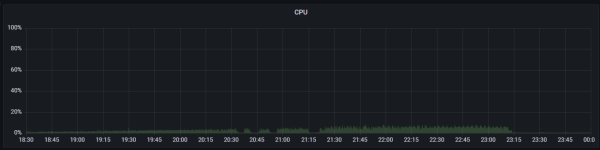
This is a graph of CPU usage during backup failures (influxDB + Grafana).
1779695132134.png

Please tell me where I can find other useful information to get help.
 
Looking at the logs I think the timeout is on the PVE side, not PBS.
If you create local backups, do the timeouts also occur?
If CPU load on PVE is low, what is the IO / Memory Pressure when the timeouts occur?
 
Looking at the logs I think the timeout is on the PVE side, not PBS.
If you create local backups, do the timeouts also occur?
If CPU load on PVE is low, what is the IO / Memory Pressure when the timeouts occur?
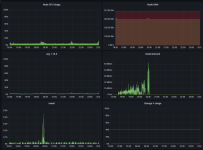
Very low too, I would even say insignificant.

This is a graph of CPU usage of a PVE during backup failures (influxDB + Grafana).
1779697620841.png
 
If I open discussions here in the forum it is because the company where I work, unfortunately, has no intention of purchasing support.
I will continue to push for it but now I have to do without it.

Anyway, with "where I can find other useful information" I meant inside the PBS or PVE systems, logs or something like that.
I see no reason that could justify these failures.
 
How reproducible is the issue? You could try to check if using a local datastore not backed by iSCSI also produces the timeout errors.