Aruba Virtual Appliances: Clearpass, Virtual Mobility Conductor, Airwave

Feb 3, 2026
23
9
3
Would be great to add not only support for KVM/RHEL but Proxmox

I tried installing CP on Proxmox, but this won't work properly. Some guys made it work, I heard that. But it would be Ace if there would be some kind of 1 packaged file, raw or iso installer I could easily get running in PVE.

I think limitations here are Network/Virtual Switch Compatibilities. But wouldn't it be possible to build something like virtual Switches in Proxmox with e.g. Bonds and Vlan Subinterfaces?
 
Hi,
we are running MC, MM for years with tens of instances.
it works out of the box pretty much.
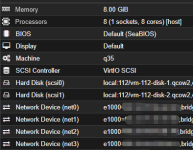
Machine q35 - otherwise its crashing occasionally and have 4 network cards as per manual.

1772180721204.png
 
Hello,
I just stumbled over this thread as I am migrating from VMware to Proxmox.
I´m trying to migrate one of my VMC, but so far no luck.
VM is booting but then gets stuck wehen starting the services and a message "datapath taking too long to start" appears. Afterwards the VM reboots.

@DaVV could you please elaborate on the installation process.

- Do you use the ArubaOS OVA and extract the .vmdk, that then will be converted into qcow2 disk?
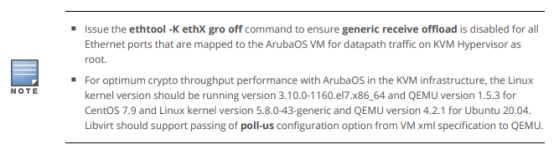
- In the Aruba Guide for installation I found that you should apply the following on KVM hypervisor
1778343610550.png
Is that necessary on Proxmox?


Any help is appreciated.
 
Hello,
I just stumbled over this thread as I am migrating from VMware to Proxmox.
I´m trying to migrate one of my VMC, but so far no luck.
VM is booting but then gets stuck wehen starting the services and a message "datapath taking too long to start" appears. Afterwards the VM reboots.

@DaVV could you please elaborate on the installation process.

- Do you use the ArubaOS OVA and extract the .vmdk, that then will be converted into qcow2 disk?
- In the Aruba Guide for installation I found that you should apply the following on KVM hypervisor
View attachment 97605
Is that necessary on Proxmox?


Any help is appreciated.

In the past I always had issues with Aruba VMs on proxmox, usually i had to tinker around with Q34 or i1440fx or by setting certain HDDs to IDE instead of virtio or the like.

I was running into the same issue as you recently and after experimenting with the OVA Import,

Solution with v8.13 of VMC:
1. Set the SCSI Controller to VMWare PVSCI
2. Configure the 2 HDDs as SCSI (I think this is automatic when imported in VMWare PVSCI but ensure this before you boot up).