

Hello, I'm hoping someone more knowledgeable than me can help me understand how much space I actually have left on my Proxmox ZFS pool.
If I do a
I get an ouput saying my pool is 3.62T in size with 2.16T allocated and 1.47T free. Seems great!
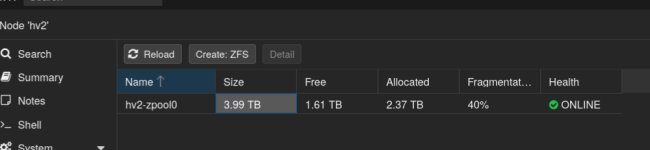
However, If I check the ZFS section in the web UI for this hypervisor, it reads that my total pool size is 3.99T with 2.37T allocated and 1.61T free. Even better!
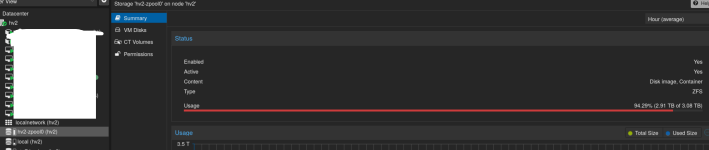
However... if I click the same volume on the left side nav pane, it reads a total pool size of 3.08T with 2.91T allocated
Which is accurate, and where's this discrepancy coming from?
Thanks!
If I do a
Code:
zpool list -vI get an ouput saying my pool is 3.62T in size with 2.16T allocated and 1.47T free. Seems great!
Code:
root@hv2:~# zpool list -v
NAME                                                                                                                                            SIZE  ALLOC   FREE  CKPOINT  EXPANDSZ   FRAG    CAP  DEDUP    HEALTH  ALTROOT
hv2-zpool0                                                                                                                                     3.62T  2.16T  1.47T        -         -    40%    59%  1.00x    ONLINE  -
  raidz1-0                                                                                                                                     3.62T  2.16T  1.47T        -         -    40%  59.5%      -    ONLINE
    nvme-INTEL_SSDPE2MX800G4M___________118000178_CVPD642100VL800U                                                                              745G      -      -        -         -      -      -      -    ONLINE
    nvme-INTEL_SSDPE2MX800G4M___________118000178_CVPD6421014Y800U                                                                              745G      -      -        -         -      -      -      -    ONLINE
    nvme-nvme.8086-43565044363432313030375038303055-494e54454c205353445045324d5838303047344d2020202020202020202020313138303030313738-00000001   745G      -      -        -         -      -      -      -    ONLINE
    nvme-INTEL_SSDPE2MX800G4M___________118000178_CVPD64220032800U                                                                              745G      -      -        -         -      -      -      -    ONLINE
    nvme-INTEL_SSDPE2MX800G4M___________118000178_CVPD642100DU800U                                                                              745G      -      -        -         -      -      -      -    ONLINE
However, If I check the ZFS section in the web UI for this hypervisor, it reads that my total pool size is 3.99T with 2.37T allocated and 1.61T free. Even better!
However... if I click the same volume on the left side nav pane, it reads a total pool size of 3.08T with 2.91T allocated
Which is accurate, and where's this discrepancy coming from?
Thanks!

