

error smart on disk SDA but from gui not confirm this .

frankz

Renowned Member
Nov 16, 2020
430
27
68
I have a log interpretation problem that is causing me confusion. I constantly receive the following alarm from the service smartd:


Code:
This message was generated by the smartd daemon running on:
   host name:  pve3
   DNS domain: internal2.lan

The following warning/error was logged by the smartd daemon:

Device: /dev/sda [SAT], 19 Currently unreadable (pending) sectors

Device info:
SATA3 240GB SSD, S/N:AA000002345, Model: XYZ
The message was in May 2025.
From Gui , no error report to this disk ..
Can i delete or sopprimed this email ???
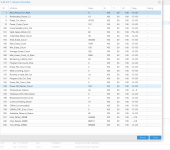
 

Attachments

  • Screenshot 2026-04-11 alle 15.19.37.png
    Screenshot 2026-04-11 alle 15.19.37.png
    416.2 KB · Views: 12
Current_Pending_Sector is 19 in the screenshot, confirming the message from smartd. Your drive is not in optimal condition. I hope there was no (valuable) data on those sectors. Maybe they get overwritten at some point and the drive is fine (again) or maybe the drive is failing slowly. Hard to say but also not specific to Proxmox so lots of opinions on the internet.
 
Last edited:
Current_Pending_Sector is 19 in the screenshot, confirming the message from smartd. Your drive is not in optimal condition. I hope there was no (valuable) data on those sectors. Maybe they get overwritten at some point and the drive is fine (again) or maybe the drive is failing slowly. Hard to say but also not specific to Proxmox so lots of opinions on the internet.
Hello, and thank you for answering. It's likely as you say, the node has been working perfectly for years, the smart da gui continues to give the optimal state of health, and I get the same email from timer to time related to the error. Perhaps the sector has been overwritten , so the state changes without errors . How do I reset the error from smart and then email notification?
 
How do I reset the error from smart and then email notification?
I think you would have to ask the manufacturer. Maybe read the whole drive to find out which sectors are bad? Someone on the internet mentions writing zeros to every unused block of the drive. Maybe a low-level format would also work? I have no (inside) information about your drive and would need to search the internet, since this is not specific to Proxmox, just like you.
 
Since it appears that the Current_Pending_Sector has not risen (19) since May 2025, & assuming this is a server that the drive is in constant use, it is possible that the drive is still "usable" or may even be perfectly alright. However this is NOT certain - so HAVE BACKUPS ALWAYS AVAILABLE!

AFAIK to clear the Current_Pending_Sector the only way this happens is if those sectors get successfully written to & read correctly.

The easiest method to do this non-destructively would probably be with the following:

Code:
badblocks -v /dev/sda      # This will search for the location of bad blocks on the sda disk.

hdparm --write-sector [sector_number] --yes-i-know-what-i-am-doing /dev/sda     # Using the sector_number from the above badblocks output, attempt to write to that sector.

If the sectors are in fact OK, the Current_Pending_Sector counter will reset itself. If not it will reallocate the sector/s.

As I've already said above - ALWAYS HAVE RESTORABLE BACKUPS READY!

The prudent thing is to probably replace the drive while you have not (yet!) lost its data.
 
  • Like
Reactions: UdoB and leesteken
Since it appears that the Current_Pending_Sector has not risen (19) since May 2025, & assuming this is a server that the drive is in constant use, it is possible that the drive is still "usable" or may even be perfectly alright. However this is NOT certain - so HAVE BACKUPS ALWAYS AVAILABLE!

AFAIK to clear the Current_Pending_Sector the only way this happens is if those sectors get successfully written to & read correctly.

The easiest method to do this non-destructively would probably be with the following:

Code:
badblocks -v /dev/sda      # This will search for the location of bad blocks on the sda disk.

hdparm --write-sector [sector_number] --yes-i-know-what-i-am-doing /dev/sda     # Using the sector_number from the above badblocks output, attempt to write to that sector.

If the sectors are in fact OK, the Current_Pending_Sector counter will reset itself. If not it will reallocate the sector/s.

As I've already said above - ALWAYS HAVE RESTORABLE BACKUPS READY!

The prudent thing is to probably replace the drive while you have not (yet!) lost its data.
ok than you