I can't access Proxmox via my browser

Navigatore

New Member
Apr 4, 2026
2
0
1
Hi everyone,

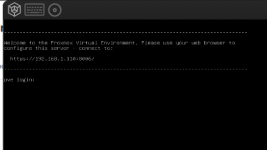
I installed Proxmox on a ProLiant ML110 Gen10 server. After following the installation instructions, I configured the network with IP address 192.168.1.110 and gateway 192.168.1.1. When the login screen appears in the browser, entering the IP address doesn’t bring up Proxmox.
I tried pinging 192.168.1.110, but it doesn’t find the host.
Any ideas? Thanks, and Happy Easter to everyone.
 

Attachments

  • Schermata da 2026-04-04 21-37-44.png
    Schermata da 2026-04-04 21-37-44.png
    14 KB · Views: 16
Basically you need to verify (and confirm) that all network settings "fit together". Is 192.168.1.0/24 actually your local network or did you just "invent" it during the PVE installation? Is your client using the very same network? (If not: you need a router to connect different networks...) Are all devices physically connected correctly - is a "link" signaled?

Maybe here are more ideas to check details: https://forum.proxmox.com/threads/f...can-not-load-the-web-gui-in-a-browser.160091/
 
To add some specific troubleshooting steps to what UdoB said:

First, connect a monitor and keyboard directly to the ProLiant and check from the Proxmox console itself. Run these commands:

ip addr show

This confirms the IP is actually assigned to the correct interface. On HP ProLiant ML110 Gen10 servers, the NIC naming can be unexpected (something like eno1, ens3f0, or even a Bonding interface). If the IP is not on the interface you expect, that is the problem.

Also check:

ip route show

Make sure the default route points to your gateway 192.168.1.1 and goes through the correct interface.

Second, verify the pveproxy service is running:

systemctl status pveproxy

If it is stopped or failed, that explains why the browser cannot connect even if the network is fine. Restart it with systemctl restart pveproxy.

Third, the ProLiant ML110 Gen10 sometimes has iLO on a shared NIC that can cause conflicts. Check in the iLO settings whether the management port is set to "Shared Network Port" and using the same IP range. If iLO is sharing the same physical NIC and subnet, it can intercept traffic meant for Proxmox.

If ping fails from your client PC, try pinging from Proxmox to your PC's IP. If that also fails, the issue is Layer 2 (cable, switch port, VLAN) rather than Proxmox configuration.
 
When the login screen appears in the browser
Which login screen?

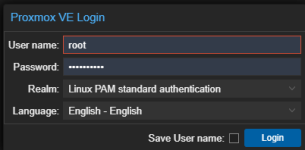
When entering https://192.168.1.110:8006/ you should get a screen that looks something like this:
1775474025213.png
You need to enter root as User name & the Password you used to setup Proxmox.