To install a NeXT OpenStep 4.2 VM, I need floppy-drive as boot disk

sachatholl

New Member
Feb 8, 2026
7
6
3
Hi everyone,

I’m currently trying to install OPENSTEP 4.2 for Intel architecture as a "Pet"-VM on Proxmox VE 8.2.2, and I’ve run into a couple of limitations that I can’t seem to solve from the GUI.

Background​

OPENSTEP requires a very specific legacy setup for installation:

  • Boot must start from a floppy disk image (Install_Floppy.img)
  • The installer then loads additional drivers from a driver floppy
  • The system disk must be configured as:
    • IDE 0:0 (Primary Master)
  • The CD-ROM must be:
    • IDE 0:1 (Primary Slave)
Otherwise, the installer cannot detect the disk or CD-ROM properly.

This behavior is also documented in various guides for OpenStep/NeXTSTEP installations on emulators and VMs.

Issues I’m facing​

1) No floppy support via GUI​

In Proxmox, I cannot find a way to:

  • Add a floppy drive
  • Attach a floppy image (e.g. Install_Floppy.img)
I tried adding hardware via the GUI, but there is no floppy option available.

Is there a supported way to add a floppy drive in Proxmox 8.2.2?

  • Via manual config?
  • Or via some hidden GUI option I’m missing?

Thanks in advance — any guidance or experience with similar legacy setups would be highly appreciated.

Greetings from Aachen,
Sacha
 
Last edited:
Installing OPENSTEP 4.2 on Proxmox 8.x (Floppy + QMP Guide)


Hi,

I managed to successfully install OPENSTEP 4.2 (Intel) installation boot diskette image. on Proxmox 8.2.2. I also managed to “swap” the diskette. This one was a bit hard to solve, since there is absolutely no chance you could do this via the gui, but instead you need to open an additional ssh console to give in some additional commands, in order to get it right. This document captures the exact working setup, including the tricky floppy disk swapping via QMP.

---

Prerequisites:

First upload the following into your local store under iso Images via Proxmox web gui:

Openstep-4.2-intel-User.iso

4.2_Install_Disk.img

4.2_Driver_Disk.img

---

VM Configuration

On my system it has the VM-ID 300


- CPU: kvm64

- RAM: 256 MB

- Disk: IDE (ide0)

- CD-ROM: IDE (ide1) with OpenStep ISO

- BIOS: SeaBIOS

- ACPI: disabled

- Ballooning: disabled

- Network: rtl8139


So far what I configure. The problem is that OpenStep 4.2 installation doesn’t seem to like my Hardrive – since I get a lot of secNum, cyl, drhd and status errors when it tries to write on that hardisk – but this another story...

So for getting the installation boot diskette image run we need to perform a Floppy Setup first:


Using theWebconsole on very top:

1773880322404.png

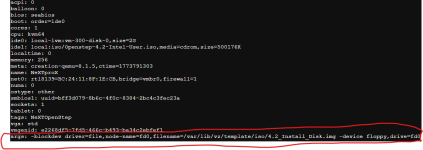
I edited the VM's conf-file, so in my case 300.conf (My VM's ID is 300)
/etc/pve/qemu-server/300.conf


After some try and error I managed to add this correctly:

Code:
args: -blockdev driver=file,node-name=fd0,filename=/var/lib/vz/template/iso/4.2_Install_Disk.img -device floppy,drive=fd0


Big thanks to mfederanko!!! Your advice was very helpful

---

Then I Started the VM using the command: qm start 300 in that same console

It started reading the 4.2_Install_Disk.img diskette image succesfully and a some point it wanted me to insert the driver diskette....

---

Floppy Swap Problem


So, I had to swap the floppy without stopping the VM. For that I used my second ssh console
I assumed I could do this using qm monitor. Unfortunately, I wasn't. I tied to

- change fd0

- change floppy0


All fail with “Device not found”.


My guess is:

- fd0 = backend name

- actual device has no exposed name

- only QOM path exists

---

Working Solution (QMP):

Code:
printf '%s\n' '{"execute":"qmp_capabilities"}' '{"execute":"blockdev-change-medium","arguments":{"id":"/machine/peripheral-anon/device[1]","filename":"/var/lib/vz/template/iso/4.2_Driver_Disk.img","format":"raw"}}' | socat - UNIX-CONNECT:/run/qemu-server/300.qmp

---

  • Press Enter in VM
---

Driver selection:

Based on a procedure I found on the net to install an OpenStep 4.2 VirtualBox VM, you wanna look for “Primary/Secondary (Dual) EIDE/ATAPI Device Controller (4.01)” for the CD/DVD-Drive.

7 → 7 → 7 → 5 →

Actually, this part of the installation is a confusing because it seems you are asked again – but no everything is fine, just select the same driver again “Primary/Secondary (Dual) EIDE/ATAPI Device Controller (4.01)” for the HDD.

7 → 7 → 7 → 5 →1


---

The installation continues:

At this point, the screen switches to graphical mode and the installation continues.

However, I encountered problems with the HDD very soon afterwards. As mentioned, I get lots of secNum, cyl, drhd and status errors when it tries to write to the HDD. I guess I have to test some Proxmox HDD configuration options in combination with driver installation options on the driver diskette image.


---

Conclusions so far:

qm monitor is insufficient for floppy swapping in this setup.

QMP with blockdev-change-medium is required.


My solution is very poor and not user-friendly. The QM monitor quirk and the confusion between the backend and the actual device seem to be alternative features. The option to select a floppy disk is definitely missing. The Proxmox team should consider implementing this feature, if it has not already been done in later Proxmox releases. Question: How many old interesting (retro) operating systems absolutely need to be installed with a diskette first?

However, I think there is most likely a non-zero probability that I missed a standard procedure explaining how to do this. Please please please let me know!
 
Last edited:
Nice to see such a bit of software archeology!

Sweet memories - I once had a NeXTstation, an Intel PC and an HP Snake with NeXTstep on them.

I remember Peter ??? from NeXT Germany visiting a NeXT user group meeting in Munich and showing a SCSI harddisk, which he put into four (!) different machines (the 4th was a Mac) and could boot it on each of them. While "fat binaries" would explain why this was possible after initial boot, he told us that the boot loader was a creation of art in its own right.

However, are you aware that not even the time will be right on that machine? See: https://forum.vcfed.org/index.php?threads/next-computer-looking-for-software.1256197/

Godspeed with that adventure!
 
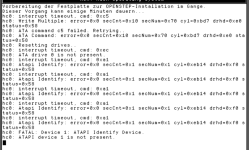
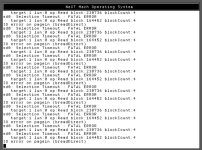
OK, so I managed to get into the graphical part of the installation, but now I am facing severe issues of the VM having a hard time to talk to its HDD and the CDrom with the installation:

See bellow:
1774009216379.png
1774009231970.png


What I know to work :

So far I got OpenStep successfully running on other Virtualisation platform, like VirtualBox.

The working hardware parameters at VBox were the following:

Type: other
Version: Other/Unknown
RAM: 256MB
Chipset: PIIX3
Mouse: PS/2
Advanced: IO-APIC activated
Processor: 1 cpu, no limitation (100%) no PAE/NX, no nested VT-x/AMD-V
Hardware-Virtualisation with Nested Paging activated
Graphics: 16MB, one screen, Graphicscontroller: VBoxVGA - no 3d accelleration

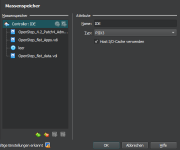
Massstorage:
1773998629494.png

IDE-controller:
HDD-primary IDE device 0 - 2GB
HDD-primary IDE device 1 - 2GB
DVD/CD: Secondary IDE-Device 0
HDD-Secondary IDE-Device 1

Audio: Standard Soundblaser 16
Network: Bridged Intel Ethernet Connection (10) I219-LM
Network advanced settings: PCNet-PCI II (Am79C970A) - connected through cable option checked

On the Proxmox side, I configured such hardware:

Memory:
256MB - no balooning

Processor: 1cpu - 1core - Type: kvm64
Comment: There is also a 486CPU, but OpenStep 4.2 has been developped in the Pentium area already, so I rhought Kvm64 would be the CPU to go first.

BIOS: SeaBIOS

Display: Standard VGA
Comment: Seems to work, since the installation was able to access into compatibility graphical installation mode successfully

Machine: i440fx

SCSI Controller: Default LSI53C895
Comment: The option for SCSI-Controller is very different from VirtualBox, since there, I had the option to not choose scsi at all (in proxmox you must choose one, you have no option otherwise.

HDD:
IDE0 - Cache: default - Async IO: Default(io_uring)

CD/DVD Drive: IDE1, with the ISO image OPenStep-4.2-Intel-User.iso

Network: Bridge vmbr0 - Model: Realtek RTL8139

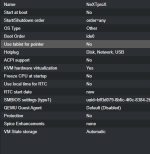
Oprtions:
1774009192257.png

Additional configuration for the Floppy-Disk:

1774009624444.png

Floppy Diskswapping induced successfully with the following command during operation:

1774009721191.png

Questions to the community:
1) Is there any body that maybe has tried to install NeXT OpenStep on Proxmox?
2) Is there a way to better define the virtual HDD attached to the VM. Things like how many cylinders, or specific hardware to mimic?

3) For th case anybody would like to help me in this endevour and would also like to have an NeXT OpenStep 4.2 I will leave some links were to get
needed ISO's and img-files for the installation.

It's a very interresting OS from a now-a-day perspective. Its the OS where internet has been developped in it today form. Its the OS where DOOM has been developped. ITs the precursor OS to todays Apples OS. The direct descendendant was Apple Rapsody and OS X. Even today, Apps and parts of OpenStep 4.2 are still in use...

See you later aligator,
Greetz,
Sacha
 
Last edited:
  • Like
Reactions: UdoB
While you did install the SCSI controller, you did not use it for the disk device. AFAIR, the SCSI protocol abstracts from physical parameters like heads, sectors and tracks, unlike the IDE protocol.

I know for a fact that SCSI worked with NeXTstep, but I am unsure if the LSI controller was supported. The usual way to do this was Adaptec at the time.
 
Last edited:
  • Like
Reactions: sachatholl
Nice to see such a bit of software archeology!

Sweet memories - I once had a NeXTstation, an Intel PC and an HP Snake with NeXTstep on them.

I remember Peter ??? from NeXT Germany visiting a NeXT user group meeting in Munich and showing a SCSI harddisk, which he put into four (!) different machines (the 4th was a Mac) and could boot it on each of them. While "fat binaries" would explain why this was possible after initial boot, he told us that the boot loader was a creation of art in its own right.

However, are you aware that not even the time will be right on that machine? See: https://forum.vcfed.org/index.php?threads/next-computer-looking-for-software.1256197/

Godspeed with that adventure!
Dear meyergru

Thank you for your reply and nice words. I have a Sun SparcStation 20 with OpenStep 4.2 for sparc architectures running in color!! However
I only run it from time to time, since it makes such a loud noise and is quite bulky...

Well concerning your Quest for a Demosoftware for your NeXT-Station at the museum at Twente University: there are a whole bunch of software, you can obtained from the net, such as:
  • Mathematica 3.02 (including serial - Wolfram released the key publically for the retro community)
  • Word perfect
  • The full lighthouse office suite (Including serial, since its obsolete vetus ware)
    • the word processor is pretty neat,
    • Classical spreadsheet,
    • Presentation tool much like powerpoint,
    • Project planing tool,
    • paint program and more).
  • NCSA Moisaic - THE first popular comercial Webbrowser of the world - yes I have it!!!
  • Omniweb - Yet another webbrowser - but a good one
  • PDF distiller -so you can create pdf's - there is actually a method, so you can send them to your laserprinter (you just need a connection to your friendly helper Linux-box)
  • CubeX11 - an X11R5 Display, so I was able to get Firefox from one of my ubuntus getting shown over OpenStep
  • FVWM2.0 X-Display Manager
  • A lot of games and demos like chess - DOOM - and many more (which suspiciouly looks like today's apple chess - guess why?)
  • Vice - A software Emulator of Commodore Personal Computers: C64, C128, Vic20, 4plus, PET and the emulator works sooooo fine!

1774040525344.png

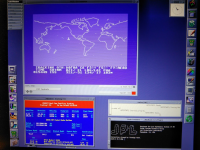
What you can see here is OpenStep 4.2 running on VirtualBox/Win10 with CubeXWindows. This allowed me to run Predict (window bottom left), an old SGP4 satellite propagator, in an xterm console.
  • The top window is VICE, running natively on that OpenStep-Machine, in a CubeXWindow-Session (X11R5). Here its emulating a Commodore C64, which is also running a satellite propagator.
  • The left border is an extended dock performed with 'the fiend' - (the icon with the crocodile head) — there you can see all my office tools from Lighthouse.
  • The black console at the bottom right is an active Telnet session to JPL Horizons, retrieving the current state vectors from the ISS (telnet horizons.jpl.nasa.gov 6775).
Hmm I realize that there is a lot of satellite ans space stuff in that screenshot... I should probably confess that I'm a lecturer in space mission operations at FH Aachen and an amateur radio satellite operator and work at the german aerospace center in Mission Operations for my living.

By the way:
  • The ftp
  • command works pretty nice in the shell and still can establish rubust connection to modern ftp file servers
  • OpenStep4.2 has also NFS1.0, so it can connect to NAS if it supports NFS 1.0
@meyergru :
Anyway, I am compiling a list of download links where interested people can retrieve installation ISOs and TAR files for the operating system and some software. I will post this list soon. Maybe, you might find some of the software you are looking for to demo on your museum's NeXT-Station there. You can also reach me by email: tholl[aT]fh-aachen.de

Cheers,
Sacha


Last edited:
Hi There,

As promised, here are some useful Links to get OpenStep installation iso's and interresting software:
For those interested, I compiled a littel lists with useful Links to install OpnStep 4.2

OpenStep installation (in toast format):
https://fsck.technology/software/NeXT/OpenStep Installation Media/OpenStep 4.2/

Another Webpage to optain istallation cd but in *iso format:
https://winworldpc.com/download/41c5bee2-82ac-c2ac-18c3-9a11c3a4efbf

and here, accompanying with a nice step-by-step procedure:
https://openstep.bfx.re/

The full lighthouse office-software suite, including serials:
https://www.nextcomputers.org/NeXTfiles/Software/NEXTSTEP/Apps/Lighthouse_Design/

Loads of software like CubXWindows, Mathematica, adobe illustrator 3.0, Lotus improv ....:
https://fsck.technology/software/NeXT/NeXTSTEP Applications/

VICE - Versatile Commodore Emulator compiled for OpenStep (with package manager):
https://vice-emu.sourceforge.io/nsosrh.html

A lot of software, installation media, literature can be found at archive.org - here:
https://archive.org/search?query=Next+OpenStep+4.2

I think its worthwhile trying to get it ported to proxmox. For me its, because always firing up my Sun Sparcstation20 is a complicated thing in my thiny space at home, and second: I want to try things out, brfore I actually implement it on the actual hardware.

OK,
have fun and happy Weekend,

Sacha