

error reported during vm migration

Jun 25, 2022
100
9
23
Kota
hi,
i am attached the screen shot of the error message i receive during a vm migration from one host to another host. after lot of struggele and investigating it is found that those VM failed to migrate where i changed the mtu=1500 value added manually to the vm config file, and do not restarted the vm like this :-

nano /etc/pve/qemu-server/.conf
Add or adjust:net0: virtio=XX:XX:XX:XX:XX:XX,bridge=vmbr0,mtu=1500

i have a mission critical proxmox cluster running with ceph, few of the vm during upgrade i can not stop or restart at this time, as upgrade to version 9 require to change the mtu value, so i edited the config file to add those mtu=1500 in the vm config. at present the cluster is running version 8.4.x , i did not migrated to version 9.1x after this error, request you to guide if there any way to change these mtu witout restarting the VM at this time , or a work around to solve this problem, request you to kindly guide.

Note:- those vm which are restarted with new mtu value is migrating without any error.
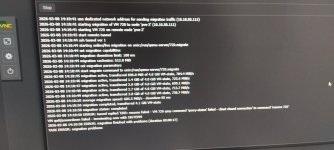
 

Attachments

  • vm migration error.jpeg
    vm migration error.jpeg
    117.7 KB · Views: 16
Hi,
manually editing the configuration means that the currently running state of the virtual machine does not match its configuration anymore. It's fully expected that this can lead to such issues. Never edit the configuration manually, always use the qm set command or the web UI!
 
hi
thanks for the reply , if i use qm set command , will it require a restart of the vm ?
if i use web ui, then restart of the vm is required to take the effect. i can migrate the vm without restarting the same ?
what if i migrate the host to version 9 without changing the mtu, will it break the system or vm in operation (vm which require to be active during upgrade)?
 
hi, thanks for your reply, and sorry for my late reply

the reason i manually edited the VM config file is there is more than 50 vm running in the cluster, and manually changing there mtu value going to each vm is time consuming and repeatitave, this reason i am planninmg the floowing script:-

For bulk VM configs:
for i in /etc/pve/qemu-server/*.conf; do
sed -i 's/net0:.*/&,mtu=1500/' "$i"
done

now as it may not work, i am slowlyn changing the value one by one..... many take some time to do as it involve attach and detach of the network interface of each VM...... thanks

my second question is follows:-

root@pve-3:~# apt autoremove --dry-run
Reading package lists... Done
Building dependency tree... Done
Reading state information... Done
The following packages will be REMOVED:
libfmt7 libfmt9 libthrift-0.13.0 proxmox-kernel-6.5.11-4-pve-signed proxmox-kernel-6.5.11-6-pve-signed proxmox-kernel-6.5.11-7-pve-signed
proxmox-kernel-6.5.13-5-pve-signed proxmox-kernel-6.8.12-11-pve-signed proxmox-kernel-6.8.12-13-pve-signed proxmox-kernel-6.8.12-15-pve-signed
proxmox-kernel-6.8.12-4-pve-signed proxmox-kernel-6.8.12-6-pve-signed proxmox-kernel-6.8.12-9-pve-signed proxmox-kernel-6.8.4-2-pve-signed
pve-kernel-5.15.107-2-pve pve-kernel-5.15.108-1-pve pve-kernel-5.15.83-1-pve python-pastedeploy-tpl telnet
0 upgraded, 0 newly installed, 19 to remove and 0 not upgraded.
Remv libfmt7 [7.1.3+ds1-5]
Remv libfmt9 [9.1.0+ds1-2]
Remv libthrift-0.13.0 [0.13.0-6]
Remv proxmox-kernel-6.5.11-4-pve-signed [6.5.11-4]
Remv proxmox-kernel-6.5.11-6-pve-signed [6.5.11-6]
Remv proxmox-kernel-6.5.11-7-pve-signed [6.5.11-7]
Remv proxmox-kernel-6.5.13-5-pve-signed [6.5.13-5]
Remv proxmox-kernel-6.8.12-11-pve-signed [6.8.12-11]
Remv proxmox-kernel-6.8.12-13-pve-signed [6.8.12-13]
Remv proxmox-kernel-6.8.12-15-pve-signed [6.8.12-15]
Remv proxmox-kernel-6.8.12-4-pve-signed [6.8.12-4]
Remv proxmox-kernel-6.8.12-6-pve-signed [6.8.12-6]
Remv proxmox-kernel-6.8.12-9-pve-signed [6.8.12-9]
Remv proxmox-kernel-6.8.4-2-pve-signed [6.8.4-2]
Remv pve-kernel-5.15.107-2-pve [5.15.107-2]
Remv pve-kernel-5.15.108-1-pve [5.15.108-2]
Remv pve-kernel-5.15.83-1-pve [5.15.83-1]
Remv python-pastedeploy-tpl [3.0.1-5]
Remv telnet [0.17+2.4-2+deb12u2]

kindly advise what to do, as i am scared to execute the command , if it failed the cluster or the host. any other guidance will be helpfull ?
should i clean this before upgrade to version 9.x or after upgrading ? i am a little bit confused ?
 
Again, you must not manually change the configuration file via an editor or sed. Do it via the qm set command. Otherwise, things can break.

If you are not somehow manually using the packages listed by autoremove (maybe think about telnet twice), it should always be safe. It just removes left-over dependencies that are no longer needed. Of course, check that you are not currently running one of these kernels just to be sure (but IIRC apt would already ask you during removal if that is the case).

For an in-depth guide, see: https://pve.proxmox.com/wiki/Upgrade_from_8_to_9
 
  • Like
Reactions: shanreich
hi, i changed mtu of all the Vm manually through GUI, it take a bit long time , but done, thanks a lot

IIRC apt, is showing a messsage to use apt autoremove to remove these packages, but i am still a little bit scared, if some reason it failed, if boot failed, using rescue mode in proxmox iso, and use the following command could restore the kernels ?

"umount /boot/efi
proxmox-boot-tool reinit"

?

a request to the proxmox team: - in future version request you to add a menu item to clean a proxmox host in a stress free way, at least in safe side, or a script to chk which one to remove safely like "pve8to9" script chk everything before upgrade and report the error.

thanks a lot for all the help
 
Proxmox VE will by default keep more than one kernel installed, so you can still boot into an older one if a new one causes issues.