How to clenup unavailable VMs from cluster, if node was lost?

TimofeyL

New Member
Sep 30, 2025
10
1
3
We lost the one server from cluster, but VMs haven't been restarted on another nodes.
We deleted broken node from cluster by "pvecm delnode" and fully redeployed one.
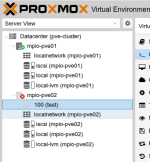
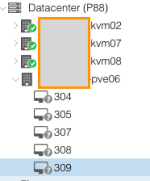
After joining into the cluster I see 5 VMs assigned to this node in gray "question" mark.
Node also in gray status, neither maintenance mode, nor green.

All VM files stored in shared NFS storage, so we can create new VM with these files.
How to cleanup these VMs from Proxmox ?
 

Attachments

  • Screenshot 2026-03-18 at 2.45.22 PM.png
    Screenshot 2026-03-18 at 2.45.22 PM.png
    10.9 KB · Views: 5
Have you tried (re)moving the unavailable node's directory in /etc/pve/nodes?
 
Last edited:
Since all your VM disks are stored on shared NFS, the VMs themselves are still intact — only their configuration is tied to the lost node.

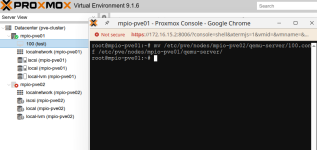
Instead of recreating each VM manually, you can simply move the VM configuration files from the lost node to an active node. For example:

Bash:
mv /etc/pve/nodes/<lost-node>/qemu-server/<vmid>.conf \
   /etc/pve/nodes/<active-node>/qemu-server/

This will make the VM appear on the target node, and since the disks are on shared storage, it should start normally.

After you have moved (or recovered) all required VMs, you can clean up the stale entries by removing the old node directory:

Bash:
rm -r /etc/pve/nodes/<lost-node>

This approach avoids having to recreate VMs and reattach disks manually.
 

Attachments

  • 2026-03-20_03-47.png
    2026-03-20_03-47.png
    35.2 KB · Views: 2
  • 2026-03-20_03-48.png
    2026-03-20_03-48.png
    61.7 KB · Views: 2
  • Like
Reactions: UdoB
Glad to hear the previous solution worked for you!

Regarding the new issue you mentioned, it sounds like there might be a rendering glitch in the WebUI or a specific display setting. To help us investigate further, could you please provide a screenshot of where you are seeing these HTML tags (like <span>hostname</span>)?