I cant upgrade proxmox

major caveira

New Member
Feb 4, 2025
9
0
1
I am trying to upgrade the proxmox, but I am getting the error mesage:
Bash:
Starting system upgrade: apt-get dist-upgrade
E: dpkg was interrupted, you must manually run 'dpkg --configure -a' to correct the problem.
But everytime that I run the command 'dpkg --configure -a' the computer simple restart without warning or error. Now I am stuck without the upgrade possibility.

Any ideas, please?

Proxmox version 9.1.2
 
But everytime that I run the command 'dpkg --configure -a' the computer simple restart without warning or error.
Do I understand it correctly? When you run the command, the machine just does a reset/reboot without any warning? If that is true, then there is something off as that should not happen. Did you check the memory for example? The Proxmox VE installation ISO has a memtest86+ available in the "Advanced" menu in the bootloader.

The problem is package "grub-efi-amd64".
How can uninstall safetly this package, please?
How do you know that? Any warning or error messages?
 
Do I understand it correctly? When you run the command, the machine just does a reset/reboot without any warning? If that is true, then there is something off as that should not happen. Did you check the memory for example? The Proxmox VE installation ISO has a memtest86+ available in the "Advanced" menu in the bootloader.
Correct. The memory is fine. No problem detected.

How do you know that? Any warning or error messages?
Because after the "dpkg --audit", I updated all the packages one by one and the grub-efi-amd64 was the last one. As soon as start updating this package the computer restart without warning.
 
I don't know if this is a right track, but doesn't hurt trying:

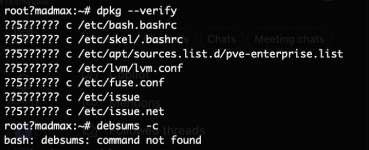
dpkg --verify
debsums -c

If the result gives any hint, try to investigate it and possibly reinstall doubtful packages.
 
Last edited:
apt-get update
apt-get install debsums

P.S. Strange you have quotation mark even it the shell prompt. Maybe some locales or emulation problem.
Try first export LC_ALL=C
(note it isn't permanent).
 
Last edited:
But everytime that I run the command 'dpkg --configure -a' the computer simple restart without warning or error.
Your issues are larger then can be corrected with dpkg/apt. you have two choices here:
1. regress EVERYTHING you did on this system (software installed, kernel line arguments, etc) until you can have that command complete without blowing up your computer
2. wipe and reinstall, and pay attention to what you do with the system after initial install so you can catch the culprit.
 
Updating that package will try to update entries in your NVRAM. Maybe your BIOS or NVRAM is faulty (or the NVRAM is full). I would try to update my BIOS to the latest version and retry. If that does not work or is not feasible, I would try to just delete the package and switch the system's boot mode to legacy mode.

That is a critical operation, however, and you may find yourself in a situation where the PVE host does not boot.

Maybe your NVRAM is full, so that deleting older kernels may help, so that fewer boot entries will result.
 
Last edited:
Your issues are larger then can be corrected with dpkg/apt. you have two choices here:
1. regress EVERYTHING you did on this system (software installed, kernel line arguments, etc) until you can have that command complete without blowing up your computer
2. wipe and reinstall, and pay attention to what you do with the system after initial install so you can catch the culprit.
I just need to remove the package "grub-efi-amd64", but I dont know how.
 
Just deleting it will probably not work as expected, because your system may not be bootable afterwards.

The command is "apt purge grub-efi-amd64", but the dependencies may be critical, depending on how your system boots.
 
Just deleting it will probably not work as expected, because your system may not be bootable afterwards.

The command is "apt purge grub-efi-amd64", but the dependencies may be critical, depending on how your system boots.
The problem is that I am stuck on this:

# apt purge grub-efi-amd64
Error: dpkg was interrupted, you must manually run 'dpkg --configure -a' to correct the problem.

And if I run 'dpkg --configure -a' the server restart immediately when the system try to configure this package
 
Last edited:
Then try "mv /var/lib/dpkg/info/grub-efi-amd64.postinst /var/lib/dpkg/info/grub-efi-amd64.postinst.bak" before 'dpkg --configure -a'.

However, the root cause seems to be a corrupted NVRAM.
 
Then try "mv /var/lib/dpkg/info/grub-efi-amd64.postinst /var/lib/dpkg/info/grub-efi-amd64.postinst.bak" before 'dpkg --configure -a'.

However, the root cause seems to be a corrupted NVRAM.
you saved my life... Worked... thank you so much.

Now I able to run "apt purge grub-efi-amd64". But question: Does the server will boot normally on next reboot after remove this package or do I need to install another package to replace this package?
 
As I said: It depends on how your system boots. Usually, Proxmox is installed in such a way that it can boot either with UEFI or BIOS (legacy) boot.
You can find out what your system is currently booted with by ececuting:

[ -d /sys/firmware/efi ] && echo UEFI || echo BIOS

If it is UEFI, it probably will not boot without the package. You can probably choose the BIOS boot mode in your BIOS setup.

For good measure, you should also use "proxmox-boot-tool refresh" - with that, you can also see which kernels are available for booting.

As I wrote above: You can probably uninstall older kernels and even save some needed space in NVRAM to be able to install the UEFI boot package again.
 
Last edited:
  • Like
Reactions: Johannes S