Missing feature: Show free internal diskspace of VM

Dd1

New Member
Mar 9, 2026
4
0
1
Hi there,

since more than 20 years administering a vSphere environment in conjunction with Veeam B&R/ONE and am therefore spoiled when it comes to alerts, etc.
I miss several convenient features, such as alerts when a (Windows or Linux) VM is running low on disk space.
I haven't been able to find any such information on the PVEs despite having "VM-Tools"-like applications like QEMU installed.

Does anyone have any suggestions on how to achieve this (besides creating a separate disk space warning system for each VM)?

Rgds,

Dietmar
 
Use a monitoring tool like Zabbix, Icinga, Prometheus or prtg. I'm a bit baffled that somebody could do twenty years without it. I couldn't do my work without the monitoring and alarming features of a Icinga since the Hypervisor ( no matter which one) is quite limited in that regard
 
  • Like
Reactions: gurubert and UdoB
Hi Dietmar,

I wanted to contribute a couple of points regarding the visibility of internal disk usage.

First, it's worth noting that Proxmox already implements this feature for LXC Containers (CT). As shown in the summary page for a container, Proxmox can natively display the "Bootdisk size" along with the percentage of internal usage. It would be great if a similar integration could be brought to VMs via the QEMU Guest Agent.

2026-03-10_12-23 ct.png

For those looking for a solution for VMs right now, I’ve been using a monitoring tool called Pulse ( https://github.com/rcourtman/Pulse ). By installing a small agent on the guest OS (VMs), it allows you to:
  1. View real-time internal disk usage across multiple hosts.
  2. Set up automated alerts for high disk usage (defaulting to 90%).

2026-03-10_12-21pulse.png

While we wait for a potential native feature in the Proxmox UI, using an external dashboard like Pulse has been a very effective workaround for my environment.
 
PVE cannot determine the free disk space inside the VM from the outside easily.
It would have to detect and parse the disk partition table and then read the filesystem metadata.
This stuff is trivial inside the VM, because there you have all the OS drivers etc loaded, the disks mounted etc.

So the only way I see how is this possible if the Qemu Guest Agent reports the free disk space to the PVE host and then the host could display it. Youd have to talk to the developers of the guest agent in order to implement this though.
 
Last edited:
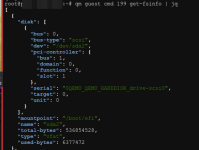
This is already available. Proxmox just has to integrate it. Try something like this
Bash:
qm guest cmd VMID get-fsinfo | jq
You can see what that looks like here.

I also searched the bug tracker for get-fsinfo (I couldn't remember the command earlier) and these reports are relevant/related
- https://bugzilla.proxmox.com/show_bug.cgi?id=1373
- https://bugzilla.proxmox.com/show_bug.cgi?id=1592

Wow, I'm learning this for the first time! This is a very useful command.

After testing it out (as shown in my output below), I can confirm that it provides detailed usage statistics for multiple disks or partitions within the VM. In my case, it correctly identified /boot/efi along with its total and used bytes.

2026-03-10_17-13.png

However, it’s worth noting that for this to work:
  1. The QEMU Guest Agent must be installed and enabled within the guest OS.
  2. The VM must be running at the time of the query.
It would be fantastic if the Proxmox team could eventually leverage this existing API to display these metrics directly in the Summary UI!
 
Hi Dietmar,

I wanted to contribute a couple of points regarding the visibility of internal disk usage.

First, it's worth noting that Proxmox already implements this feature for LXC Containers (CT). As shown in the summary page for a container, Proxmox can natively display the "Bootdisk size" along with the percentage of internal usage. It would be great if a similar integration could be brought to VMs via the QEMU Guest Agent.

View attachment 96404

For those looking for a solution for VMs right now, I’ve been using a monitoring tool called Pulse ( https://github.com/rcourtman/Pulse ). By installing a small agent on the guest OS (VMs), it allows you to:
  1. View real-time internal disk usage across multiple hosts.
  2. Set up automated alerts for high disk usage (defaulting to 90%).

View attachment 96405

While we wait for a potential native feature in the Proxmox UI, using an external dashboard like Pulse has been a very effective workaround for my environment.
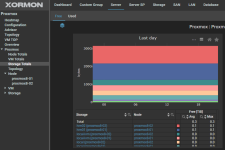
similarly in https://xormon.com/


1773179482938.png
 
  • Like
Reactions: pulipulichen
This is already available. Proxmox just has to integrate it. Try something like this
Bash:
qm guest cmd VMID get-fsinfo | jq
A very useful function, but because it is a "guest" command, it can unfortunately only be used when the VM is running.
 
I'd like to thank everyone who contributed tips here!

As you can see, I'm not the only one who would like such a feature without having to install, maintain (update), and messing around with additional tools in every VM. This has proven itself over the past few years, at least for me. Even with software: "too many cooks spoil the broth."
 
As you can see, I'm not the only one who would like such a feature without having to install, maintain (update), and messing around with additional tools in every VM. This has proven itself over the past few years, at least for me. Even with software: "too many cooks spoil the broth."

How do you monitor the availability and function of the services running inside the vm? For this you need a dedicated monitoring software anyhow. I'm really baffled, are there seriously professional IT-departments without a dedicated monitoring/alert stack who just look up the metrics in their hypervisor from time to time and hope for the best? And neither ProxmoxVE nor ESX (or any other hypervisor) will ever reach the number of features in a nagios-variant (like Icinga or checkmk), Prometheus, pulse or even PRTG
 
As you can see, I'm not the only one who would like such a feature without having to install, maintain (update), and messing around with additional tools in every VM.
It would certainly be nice to have that in the UI, and it would probably be relatively easy to implement given that the QEMU guest agent provides the necessary data.

On the other hand, how important is it actually to see the available storage space in a VM directly from the UI?

I mean, if I had VMs where storage fills up quickly, and it would be mission critical to know how much storage is available at any given time, it would probably also be essential to be alerted early enough when a certain threshold is reached, and I would then probably either run some kind of script/tool in the VM that alerts me, or use external monitoring software. A hypervisor dashboard, or dashboards in general for that matter, are only suitable for this to a limited extent, unless you have time to look at them all day long. ;)
 
Last edited:
  • Like
Reactions: Johannes S
It would certainly be nice to have that in the UI, and it would probably be relatively easy to implement given that the QEMU guest agent provides the necessary data.

On the other hand, how important is it actually to see the available storage space in a VM directly from the UI?

I mean, if I had VMs where storage fills up quickly, and it would be mission critical to know how much storage is available at any given time, it would probably also be essential to be alerted early enough when a certain threshold is reached, and I would then probably either run some kind of script/tool in the VM that alerts me, or use external monitoring software. A hypervisor dashboard, or dashboards in general for that matter, are only suitable for this to a limited extent, unless you have time to look at them all day long. ;)
As previously explained, I use VEEAM-ONE (https://www.veeam.com/products/veeam-data-platform/monitoring-observability-ai.html), which actively alerts me as soon as, for example, marketing agencies fill up their FTP share, or service providers repeatedly back up copies of entire database directories without considering the available storage space. And so on.

This alerting worked flawlessly for years in conjunction with vSphere, automatically across all VMs. Now I am missing this.

No hassle with new software, licenses, firewall changes in every VM – no need to create/store credentials, keep an eye on and patch the additional system. And: Well-established and familiar human processes continue.
 
Well I wouldn't use a propietary tool for this but shouldn't Veeams Monitoring AI (imho a really bad idea to use ai for this but what do I know?) have an agent to install on the vms? That's the way every other monitoring software do this. And for a bare metal install the Veeam software would need an agent too.
 
As previously explained, I use VEEAM-ONE
Which means that, if I understand this correctly, vSphere couldn't do it either, and you had to use a third-party tool to achieve what you wanted. ;)

If we now apply this logic to Proxmox, for which we have already established that the QEMU agent can expose this data to the host, then, in theory, it should also be possible to use that data with third-party monitoring tools such as those listed by @Johannes S in post #2, without having to install an agent for those tools in every single VM.

But maybe someone with more experience in this area can comment on this.
 
Last edited:
Zabbix and checkmk leverage the Proxmox API at the moment:
Most monitoring tools don't use the qemu agent or ProxmoxVE api since (obviouvsly) this would only work as long as there are qemu tools installed on the guest os. So Zabbix will only display what is exposed in the PVE api. Since the api can't look inside the guest we still have that limitations.

So the solution (like already explained) is to install an agent of your preffered monitoring software inside the guest. Some monitoring tools also use stuff like a snmp or a nsca/nrpe daemon or nsclient++ for monitoring. If possible I would use the agent provided by the monitoring software though since they usually have the best integration and largest feature set.
At work we use Icinga inside vmware guests. For Linux guests the agent is already part of the template, after the first boot an administrator executes a script to register the vm on the Icinga master node with its API. On Windows guests the agent is installed with the IcingaForWindows Powershell scripts and also uses the API to register the new vm at the monitoring master.

This would also work with Proxmox VE , in fact I use this in my homelab to monitor my linux guests ;) I don't use windows there though but I wouldn't expect to behave it different. From the perspective of the monitoring software it doesn't matter whether the agent runs in a Proxmox/vmware/hyper-v/whatever-VM or bare metal as long as the master and agent have compatible versions.
 
  • Like
Reactions: proxuser77