reinstall proxmox and keep the settings

mihaib

Member
Oct 10, 2024
34
3
8
Amsterdam
Hi all,

I have a noob question: I am currently running 8.4.14 - one single node - everything works perfectly.
Unfortunately I need to reinstall it as my system ssd is almost dead.
I was thinking of installing 9.1 on the new ssd. Now, I have back-ups for all containers and vms.
How can I bkp my storage and network settings? also the Nvidia and HBA driver setup.
Also, I have 2 SSDs where I keep my images and Apps. Is there a way I can import them in the new setup without being forced to format them and loose all data ?

Thank you
 
Last edited:
you might want to install 9.1. on the new ssd and copy /etc/pve/ from your pve 8.4.14. Then, you could pick parts of your old setting in your new setting, e.g., designated configs relating to storage and network settings
 
  • Like
Reactions: mihaib
If you back up the following, it should contain the information needed to restore it. Whether you can restore it or not is up to you, so I can't say for sure.

*Programs added via the package manager or compiled using `make` must be configured in the same manner as when originally set up on the disk.

Code:
/etc/kernel/cmdline        // boot *Do Not Overwrite. Paste the necessary parts from the file.
/etc/default/grub        // boot *Do Not Overwrite. Paste the necessary parts from the file.

/etc/network/interfaces        // network *Do Not Overwrite. Paste the necessary parts from the file.
/etc/pve/storage.cfg        // storage *Do Not Overwrite. Paste the necessary parts from the file.

/etc/pve/qemu-server/*        // vm config
/etc/pve/lxc/*            // lxc config

/var/lib/vz/snippets/*        // hookscript *After copying, chmod +x * is required.
/etc/modprobe.d/*        // modprobe

/usr/share/kvm/*        // bios/firmware

/etc/modules            // modules
 
Hi all. I have another issue and I am seeking guidance. I installed the 9.1 on the new drive. As all my bkps and containers are on freenas which is a VM as well, I moved the bkp the new installed disk and tryied to recover it but it fails. the vm is not protected. seems to be a disk issue on import. any idea how can I do this. I still have the old ssd with the old install what I am running now.
 
Not really. I can now boot and run proxmox from both ssd’s. What I’m asking is: how can I backup my nas vm so I can restore it on the new ssd where I installed 9.1?
 
It's too abstract to understand.

Without detailing various specifics—such as the storage configuration, the backup procedures performed, where the configuration backups are located, and where the VM virtual disks reside (this is only a partial list)—no one will understand.

Please also formulate your questions more specifically.
 
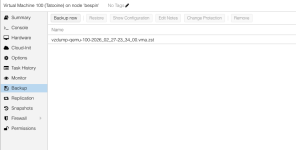
I am back-ing up by using the bkp button from the web interface:
1772989033983.png

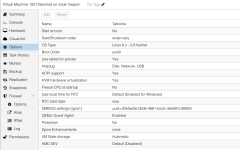
then the VM loops like this:
1772989102232.png

to restore I am using qmrestore /path to bkp files (3) machine ID (100 in this case)

Basically, I copied the .vma.zst file to the new install disk and I tried to run qmrestore /var/lib/vz/dump/vzdump-qemu-truenas.vma.zst 100
and this failed
 
Last edited: