

[SOLVED] Snapshot aborted - SAN full

lightyear

New Member
Jun 5, 2025
3
1
3
Hi!

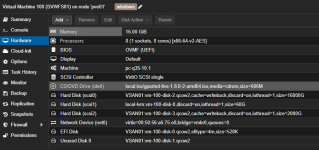
This concerns a PVE installation with a VM and an attached disk of approximately 16 TB.
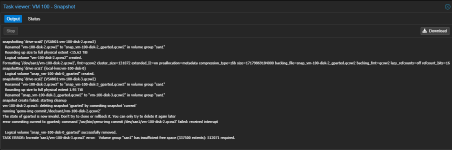
When attempting to create a snapshot of this VM, the process aborted after a few seconds.

Here is the log file I have (I named the snapshot "gparted," but the tool wasn't used):
1772482720928.png

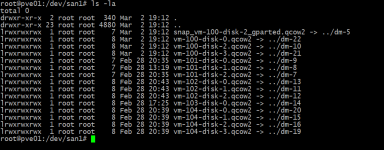
At the file level, I now see the following:
1772482742477.png

The VM itself doesn't display any snapshots.

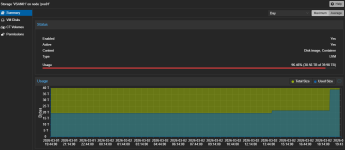
A look at the SAN is as follows (it was only partially populated before the snapshot):
1772482761825.png

The affected VM has the following hardware:
1772482783178.png

Now I can't free up any more storage space and I probably have remnants of the failed snapshot on the SAN.

Do you have any ideas on how I can clean this up?

Thanks in advance and best regards
 
Hey @lightyear,

I'm glad you found a solution for this. Would you mind sharing it in this thread, so other people encountering this may solve it too?

I assume you have just deleted the lv snap_vm-100-disk-2_gparted.qcow2, like this?

lvremove /dev/<VG>/snap_vm-100-disk-2_gparted.qcow2
EDIT: Please see answer from @lightyear.

The explanation why the LVM filled up would still be helpful. I know snapshots are being generated thick, but how much space is a snapshot using upfront?
Normally a snapshot is only as big as the delta between creation and data change.
As they are being generated thick, there needs to be a % how much space is reserved for one snapshot upfront, no?
 
Last edited:
AFAIK 100% of the original volume will be used as capacity for the snapshot volume.
Ouch, I need to test that later but this would mean for a 16TB disk, it would reserver another 16TB!? So 32TB in total?
I know this is still a technology preview, but is this somehow possible with thin provisioning?

Does this behave the same way for qcow2 snapshots on NFS / SMB?

CEPH / ZFS Snapshots are thin, this one I know.
 
Hi everyone,

Please excuse the delay – I'm happy to give you an update on the solution.

@Khensu ... yes, I used lvremove, but that's where the problem started.

The snapshot creates a 100% copy – which is insane – and then the original disk is renamed to
snap_vm-100*. So, by using lvremove, I removed the original disk.

Afterwards, I realized that I hadn't removed the disk itself, but rather the reference. This brought my heart rate back to normal hours later.

In short, I restored the VG from the archive, since the references were also saved there.

The command: "vgcfgrestore -f /etc/lvm/archive/san1_00019-1260569199.vg san1" was the solution.

The file contains the following description:
description = "Created *before* executing '/sbin/lvrename san1 vm-100-disk-2.qcow2 snap_vm-100-disk-2_gparted.qcow2'"

@gurubert ... You're right, it does indeed consume 100% of the disk space. This makes taking a snapshot and creating a backup using a snapshot difficult.

Best regards
 
  • Like
Reactions: Khensu