Question on disks after resilvering

jeffgott

New Member
Jan 12, 2026
29
3
3
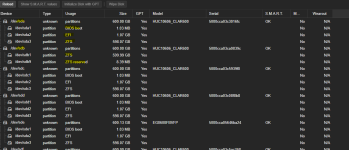
We just replaced a disk (/dev/sdb) in a ZFS RAIDZ1 configuration that was faulted. After the resilvering process, everything looks good. I am new to Proxmox (and linux in general) and I am curious about one thing: why are the partitions different than the seven other devices that were configured during the Proxmox install?

1772025344187.png
 
We installed Proxmox on a DL380 G8 computer. We are booting from the internal SD card in the 380 so I'm not sure how we ended up with a bootable ZFS
pool. Maybe we did something wrong during the Proxmox install?

We did follow the manual to replace the failed drive but we did not do the proxmox-boot-tool status command - only the replace command.

Is there something we need to do to correct this? This is a production server and I'm a little concerned.
 
We installed Proxmox on a DL380 G8 computer. We are booting from the internal SD card in the 380 so I'm not sure how we ended up with a bootable ZFS
pool. Maybe we did something wrong during the Proxmox install?
I believe that the Proxmox VE installer usually does not allow installing on SD cards. Is this ZFS pool named rpool? Maybe it was installed this way and later the boot drive was changed?

Is there something we need to do to correct this? This is a production server and I'm a little concerned.
You could remove the drive, wipe it, re-insert it and follow the "Changing a failed bootable device"?
Is the SD-card the only EFI System Partition (ESP) active in proxmox-boot-tool? Then you can also remove all other ESPs.
You don't really have to correct anything here, except maybe remove the old ESP UUID from the proxmox-boot-tool configuration?

EDIT: Your system is already non-standard with the SD-card and using a RAIDz1 for VMs (which is terrible for running VMs as the IOPS is very low compared to stripe of mirrors).

 
Last edited:
I believe that the Proxmox VE installer usually does not allow installing on SD cards. Is this ZFS pool named rpool? Maybe it was installed this way and later the boot drive was changed?


You could remove the drive, wipe it, re-insert it and follow the "Changing a failed bootable device"?
Is the SD-card the only EFI System Partition (ESP) active in proxmox-boot-tool? Then you can also remove all other ESPs.
You don't really have to correct anything here, except maybe remove the old ESP UUID from the proxmox-boot-tool configuration?

EDIT: Your system is already non-standard with the SD-card and using a RAIDz1 for VMs (which is terrible for running VMs as the IOPS is very low compared to stripe of mirrors).


Ok, we already did zpool replace -f <pool> <old-device> <new-device>

But now we should remove device, wipe it, resinsert it and do the following:
sgdisk <healthy bootable device> -R <new device>
sgdisk -G <new device>
zpool replace -f <pool> <old zfs partition> <new zfs partition>

Wait for resilvering to complete, then do:
proxmox-boot-tool format <new disk's ESP>
proxmox-boot-tool init <new disk's ESP> [grub]

grub-install <new disk>

Can I let the device in the server and use wipefs to wipe the drive? Do I need to remove it from the ZFS volume first?

Forgive me but I am not linux proficient and this is all new for me.
 
Can I let the device in the server and use wipefs to wipe the drive? Do I need to remove it from the ZFS volume first?
You cannot remove it (in ZFS terms) and I don't know if you can detach it (in ZFS terms). You can probably leave it in. Maybe just re-partition and ZFS will report it missing? Or might might try to use the wrong partition. But then you can use the replace command on the right new partition. RAIDz1 is supposed to handle a single drive failure (but you data is at risk as you lose redundancy).

Wait for resilvering to complete, then do:
proxmox-boot-tool format <new disk's ESP>
proxmox-boot-tool init <new disk's ESP> [grub]

grub-install <new disk>
Don't run both. Run the one that is applicable to your setup. Read the manual about proxmox-boot-tool first to determine if your Proxmox uses it. I'm assuming your run PVE 9.x but you might be on a much older version.

Forgive me but I am not linux proficient and this is all new for me.
Or you can just do nothing and leave it as it is fine this way. Since you do not boot from those drives (in your non-standard setup that you chose). Don't rely on me for any guarantees as I'm just a stranger on the internet that might not have your best interest at heart. If you want professional support your can buy a Proxmox support subscription or get a Proxmox partner to help you.

This is a production server and I'm a little concerned.
Maybe create a test server and experiment/learn about all this first? Or create a VM that looks like your production server and practice this first?
Make sure to have a whole server backup before making irreversible changes. Or create a new server instead as to not interrupt productivity.