

PE8.4.16 Error Removing Snapshot

csl

New Member
Jul 24, 2024
18
1
3
Hi,

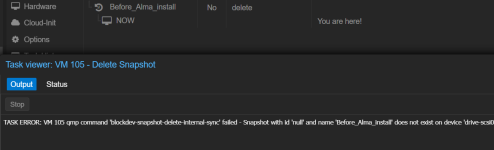
I had an error in PE8.4.16 removing the snapshot below:
1770145413232.png

It went through all the steps but errored at the end with "does not exist on device 'drive-scsi0'"

The host was up running again but there was a padlock next to the name. I tried 'qm unlock 105' which caused to padlock to disappear, but I've still got the snapshot listed 'Before_Alma_install' with status marked 'delete'.

Has the snapshot actually been deleted? If so what do I do to get rid of it?

Thanks,

Alex
 
Hi @csl , more information is needed for proper analyses.

- VM configuration: qm config [id]
- raw VM configuration: cat /etc/pve/qemu-server/vmid.conf
- storage configuration, as requested by @Impact
- storage status: pvesm status
- if you have block storage: lvm; lsblk
- volume list: pvesm list [storageid]
- snapshot list: qm listsnapshot [vmdi]


Blockbridge : Ultra low latency all-NVME shared storage for Proxmox - https://www.blockbridge.com/proxmox
 
Share this and we can investigate
Bash:
cat /etc/pve/storage.cfg
qm config 105
Hi @Impact

Here's my storage.cfg:
root@proxmox:~# cat /etc/pve/storage.cfg
dir: local
path /var/lib/vz
content vztmpl,backup,iso

lvmthin: local-lvm
thinpool data
vgname pve
content images,rootdir

dir: Storage
path /mnt/pve/Storage
content backup,snippets,vztmpl,import,iso,images,rootdir
is_mountpoint 1
nodes proxmox
shared 0

nfs: QNAP_Backup
export /Backup/Proxmox
path /mnt/pve/QNAP_Backup
server 192.168.100.5
content images,backup,iso
prune-backups keep-all=1

dir: Storage2
path /mnt/pve/Storage
content iso,vztmpl,import,rootdir,images,backup,snippets
nodes proxmox2
prune-backups keep-all=1
shared 0

Hi @csl , more information is needed for proper analyses.

- VM configuration: qm config [id]
- raw VM configuration: cat /etc/pve/qemu-server/vmid.conf
- storage configuration, as requested by @Impact
- storage status: pvesm status
- if you have block storage: lvm; lsblk
- volume list: pvesm list [storageid]
- snapshot list: qm listsnapshot [vmdi]


Blockbridge : Ultra low latency all-NVME shared storage for Proxmox - https://www.blockbridge.com/proxmox
Hi @bbgeek17

- VM configuration: qm config [id]
root@proxmox:~# qm config 105
agent: 1
boot: order=scsi0;ide2;net0
cores: 8
cpu: x86-64-v3
description: On backup does SFTP leave files/permissions which QEMU can't 'freeze', and then goes into a spack???
ide2: none,media=cdrom
memory: 16384
meta: creation-qemu=9.0.2,ctime=1727455161
name: WHM
net0: virtio=BC:24:11:EA:E8:76,bridge=vmbr0,firewall=1
numa: 0
onboot: 1
ostype: l26
parent: Before_Alma_install
scsi0: Storage:105/vm-105-disk-0.qcow2,iothread=1,size=500G
scsihw: virtio-scsi-single
smbios1: uuid=214bf977-7507-450a-ab28-aa29ecefb181
sockets: 1
tags: 9;rocky;linux
vmgenid: e13ee479-fca7-40d3-ba28-6d24265984b1


- raw VM configuration: cat /etc/pve/qemu-server/vmid.conf
root@proxmox:/etc/pve/qemu-server# cat 105.conf
#On backup does SFTP leave files/permissions which QEMU can't 'freeze', and then goes into a spack???
agent: 1
boot: order=scsi0;ide2;net0
cores: 8
cpu: x86-64-v3
ide2: none,media=cdrom
memory: 16384
meta: creation-qemu=9.0.2,ctime=1727455161
name: WHM
net0: virtio=BC:24:11:EA:E8:76,bridge=vmbr0,firewall=1
numa: 0
onboot: 1
ostype: l26
parent: Before_Alma_install
scsi0: Storage:105/vm-105-disk-0.qcow2,iothread=1,size=500G
scsihw: virtio-scsi-single
smbios1: uuid=214bf977-7507-450a-ab28-aa29ecefb181
sockets: 1
tags: 9;rocky;linux
vmgenid: e13ee479-fca7-40d3-ba28-6d24265984b1

[Before_Alma_install]
agent: 1
boot: order=scsi0;ide2;net0
cores: 8
cpu: x86-64-v3
ide2: none,media=cdrom
memory: 16384
meta: creation-qemu=9.0.2,ctime=1727455161
name: WHM
net0: virtio=BC:24:11:EA:E8:76,bridge=vmbr0,firewall=1
numa: 0
onboot: 1
ostype: l26
runningcpu: qemu64,+abm,+aes,+avx,+avx2,+bmi1,+bmi2,enforce,+f16c,+fma,+kvm_pv_eoi,+kvm_pv_unhalt,+movbe,+pni,+popcnt,+sse4.1,+sse4.2,+ssse3,+xsave
runningmachine: pc-i440fx-9.2+pve1
scsi0: Storage:105/vm-105-disk-0.qcow2,iothread=1,size=500G
scsihw: virtio-scsi-single
smbios1: uuid=214bf977-7507-450a-ab28-aa29ecefb181
snapstate: delete
snaptime: 1768933796
sockets: 1
tags: 9;rocky;linux
vmgenid: e13ee479-fca7-40d3-ba28-6d24265984b1


- storage status:
root@proxmox:/etc/pve/qemu-server# pvesm status
Name Type Status Total Used Available %
QNAP_Backup nfs active 12681592832 5227502592 7454090240 41.22%
Storage dir active 1921693964 741855772 1082147772 38.60%
Storage2 dir disabled 0 0 0 N/A
local dir active 98497780 4743048 88705184 4.82%
local-lvm lvmthin active 1793044480 179304 1792865175 0.01%

- if you have block storage: lvm; lsblk
Don't think I have that?

- volume list: pvesm list [storageid]
Where do I find 'storageid'? (sorry :oops:)

- snapshot list: qm listsnapshot [vmdi]
root@proxmox:~# qm listsnapshot 105
`-> Before_Alma_install 2026-01-20 18:29:56 no-description
`-> current You are here!


Thank you both for your help!

Alex
 
Try
Bash:
qm listsnapshot 105
qemu-img info /mnt/pve/Storage/images/105/vm-105-disk-0.qcow2
qemu-img snapshot -l /mnt/pve/Storage/images/105/vm-105-disk-0.qcow2
Please use code blocks instead of quotes. These look good and preserve the formatting.
 
Last edited:
Hi @Impact

Code:
image: /mnt/pve/Storage/images/105/vm-105-disk-0.qcow2
file format: qcow2
virtual size: 500 GiB (536870912000 bytes)
disk size: 466 GiB
cluster_size: 65536
Format specific information:
    compat: 1.1
    compression type: zlib
    lazy refcounts: false
    refcount bits: 16
    corrupt: false
    extended l2: false
Child node '/file':
    filename: /mnt/pve/Storage/images/105/vm-105-disk-0.qcow2
    protocol type: file
    file length: 1.01 TiB (1109424996864 bytes)
    disk size: 466 GiB

Code:
`-> Before_Alma_install         2026-01-20 18:29:56     no-description
 `-> current

Bash:
root@proxmox:~# qemu-img snapshot -l /mnt/pve/Storage/images/105/vm-105-disk-0.qcow2
root@proxmox:~#

Thanks,

Alex
 
I see no snapshots in the disk itself. You can try this or remove the snapshot entry from the VM's config file manually
Bash:
qm delsnapshot 105 Before_Alma_install --force
 
That's good that there's no snapshot present!

Unfortunately it can't delete it using 'qm delsnapshot' though...

Bash:
root@proxmox:~# qm delsnapshot 105 Before_Alma_install --force
VM 105 qmp command 'blockdev-snapshot-delete-internal-sync' failed - Snapshot with id 'null' and name 'Before_Alma_install' does not exist on device 'drive-scsi0'

Which lines need to be deleted in '/etc/pve/qemu-server/105.conf' manually?

Thanks,

Alex
 
Hmm. Force is supposed to help here
Bash:
--force <boolean>
For removal from config file, even if removing disk snapshots fails.
If you share the whole file I can tell you exactly, but basically the whole section with the snapshot name.
 
Last edited:
Ah, it has actually worked, I didn't check the 'Snapshot' page afterwards!

Code:
#On backup does SFTP leave files/permissions which QEMU can't 'freeze', and then goes into a spack???
agent: 1
boot: order=scsi0;ide2;net0
cores: 8
cpu: x86-64-v3
ide2: none,media=cdrom
memory: 16384
meta: creation-qemu=9.0.2,ctime=1727455161
name: WHM
net0: virtio=BC:24:11:EA:E8:76,bridge=vmbr0,firewall=1
numa: 0
onboot: 1
ostype: l26
scsi0: Storage:105/vm-105-disk-0.qcow2,iothread=1,size=500G
scsihw: virtio-scsi-single
smbios1: uuid=214bf977-7507-450a-ab28-aa29ecefb181
sockets: 1
tags: 9;rocky;linux
vmgenid: e13ee479-fca7-40d3-ba28-6d24265984b1

Thank you for your help!

Alex
 
  • Like
Reactions: Impact