Secure Boot – Microsoft UEFI CA 2023 Certificate Not Included in EFI Disk

Hi,
Hi @fiona,
after deleting the EFI-Disk of an old VM on a current PVE 8.4.16 and creating a new EFI-Disk with enrolled keys, the disk contains only the old certs. Is that only applicable for current PVE 9.1?
Thanks for the info.
yes, for Proxmox VE 8 there was no backport of the changes yet. It's planned to be done once the improvements to enrollment land, so everything can be backported at the same time.
 
  • Like
Reactions: ces and BastianR
Hello,

I read this thread. So what are the steps need to be done for windows server?
As we have thousend of VMs, what need to be done to update the certificate?

Can this be done inside VM only with some windows update?
Or do we need to stop every vm and run command "qm enroll-efi-keys"?

For me it's not clear what need to be done. And we need some clear and easy to handle way. As we can not manually update all thousend VMs.

Best Regards
 
  • Like
Reactions: Gavino
Hi @Nerion,
with qemu-server >= 9.1.4, you can set the ms-cert=2023w property for an EFI disk via the API. This can also be done for running VMs and will lead to enrollment of the new certificates the next time pending changes for the VM are applied (e.g. when doing a reboot via API/UI).

There will also be an UI button for it once the rest of the patches is applied: https://lore.proxmox.com/pve-devel/20260121154453.285642-1-f.ebner@proxmox.com/T/

The rest is done within the VMs, see the relevant Microsoft articles: https://lore.proxmox.com/pve-devel/20260121154453.285642-4-f.ebner@proxmox.com/
 
  • Like
Reactions: Gavino and jtru
Hi @Nerion,
with qemu-server >= 9.1.4, you can set the ms-cert=2023w property for an EFI disk via the API. This can also be done for running VMs and will lead to enrollment of the new certificates the next time pending changes for the VM are applied (e.g. when doing a reboot via API/UI).

There will also be an UI button for it once the rest of the patches is applied: https://lore.proxmox.com/pve-devel/20260121154453.285642-1-f.ebner@proxmox.com/T/

The rest is done within the VMs, see the relevant Microsoft articles: https://lore.proxmox.com/pve-devel/20260121154453.285642-4-f.ebner@proxmox.com/
Hello,

when this new version is going to be released in the enterprise repo?
 
Hi,
when this new version is going to be released in the enterprise repo?
it depends on when other developers will find the time to review it.
 
  • Like
Reactions: uzumo
Not sure if this is related; I'm on 9.1.5 and the efi disk has the 2023w flag set, using Win 11 LTSC 2024 (based on 24h2) and with any update applied it will fail and revert. On a physical system using the same downloaded iso from MSDN it works fine and is updatable.

I've read through this thread and Microsoft docs; still having issues updating. Is this expected until an update is release on pve for to include the efi keys?
 
Hi @ns33,
you can check with Powershell if Windows can see the new cert:
Code:
[System.Text.Encoding]::ASCII.GetString((Get-SecureBootUEFI db).bytes) -match 'Windows UEFI CA 2023'

What exactly fails and reverts?
 
I believe the issue causing UEFICA2023Status to fluctuate between NotStarted and InProgress is on Microsoft's side.

https://support.microsoft.com/en-au...634-42e1-9ca1-df06f43f360d#bkmk_registry_keys

reg query HKEY_LOCAL_MACHINE\SYSTEM\CurrentControlSet\Control\SecureBoot\Servicing /v UEFICA2023Status

https://support.microsoft.com/en-us...23-24932-41a975df-beb2-40c1-99a3-b3ff139f832d

[System.Text.Encoding]::ASCII.GetString((Get-SecureBootUEFI db).bytes) ★
[System.Text.Encoding]::ASCII.GetString((Get-SecureBootUEFI kek).bytes) △

https://support.microsoft.com/en-us...-updates-7ff40d33-95dc-4c3c-8725-a9b95457578e

KEK : Microsoft Corporation KEK 2K CA 2023 △
db : Windows UEFI CA 2023 ★
db : Microsoft UEFI CA 2023 ★
db : Microsoft Option ROM UEFI CA 2023

In fact, you have a Windows machine where the problem was resolved simply by reinstalling the OS, even though you didn't do anything on the PVE side, right?

edit : “Microsoft Option ROM UEFI CA 2023” is not included in 2023w but has been added via command.
 
Last edited:
I'm not sure if it's okay that there are no updates for kek, but it shouldn't be mandatory for upgrades.

*Even without the 0x4 flag, it will be marked as Updated, so it doesn't matter.

edit : I can't test it anymore since there are no virtual machines left to update via command, but when I added it with `ms-cert=2023w`, `kek` was also updated. I don't know if kek is added by the qm enroll-efi-keys command.

At least I've been able to update, so I'm not going to open a ticket and ask Microsoft.

*I don't know when the qm enroll-efi-keys command below was executed, so I don't know if the current command produces the same result. I don't know because there are no more virtual machines to run.

Code:
root@pve2:~# qm enroll-efi-keys 822
efidisk0: enrolling Microsoft UEFI CA 2023
INFO: reading raw edk2 varstore from /var/run/qemu-server/qsd-vm-822-efi-enroll-efidisk0-enroll.fuse
INFO: var store range: 0x64 -> 0x40000
INFO: add db cert /usr/lib/python3/dist-packages/virt/firmware/certs/MicrosoftCorporationUEFICA2011.pem
INFO: certificate already present, skipping
INFO: add db cert /usr/lib/python3/dist-packages/virt/firmware/certs/MicrosoftUEFICA2023.pem ★
INFO: add db cert /usr/lib/python3/dist-packages/virt/firmware/certs/MicrosoftWindowsProductionPCA2011.pem
INFO: certificate already present, skipping
INFO: add db cert /usr/lib/python3/dist-packages/virt/firmware/certs/WindowsUEFICA2023.pem ★
INFO: writing raw edk2 varstore to /var/run/qemu-server/qsd-vm-822-efi-enroll-efidisk0-enroll.fuse
successfully updated efidisk
root@pve2:~#

The following and attached files are the default certificates for the `ms-cert=2023w` database and key certificate obtained on Windows.

db
Microsoft Root Certificate Authority 20100
Microsoft Windows Production PCA 2011
Microsoft Root Certificate Authority 2010
Windows UEFI CA 2023 ★
Microsoft Corporation Third Party Marketplace Root
Microsoft Corporation UEFI CA 2011
Microsoft RSA Devices Root CA 2021
Microsoft UEFI CA 2023 ★

kek
Microsoft Corporation Third Party Marketplace Root
Microsoft Corporation KEK CA 2011
Microsoft RSA Devices Root CA 2021
Microsoft Corporation KEK 2K CA 2023 △

If you're talking about NotStarted and InProgress, you could personally contact Microsoft's paid support. Of course, it costs money, so sharing the results would make everyone happy.
 

Attachments

Last edited:
Answering both @fiona and @uzumo

What exactly fails and reverts?
The windows update cumulative security package. Tried 2025-10, 2025-11, 2025-12, 2026-01 and 2026-02. They all fail with the error code 0x800f0922 and windows does its typically revert of the update.

Running [System.Text.Encoding]::ASCII.GetString((Get-SecureBootUEFI db).bytes) -match 'Windows UEFI CA 2023' returns true. As does
[System.Text.Encoding]::ASCII.GetString((Get-SecureBootUEFI kek).bytes) -match 'Microsoft Corporation KEK 2K CA 2023'

In fact, you have a Windows machine where the problem was resolved simply by reinstalling the OS, even though you didn't do anything on the PVE side, right?
Where it works is on a bare metal system; using the same iso (burned to a disc) and the same update package (2026-01).

What led me to believe it's a potential issue with the efi keys in proxmox is to get updates working on some of my bare metal systems running Win 11 LTSC, I needed to grab a newer bios release from Supermicro.

I did run through the reg key modification and running the scheduled task, but I guess Win11 LTSC 2024 just completely lacks the UEFICA2023Status key? It's missing on the updatable bare metal system too.

Some other things I tried:
  • I ran the script described here against my iso file. No luck.
  • And took it a step further using ADK to inject the latest failing update package to the iso's install.wim. Thinking pre-applying them would get me past this issue. But any created VM using that image for the install just fails to boot after install. But burning that updated image to a disc and installing it on a bare metal system, works fine
Adding an edit:
It's worth mentioning; all these systems are offline, i.e. no connection to the outside world. All updates are obtained manually through the Microsoft update catalog and carried over locally. Knowing which updates are need, usually ends up being a .net and the latest security patch, is listed out by use of the wsusscan2.cab and a little ps script to list what updates are needed.
 
Last edited:
The windows update cumulative security package. Tried 2025-10, 2025-11, 2025-12, 2026-01 and 2026-02. They all fail with the error code 0x800f0922 and windows does its typically revert of the update.

I don't understand why this was asked in this thread (and the PVE thread).

Wouldn't this be better suited for Microsoft?

The EFI update won't affect updates until May 2026.
 
I did run through the reg key modification and running the scheduled task, but I guess Win11 LTSC 2024 just completely lacks the UEFICA2023Status key? It's missing on the updatable bare metal system too.

I just jumped to conclusions. There was a bug causing it to switch between NotStarted and InProgress, but I don't know if it's fixed yet.

This has nothing to do with your Windows issue (a problem unrelated to PVE).

You should ask Microsoft about that too.
 
Last edited:
0x800f0922 is the final generic error code indicating an installation failure, so it won't resolve without investigation.

If you're knowledgeable, you can investigate the logs and fix it.

If you can't investigate, you should contact Microsoft.
This is a PvE forum, not a Microsoft product forum.
 
Hi,
We are preparing Windows Server VMs for Microsoft's Secure Boot certificate updates (Microsoft UEFI CA 2023).

We are currently using Proxmox VE with Secure Boot enabled and EFI disks (OVMF).

May I confirm:
  1. Does our current Proxmox version include the updated Microsoft UEFI CA 2023 certificate in OVMF?
  2. Is upgrading to Proxmox VE 9.1 required to support this?

Thank you.
 

If you perform a fresh installation, it will be set to `ms-cert=2023w` and thus included. It also appears to be possible to add it via command.

qemu-server (9.1.4) trixie; urgency=medium
https://github.com/proxmox/qemu-server/commit/29ea3d0c10b2cd8b426a0a2f8f4dd5c90929be39

You will likely need qemu-server 9.1.4 or later.

edit: It seems it will be added to PVE8 via backport at some point.


At least for now, there won't be any such updates.

https://github.com/proxmox/qemu-server/commits/stable-bookworm/
 
Last edited:
This is a PvE forum, not a Microsoft product forum
Well aware. I'm here because it only fails on PVE and 0x800f0922 can also mean issues with secure boot.

Anyway, forget cbs.log existed; memorydiagnostic.dll is logged at the failure point.

Whether it's the actually issue or just something that allows it to occur, using x86-64-v4 as my cpu type causes Win11 LTSC to fail any updates and just regular enterprise releases like Win11 24h2 and 25h2 to even install. Those install logs report a bunch of hwreqchk errors which lead me to this conclusion. Apparently through our helpdesk, I can reach MS support...didn't know that but still waiting on a response. I expect little help anyway since I can't send them any logs.

I can't explain why the v4 selection works fine for all my RHEL 8/9 and the few Win10/Server 2016 stuff I'm locked into using but using V3 for the Win11 works. All cpus are Xeon from the skylake-sp era. Maybe some hardware compatibility that isn't apparent
 
having done a lot (a lot lot) of reading and testing on this subject now I believe that there is still an outstanding issue with the qm enroll-efi-keys command

I, like others, ran this command against a windows 11 machine, and it does indeed update both the ovmf firmware code (the uefi bios) as well as inserts the relevant keys into the "db" of the uefi vars.. i am however still facing issues with this machine is exhibiting the 1801 event log stating that not all the keys are present.. this i believe is because qm enroll-efi-keys has not updated this VM's efivars to place the "Microsoft corporation kek 2k ca 2023" public key in its KEK

now, with some.. registry tomfoolery.. it is possible to trick the windows updater task to see the new certificate in the db and therefore go ahead with deploying/updating the windows efi boot stub with one that's signed by the "new" 2023 CA.. and yes, it works.... but... still getting 1801 errors..

if i spin up a new VM, head into the bios, head to device setup > secure boot > custom mode and check the KEK list, the 2023 key *is present* and this further proves my theory that the KEK key should be present in the efivars

i'm happy to be schooled on this, but reading up on the chain of trust for uefi, my understanding is that while a uefi device is in "user mode" (that is to say, booting securely and tamper locked) if an OS or user intends to update the KEK then that update must be signed by the PK (platform key, usually owned by the vendor e.g. dell or lenovo, etc) - in the case of proxmox, the PK embedded into the OVMF package is from debian, who have created their own PK certificate.. if microsoft's 2023 KEK key has not been signed in by the debian PK present in the VM's existing efivars then microsoft's update process can not and will not be permitted to update the KEK - ergo machines that have been updated through this process at the proxmox cli are at risk of this issue

why is it bad not having the operable KEK onboarded? in the short term, it's not, your VM boots. the KEK is used to authenticate changes to the db (list of permitted secure boot binary signatures) and dbx (list of denied/revoked/compromised secure boot binary signatures) - therefore, it is my assumption that if you have the correct key in your db, and then fudged your existing VM through microsoft's registry merry-go-round to the point where you have updated the boot loader, the next time microsoft pushes out a db or dbx update through a windows update, this VM will not be able to apply that db/dbx update because the KEK they have been signed with is not trusted, and that could potentially lead to boot failures if microsoft's update process doesn't check the health of the efivars beforehand

there's a lot of quasi-complete information available on the internet that refers just to checking the presence of the new certificate in the efi's db - this overlooks the KEK and could lead to troubles later if microsoft doesn't code defensively around db/dbx updates and/or updates to the boot loader. if you check a certain other popular hypervisor vendor's write-up on this issue, theirs is somewhat similar to my findings in that the admin is encouraged to unseal the efivars, replace the PK with one provided by microsoft (see PKfail github examples too), and in doing so does of course underwrite both their long-standing 2011 KEK as well as the 2023 KEK, allowing the update processes to continue unhindered

one way to solve this problem i believe will be to copy the 2023 KEK file from microsoft into the uefi boot partition of the VM, use the bios then to enter custom mode, and manually upload the KEK to the machine - *but importantly* if you do this on a machine that has bitlocker/luks disk encryption tied to the tpm/efivars you should unseal it first as doing so will cause a lockout - i need to try this out :)

in the meantime though, i hope the proxmox team will consider the above scenario

sorry for the ted talk

 
Last edited:
further update my previous post, i have now resolved the 1801 event on this windows 11 device by ensuring it has the microsoft's 2023 KEK key
  1. inside the VM, mount the efi partition to a drive letter using diskpart (let's say this is now B: )
  2. download the 2023 KEK file from here https://github.com/microsoft/secureboot_objects/tree/main/PreSignedObjects/KEK/Certificates
  3. copy this file to the root of the efi partition you just mounted at B:
  4. disable bitlocker using manage-bde -protectors -disable C: (or have your bitlocker recovery key at the ready)
  5. reboot and head into the VM's uefi bios
  6. go to device manager > secure boot configuration > secure boot mode > custom mode to enable the key management menu
  7. enter the new menu custom secure boot options > KEK options
  8. use enroll KEK > enroll KEK using file
  9. open the uefi partition on the VM disk and select the der file you copied there in step 3
  10. once selected, use commit changes and exit
  11. now reboot back to windows
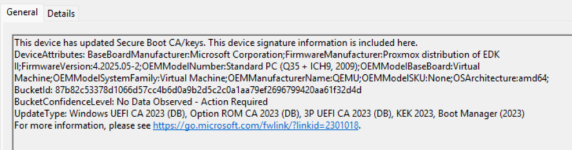
after running through the above steps, re-triggering the secure-boot-update task from microsoft, the event viewer immediately showed event id 1808 which is a "success" message to state all the update components are in place, and proving that it is important that the KEK is present for this process to be considered complete.. you can see the requisite keys listed in the event:

Screenshot_20260221_121336.png

if you are experiencing the 1801 event after running through the proxmox enrollment steps then you can check to see if the required KEK is in place with the following powershell command:
Code:
[System.Text.Encoding]::ASCII.GetString((Get-SecureBootUEFI KEK).Bytes) -match 'Microsoft Corporation KEK 2K CA 2023'

i am now, therefore, requesting our kind proxmox devs to consider reviewing the qm enroll-efi-keys feature to ensure that it also deploys microsoft's 2023 KEK into the efivars of the target VM, as updating the db alone is not sufficient in all cases, such as mine where the PK is older/has not signed the 2023 KEK key
 
Last edited: