[SOLVED] WebSocket VNC console not working via Cloudflare Tunnel (works locally)

cristobal.t_2009

New Member
Jan 19, 2026
3
0
1

Description​

Hello,

I’m having issues accessing the Proxmox web console (VNC/LXC console) only when accessing Proxmox through my public domain behind a Cloudflare Tunnel.

Accessing Proxmox directly via LAN IP works fine, but the console fails when using the domain.

Environment​

Problem​

When I try to open the LXC console via the web UI, the console never connects.

Browser error:

WebSocket connection to
'wss://proxmox.domain.com/api2/json/nodes/proxmox/lxc/103/vncwebsocket?...'
failed

Proxmox server error

failed waiting for client: timed out
TASK ERROR: command '/usr/bin/termproxy 5900 --path /vms/103 --perm VM.Console -- /usr/bin/dtach -A /var/run/dtach/vzctlconsole103 -r winch -z lxc-console -n 103 -e -1' failed: exit code 1

This suggests that Proxmox starts the console but never receives the WebSocket connection from the client.

WebSocket request details​

The browser sends a WebSocket request to:

wss://proxmox.domain.com/api2/json/nodes/proxmox/lxc/103/vncwebsocket

With:
  • Upgrade: websocket
  • Connection: Upgrade
  • Sec-WebSocket-Protocol: binary
  • Cookies include PVEAuthCookie
  • Request goes through Cloudflare Access / Tunnel
(Full request headers available if needed.)

Observations​

  • ✅ Console works perfectly when accessing Proxmox via LAN IP.
  • ❌ Console fails only when accessed through the domain.
  • Normal web UI works, only the VNC/LXC console WebSocket fails.
  • Looks like Cloudflare Tunnel or proxy is not correctly forwarding WebSocket traffic or timing it out.
  • Proxmox waits for the client but never receives the WebSocket connection.

Question​

Is this a known limitation or configuration issue when using Cloudflare Tunnel / reverse proxy with Proxmox WebSockets?

Is there any recommended configuration for:
  • WebSocket proxying
  • termproxy / VNC console
  • Cloudflare Tunnel compatibility with Proxmox VE?
Any advice or confirmation would be appreciated.

Thanks!
 
Last edited:
Hi, can you elaborate a bit on what the fix was here?

I have similar issues with websockets on ntfy with cloudflare tunnels
 
Hi, can you elaborate a bit on what the fix was here?

I have similar issues with websockets on ntfy with cloudflare tunnels

Detailed fix for Cloudflare Tunnel / Access WebSocket issues

Hi,

I’m happy to elaborate because this issue was quite a headache. The problem lies in how Cloudflare Access handles authentication challenges for WebSocket connections. When the browser tries to initiate the WebSocket for the console, it can’t always pass through the Access login page or handle the authentication token correctly, causing the "failed waiting for client" error in Proxmox.

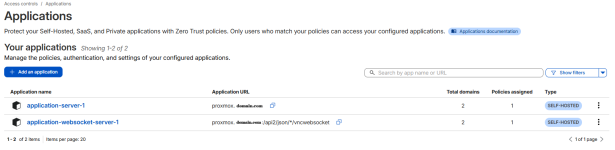
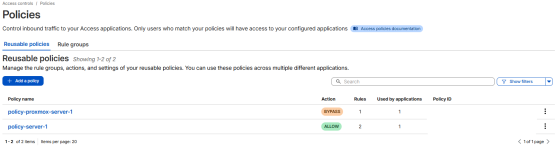
To solve this, I had to split my Cloudflare Access configuration into two separate Applications/Policies:

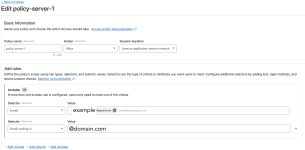
1. The Main Dashboard Application

  • Application URL:proxmox.domain.com
  • Policy:Allow
  • Include: Your specific email or domain (e.g., example@gmail.com or @domain.com).
  • Purpose: This protects the main web interface, requiring you to log in via Cloudflare first.
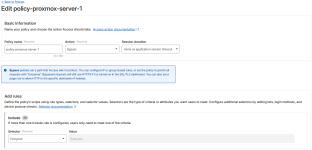
2. The WebSocket Bypass Application

  • Application URL:proxmox.domain.com/api2/json/*/vncwebsocket
  • Policy:Bypass
  • Include:Everyone
  • Purpose: By using the Bypass action for the specific WebSocket path, you allow the terminal traffic to flow without the Cloudflare Access challenge blocking it. Since Proxmox itself still requires a login (PVEAuthCookie), this is still secure.
Tunnel Configuration:
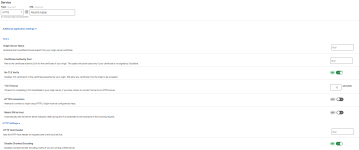
Additionally, within the Cloudflare Tunnel settings for that specific public hostname, I ensured these two options were enabled under the "Origin Settings" tab:

  • No TLS Verify: Enabled (since Proxmox uses self-signed certificates by default).
  • Disable Chunked Encoding: Enabled.

I have attached screenshots of my Cloudflare dashboard showing both applications, the policies, and the tunnel configuration.

In your case with ntfy, I suspect you need to find the specific API or WebSocket path that the app uses and create a similar Bypass policy for it.

I hope this helps you get your consoles back online!
 

Attachments

  • applications.png
    applications.png
    98.8 KB · Views: 0
  • policies.png
    policies.png
    87.3 KB · Views: 0
  • policy-proxmox-server-1.png
    policy-proxmox-server-1.png
    99.7 KB · Views: 0
  • policy-server-1.png
    policy-server-1.png
    129.2 KB · Views: 0
  • tunnel-subdomain-config.png
    tunnel-subdomain-config.png
    70.9 KB · Views: 0