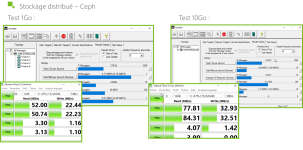
I was expecting better performance thanks to the 10 Gbps, but it turns out that it's because our SSD drives are probably old. On my cluster, I have two nodes, two OSDs (Transcend 220s 240 GB SSD) per node. And I wanted to know if this kind of result was normal.
10Gbps is the minimum for a productive cluster and one should have at least three nodes. And with three nodes you won't have auto-healing and can only loose one node as explained by
@UdoB in his writeup on small clusters
https://forum.proxmox.com/threads/fabu-can-i-use-ceph-in-a-_very_-small-cluster.159671/
The Cluster will continue to run if one node fails or is down due to maintenance (e.G. system updates + reboot) but not both on the same time. Depending on your needs this might still be enough even if you don't want to invest in a fourth or fifth node. Udos writeup is great but more aimed at homelabbers with very basic hardware. If you implement Ceph according to the recommendations (
https://pve.proxmox.com/wiki/Deploy...r#_recommendations_for_a_healthy_ceph_cluster ) you should have good performance and no issues with the given constraints of a three-node-cluster (aka not allowing failure/downtime of two nodes at the same time).
These are the the officithal recommendations for a healthy cluster who recommend to have at least three network links:
- one very high bandwidth (25+ Gbps) network for Ceph (internal) cluster traffic.
- one high bandwidth (10+ Gpbs) network for Ceph (public) traffic between the ceph server and ceph client storage traffic. Depending on your needs this can also be used to host the virtual guest traffic and the VM live-migration traffic.
- one medium bandwidth (1 Gbps) exclusive for the latency sensitive corosync cluster communication.
https://pve.proxmox.com/wiki/Deploy...r#_recommendations_for_a_healthy_ceph_cluster
Some of the professional consultants/Proxmox Partners in this forum even recommend to start with 100 Gbps for new clusters to have space for growth in the next years, depending on yoru budget this might not be worth it though.
So: Your two-node-cluster is not very useful to get any idea for production but of course might still be viable to experiment a little bit with ceph.
If you happen to know that your production will also have just two virtualization servers you are propably better of with two single-node non-clustered installs and the Proxmox Datacenter Manager (can be run in a VM) for migration between the nodes.
Or if you want to have a cluster for high-availability zfs-based storage replication, which will still yield accceptable performance with 10 Gbps (
https://pve.proxmox.com/wiki/Storage_Replication ). You will have a minimal dataloss due to it's asyncronous nature though. Basically with Storage replication the data on the VM is transferred to any other configured node. By default the schedule is every 15 minutes, this can be reduced to one minute. So you need to ask yourself, whether this is a loss you can live with or not.
You will also still need a third node to avoid a split-brain scenario for your cluster but this can also be an so-called external quorum device:
https://pve.proxmox.com/wiki/Cluster_Manager#_corosync_external_vote_support
This could even be on a raspberry, basically any system able to run Debian Linux can run the needed service, it just needs to be turned on 24/7.
Since each member of a cluster can access the qdevice via ssh you need to setup the backup server in a way, that the qdevice and backups are seperated from each other. One possible setup was desscribed by Proxmox developer Aaron here:
https://forum.proxmox.com/threads/2-node-ha-cluster.102781/#post-442601
The gist is this:
- Install a single-node pve and pbs on the same host, don't add it as qdevice
- Create a Debian vm or lxc on the combined pbs/pve single-node and add it as qdevice
- Now you can use the node as backup host ( you might even setup something like restic-rest-server or borgbackup in another lxc to act as target for non-pve backup data) and as qdevice without needing to worry about the security implications