

Really new to linux
Im trying to set up a partition on the extra drive on my node to run a CT in that i intend to run samba and cockpit for a simple 100GB NAS and im having issues
When i lsblk it shows both drives, when i lvs it shows the volume group that i created as what i set the space too which is 100GB
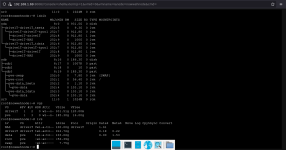
Now the issue is when i add it to the web UI as a directory so i can get a CT template from it and use it its only showing that it has 4GB
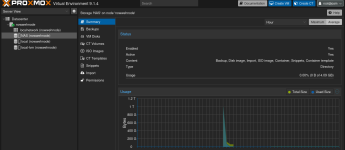
meanwhile i go back and check in the terminal and it still is 100GB idk what im doing wrong but its driving me insane
Im trying to set up a partition on the extra drive on my node to run a CT in that i intend to run samba and cockpit for a simple 100GB NAS and im having issues
When i lsblk it shows both drives, when i lvs it shows the volume group that i created as what i set the space too which is 100GB
Now the issue is when i add it to the web UI as a directory so i can get a CT template from it and use it its only showing that it has 4GB
meanwhile i go back and check in the terminal and it still is 100GB idk what im doing wrong but its driving me insane
Last edited:
