Hi there,
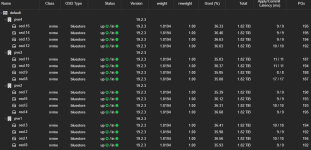
I am having trouble with OSD latency, ranging inbetween 4 to 20 milliseconds:
The Servers are somewhat old, I just moved an existing Setup from VMware to Proxmox.
Hardware Setup:
- 4 Servers (2x Intel Xeon 4214, 256GB DDR4, Mellanox Connectx-3 40Gbit/s, 4x 2TB Samsung 990 Pro NVMe, 2x 256 SATA SSD on HW Raid1 for OS)
- 2x Juniper QFX 5100, Virtual Chassis mode, (2x 40 GBit/s via DAC per Host, 4x 40 Gbit/s DAC VC interconnect)
Network Setup:
LACP Bond --> VLAN --> Bridges --> VMs/Ceph.
I am having separate VLANs for Ceph Frontend/Backend.
Software Setup / Tuning:
- PVE 9.1.2 with Ceph 19.2.3, Size 3, 1024 PGs
- IOMMU and all Energy saving features (C-States) deactivated.
- Switches in "cut through" forwarding mode, latency under 0,1 ms.
- Iperf shows 50Gbit+ between Hosts.
- Local NVMe performance as expected.
Its just a bit slowish IOPS-Wise:
One Queue 4K results in ~ 5K IOPS.
A Queue of 64 yields a harvest of about 60K IOPS.
Sequential RW Bandwith is somewhere between 5 and 10 GB/Sec, as expected.
Tests are performed from within a Windows 11 VM, VirtIO, Cache mode Write Back.
So everything is fine, its just not what I expect from 16 NVMe dives.
So I try to bring the OSD latency down, at least I think that this is my problem.
I am having trouble with OSD latency, ranging inbetween 4 to 20 milliseconds:
Code:
root@pve2:~# ceph osd perf
osd  commit_latency(ms)  apply_latency(ms)
  3                  11                 11
  0                  12                 12
  2                  10                 10
  4                  12                 12
  5                  11                 11
  6                  12                 12
  7                  13                 13
  8                  13                 13
  9                  11                 11
 10                  15                 15
 11                  12                 12
 12                  12                 12
 13                  11                 11
 14                  11                 11
  1                  17                 17
 15                   9                  9
The Servers are somewhat old, I just moved an existing Setup from VMware to Proxmox.
Hardware Setup:
- 4 Servers (2x Intel Xeon 4214, 256GB DDR4, Mellanox Connectx-3 40Gbit/s, 4x 2TB Samsung 990 Pro NVMe, 2x 256 SATA SSD on HW Raid1 for OS)
- 2x Juniper QFX 5100, Virtual Chassis mode, (2x 40 GBit/s via DAC per Host, 4x 40 Gbit/s DAC VC interconnect)
Network Setup:
LACP Bond --> VLAN --> Bridges --> VMs/Ceph.
I am having separate VLANs for Ceph Frontend/Backend.
Software Setup / Tuning:
- PVE 9.1.2 with Ceph 19.2.3, Size 3, 1024 PGs
- IOMMU and all Energy saving features (C-States) deactivated.
- Switches in "cut through" forwarding mode, latency under 0,1 ms.
- Iperf shows 50Gbit+ between Hosts.
- Local NVMe performance as expected.
Its just a bit slowish IOPS-Wise:
One Queue 4K results in ~ 5K IOPS.
A Queue of 64 yields a harvest of about 60K IOPS.
Sequential RW Bandwith is somewhere between 5 and 10 GB/Sec, as expected.
Tests are performed from within a Windows 11 VM, VirtIO, Cache mode Write Back.
So everything is fine, its just not what I expect from 16 NVMe dives.
So I try to bring the OSD latency down, at least I think that this is my problem.