Bad experience on Window Server running SQL on PVE 9.1

dung.pm

New Member
Jun 18, 2025
14
1
3
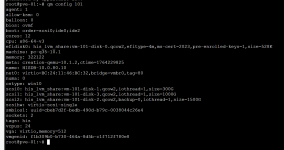
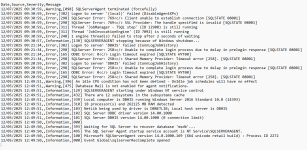
We are using a VM running window server 2016 on Proxmox, we have found that the windows server 2016 run mysql DB 2017 is slowm, laggy and sometime stuck. Criticaly, the Db production is down for hours, that VM is unstable. We have never meet this problem when using Vmware, although the config is the same. Is this related to proxmox comparible with window or sql server
I have attached an logs file of sql and config of VM in below.Have anyone face this issue ? Any recommendation for smoother experience in window server ?
1765186073543.png

1765185848861.png
 
  • Like
Reactions: ddanh512
Whats the underlying storage of "his_lvm_share"? Is this a RAID setup? Enterprise SSD/NVME? QCOW2 is by far one of the worst choices for DB servers - slow copy on write, high latency, higher CPU pressure, fragmentation, etc.
 
Whats the underlying storage of "his_lvm_share"? Is this a RAID setup? Enterprise SSD/NVME? QCOW2 is by far one of the worst choices for DB servers - slow copy on write, high latency, higher CPU pressure, fragmentation, etc.
we are using FC SAN Dell PowerStore All NVME, RAID 6. By far we have try many things in config hardware but the laggy still the same.
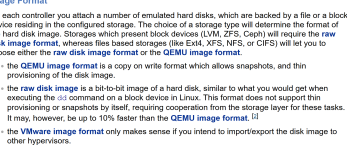
I see in this docs https://pve.proxmox.com/wiki/Performance_Tweaks that we need to use raw, and "write-back". But the document also show that it only iincreasethe speed by 10%. It this that good in window VM ?
1765190403102.png
 
Whats the underlying storage of "his_lvm_share"? Is this a RAID setup? Enterprise SSD/NVME? QCOW2 is by far one of the worst choices for DB servers - slow copy on write, high latency, higher CPU pressure, fragmentation, etc.
@cwt Very interesting. What kind of you choices you suggest for Windows Workloads as Storage? Thank you in Advance.
 
  • Like
Reactions: dung.pm
They are still optimisation not yet implemented in qcow2 on lvm share (mainly the cache size), it could impact the performance with disk > 300Gb. But it should impact so much the performance.

do you have tried with raw format to compare instead qcow2?

also, windows virtio driver could have bug ,last good version is
https://fedorapeople.org/groups/vir...ownloads/archive-virtio/virtio-win-0.1.271-1/

the 0.1.285 is buggy


if you want a fast fix, use linux for your mysql, It'll be a lost faster than running on windows (also without virtulization on hardware server)
 
that we need to use raw, and "write-back". But the document also show that it only iincreasethe speed by 10%. It this that good in window VM ?
The numbers in the Proxmox Wiki (“~10% improvement”) are based on synthetic sequential benchmarks and do NOT reflect real workloads like Windows Server + SQL / MySQL.

In real world Windows database VMs, switching from qcow2 → RAW and enabling Write-back cache typically gives:

+40% to +300% more IOPS

much lower latency (0.3–1.5 ms instead of 3–12 ms)

25–150% higher transaction throughput

far better Windows responsiveness

qcow2 always introduces additional metadata operations and CoW overhead, even on a very fast SAN like PowerStore.

That overhead cannot be eliminated by hardware – only by switching to RAW.

Write-back is safe on PowerStore because the SAN has battery-backed cache and journaling. Performance gains are substantial.

So yes – RAW + Write-back is absolutely recommended for Windows VMs on NVMe FC SAN, and the benefit is far greater than 10% in practice.
 
Thank you guys, i have tried downgrde from virtIO 1.285 to 1.271. I will wait 2 -3 days to check if the system was ok, then consider using raw format on disk.