iGPU passthrough on Proxmox VE 9.1.1 – VM freezes on boot

MatHeb

New Member
Dec 3, 2025
2
0
1
Hi everyone,


I’m trying to passthrough my Intel iGPU to a Linux VM on Proxmox VE 9.1.1, but the VM consistently freezes as soon as the iGPU is attached via hostpci0.

Here’s what I’ve tried:
  • OVMF (UEFI) + q35 machine type
  • iGPU bound to vfio-pci
  • Kernel params: intel_iommu=on iommu=pt
  • i915 blacklisted on the host
  • Several tutorials and guides (Proxmox wiki, forum posts, external blogs)
Behavior:
  • VM boots normally without the GPU passthrough line.
  • When adding hostpci0, the VM freezes during start up.
  • Reproduced with different configurations (x-vga, pcie=1, ROM-bar, etc.).

Question:
Is this a known issue or regression in Proxmox VE 9.x regarding iGPU passthrough?
Should I assume a bug and wait for a fix, or is there something obvious I might be missing?


Thanks for any insights!
 
Hi,

did you check the journal/dmesg for any related messages?

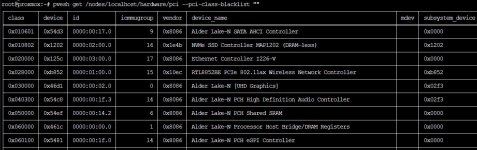
Have you checked that your IOMMU groups are properly set up (pvesh get /nodes/localhost/hardware/pci --pci-class-blacklist "")?
Can you provide your complete VM configuration (qm config <vmid>)?

FYI:
Kernel params: intel_iommu=on iommu=pt
That's quite outdated information, these parameters (or at least, the first one) are not necessary anymore since 8.2, where they became default-on.
 
  • Like
Reactions: MatHeb

check this, and when you passthrough igpu, make sure your VM display set to none or it will hang.
 
  • Like
Reactions: MatHeb and uzumo
Hi everyone,

thanks a lot for your helpful replies!
It turns out the issue was on my side: I hadn’t set the VM Display option to “none” when passing through the iGPU.
After changing that, the VM boots perfectly and the iGPU works as expected inside the guest.

A bit embarrassing that I overlooked such a simple detail, but your hints pointed me in the right direction — really appreciate the support!

Thanks again!
Matthias
 
I’m trying to passthrough my Intel iGPU to a Linux VM on Proxmox VE 9.1.1, but the VM consistently freezes as soon as the iGPU is attached via hostpci0.

Here’s what I’ve tried:
  • OVMF (UEFI) + q35 machine type
  • iGPU bound to vfio-pci
  • Kernel params: intel_iommu=on iommu=pt
  • i915 blacklisted on the host
  • Several tutorials and guides (Proxmox wiki, forum posts, external blogs)


Hello. I have the same problem. Can u help me, please?

PVE version - 9.1.2

Code:
root@proxmox:~# lspci -nnk
00:02.0 VGA compatible controller [0300]: Intel Corporation Alder Lake-N [UHD Graphics] [8086:46d1]
        DeviceName: Onboard - Video
        Subsystem: Device [0301:02f3]
        Kernel driver in use: i915
        Kernel modules: i915, xe

Code:
root@proxmox:~# qm config 105
agent: 1
bios: ovmf
boot: order=scsi0
cipassword: **********
ciupgrade: 0
ciuser: root
cores: 2
cpu: host
efidisk0: local-lvm:vm-105-disk-0,size=4M
ide2: local-lvm:vm-105-cloudinit,media=cdrom
ipconfig0: ip=dhcp
localtime: 1
machine: q35
memory: 4096
meta: creation-qemu=10.1.2,ctime=1765469199
name: docker
net0: virtio=02:3C:FD:4F:55:3E,bridge=vmbr0
onboot: 1
ostype: l26
scsi0: local-lvm:vm-105-disk-1,discard=on,size=30G,ssd=1
scsihw: virtio-scsi-pci
serial0: socket
smbios1: uuid=cf571810-c2a3-415a-8638-c01e18332772
tablet: 0
tags: community-script
usb0: host=1058:25a2
vmgenid: 3218f573-cb8e-4bb3-a0e9-833a5099eb3c

pvesh get /nodes/localhost/hardware/pci --pci-class-blacklist ""
Screenshot_2.jpg
 
@cracked Make sure you meet Requirement:
  • Intel CPU with integrated graphics (2nd generation or newer)
  • Motherboard with VT-d / IOMMU support (must be enabled in BIOS/UEFI)
  • UEFI-only boot mode (Legacy/CSM must be disabled in BIOS/UEFI settings)
  • Proxmox VE:
    • Intel 2nd–10th Gen: Proxmox VE 7.4 or newer
    • Intel 11th Gen and newer: Proxmox VE 9.0 or newer
  • Linux distributions: Modern Linux distros with QEMU/KVM support
  • Host kernel: IOMMU enabled (enabled by default in Proxmox VE 8.2 and newer)
  • Virtual machine configured to use OVMF (UEFI) firmware

Make sure disable_vga=1 is not set anywhere in /etc/modprobe.d/vfio.conf or in your kernel parameters (/etc/default/grub) . If it is, remove it, then run update-grub, update-initramfs -u and reboot.
Important

Meteor Lake, Arrow Lake, Lunar Lake and future Intel iGPU require QEMU 10.1.0 or newer (kvm --version).

With QEMU 10.1+, Ice Lake, Rocket Lake, Tiger Lake, Alder Lake, and newer CPUs require a custom QEMU build to enable display output at VM startup when using legacy mode, because legacy mode is limited to IGD generations 6–9 (Sandy Bridge to Comet Lake). If you need UEFI GOP display support, download or build one from here: https://github.com/LongQT-sea/pve-qemu-builder/releases

And use legacy mode passthrough, it's will work.
 
Last edited:
  • Like
Reactions: cracked
And use legacy mode passthrough, it's will work.

@

@LongQT-sea


Hello! Could you please tell me if this method of passing integrated graphics (Intel N100 + Intel UHD 630) to Ubuntu 22.04 (installed from Proxmox VE scripts) is suitable for subsequent transcoding of video files in Docker using a Jellyfin container? Or is it pointless?

Screenshot_2.jpg

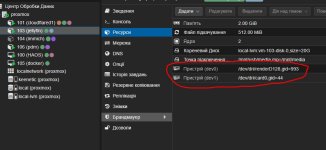
Do I need to remove disabled LXC containers with the passthrough graphics card? Or is it enough to just disable them?
 
Last edited:
Multiple LXCs can use the same GPU simultaneously because they're all running on the host kernel.

VM PCI passthrough is exclusive - the GPU gets fully assigned to one VM, and the host (and therefore all LXCs) lose access to it completely.
 
  • Like
Reactions: cracked
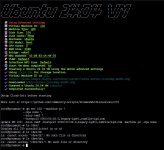
I followed the instructions. Nothing worked. The graphics card disappears in the host (there's no /dev/dri), but it doesn't appear in the virtual machine. I don't understand...
Screenshot_3.jpgScreenshot_4.jpg
 
Last edited:
lspci -nnk -s 00:02.0 inside the VM, it has to look like this to indicate that it's working.: Kernel driver in use: i915
Code:
00:02.0 VGA compatible controller [0300]: Intel Corporation CoffeeLake-H GT2 [UHD Graphics 630] [8086:3e9b] (rev 02)
        DeviceName: Onboard - Video
        Subsystem: ASUSTeK Computer Inc. Device [1043:8694]
        Kernel driver in use: i915

If it does not look like that, then you need to debug it, run dmesg inside the VM, post the output here.
 
@

LongQT-sea


Code:
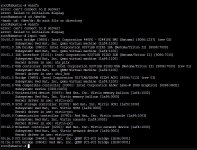
root@ubuntu:~# lspci -nnk

00:01.2 USB controller [0c03]: Intel Corporation 82371SB PIIX3 USB [Natoma/Triton II] [8086:7020] (rev 01)
        Subsystem: Red Hat, Inc. QEMU Virtual Machine [1af4:1100]
        Kernel driver in use: uhci_hcd
00:01.3 Bridge [0680]: Intel Corporation 82371AB/EB/MB PIIX4 ACPI [8086:7113] (rev 03)
        Subsystem: Red Hat, Inc. Qemu virtual machine [1af4:1100]
00:02.0 VGA compatible controller [0300]: Intel Corporation Alder Lake-N [UHD Graphics] [8086:46d1]
        Subsystem: Device [0301:02f3]


root@ubuntu:~# dmesg | grep 0:02

[    0.562485] pci 0000:00:02.0: [8086:46d1] type 00 class 0x030000 PCIe Root Complex Integrated Endpoint
[    0.564862] pci 0000:00:02.0: BAR 0 [mem 0x810000000-0x810ffffff 64bit]
[    0.565856] pci 0000:00:02.0: BAR 2 [mem 0x800000000-0x80fffffff 64bit pref]
[    0.566852] pci 0000:00:02.0: BAR 4 [io  0xd100-0xd13f]
[    0.567874] pci 0000:00:02.0: ROM [mem 0xfffc0000-0xffffffff pref]
[    0.569249] pci 0000:00:02.0: DMAR: Skip IOMMU disabling for graphics
[    0.569971] pci 0000:00:02.0: Video device with shadowed ROM at [mem 0x000c0000-0x000dffff]
[    0.692823] pci_bus 0000:02: extended config space not accessible
[    0.772926] pci 0000:00:02.0: vgaarb: setting as boot VGA device
[    0.773809] pci 0000:00:02.0: vgaarb: bridge control possible
[    0.773809] pci 0000:00:02.0: vgaarb: VGA device added: decodes=io+mem,owns=io+mem,locks=none
[    1.035664] pci_bus 0000:02: resource 0 [io  0xc000-0xcfff]
[    1.038307] pci_bus 0000:02: resource 1 [mem 0x80000000-0x801fffff]
 
Last edited:
It looks like the kernel in the Ubuntu VM created by the Proxmox VE scripts is a minimal kernel, which does not include the Intel iGPU drivers (i915 or xe).

You need to reinstall the full generic Linux kernel:
Code:
sudo apt update
sudo apt install --reinstall linux-image-generic linux-headers-generic
sudo reboot

After reboot:
lspci -nnk -s 00:02.0
 
It looks like the kernel in the Ubuntu VM created by the Proxmox VE scripts is a minimal kernel, which does not include the Intel iGPU drivers (i915 or xe).

You need to reinstall the full generic Linux kernel:
Code:
sudo apt update
sudo apt install --reinstall linux-image-generic linux-headers-generic
sudo reboot

After reboot:
lspci -nnk -s 00:02.0
Code:
root@ubuntu:~# lspci -nnk -s 00:02.0
00:02.0 VGA compatible controller [0300]: Intel Corporation Alder Lake-N [UHD Graphics] [8086:46d1]
        Subsystem: Device [0301:02f3]
        Kernel driver in use: i915
        Kernel modules: i915, xe
root@ubuntu:~# ls /dev/dri/
by-path  card0  renderD128
root@ubuntu:~#

@LongQT-sea

Thank you so much! I thought I'd break my head over this problem. Thanks again.
 
  • Like
Reactions: LongQT-sea