windows vm crashing / hanging

jamesmb1

New Member
Nov 26, 2025
6
0
1
We have a Windows Server 2025 VM that has hung or crashed a couple of times over the past few months, requiring a reboot of the VM to recover.
This is running on Proxmox VE 9.1.1.

What I've checked so far:
  • It seems to happen during a quiet period between 4am and 8am, with no scheduled events or backups occurring within an hour of the issue starting.
  • No sign of any issues in Windows event logs, just a "recovered from unexpected shutdown" entry after the manual reboot.
  • No log entries in journalctl near the time of the issue.
  • No hardware or storage errors in Proxmox or iDRAC.
  • The node hosting the VM is only using around 60% of its total memory.
  • The VM is using local storage, and other VMs on the same storage are not having any issues.

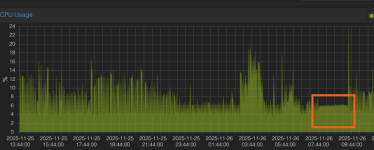
I did notice the CPU graph was reporting a strange, fairly flat amount of cpu usage during the time it was frozen / crashed.

Any pointers on where I should look to find what could be causing this would be appreciated.

1764165098339.png
 
Hi there,

Here is how I proceed when I have come across similar situations.

First check your VM setup - this may sound obvious but on occasions I've missed small details that lead to bigger problems.

* Verify the CPU type (host vs default vs kvm64). Some Windows Server builds can misbehave with certain emulated CPU models.
* Make sure you’re using VirtIO drivers for disk and network. Outdated or mismatched drivers can cause hangs without clear logs.
* Look at ballooning/NUMA settings : if memory ballooning is enabled, try disabling it temporarily to see if stability improves.
* Check if you’re using QEMU Guest Agent. If not, install it, it can provide better visibility and control.

The Windows 2025 best practices - https://pve.proxmox.com/wiki/Windows_2025_guest_best_practices from the official docs has a lot of important information - go through it in detail :)


Fabián Rodríguez | Le Goût du Libre Inc. | Montreal, Canada | Mastodon
Proxmox Silver Partner, server and desktop enterprise support in French, English and Spanish
 
Hi there,

Here is how I proceed when I have come across similar situations.

First check your VM setup - this may sound obvious but on occasions I've missed small details that lead to bigger problems.

* Verify the CPU type (host vs default vs kvm64). Some Windows Server builds can misbehave with certain emulated CPU models.
* Make sure you’re using VirtIO drivers for disk and network. Outdated or mismatched drivers can cause hangs without clear logs.
* Look at ballooning/NUMA settings : if memory ballooning is enabled, try disabling it temporarily to see if stability improves.
* Check if you’re using QEMU Guest Agent. If not, install it, it can provide better visibility and control.

The Windows 2025 best practices - https://pve.proxmox.com/wiki/Windows_2025_guest_best_practices from the official docs has a lot of important information - go through it in detail :)


Fabián Rodríguez | Le Goût du Libre Inc. | Montreal, Canada | Mastodon
Proxmox Silver Partner, server and desktop enterprise support in French, English and Spanish

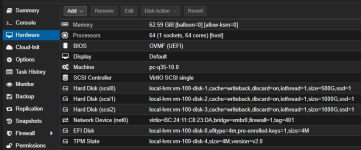
Can confirm the cpu type is set as host, using the latest VirtIO drivers with disk/network hardware set to VirtIO versions and the QEMU guest agent is running. I read through the best practices wiki and it looks like we are following all of those.

Will try disabling memory ballooning and see if it has an impact but it could be 1-2 weeks before we see it happen again.
Is it normal to not see any sign of a crash like this in the proxmox logs or is there additional logging that can be enabled for this?
 
If the VM crash is not Proxmox related (hardware, memory, irq, qemu, etc.) you won’t see any entries.

Did you check the Windows log files? And how is your VM configured?
 
If the VM crash is not Proxmox related (hardware, memory, irq, qemu, etc.) you won’t see any entries.

Did you check the Windows log files? And how is your VM configured?
In event viewer there were normal entries right up to the crash and then after boot just a "unexpected shutdown" error with no other details and no memory.dmp generated.


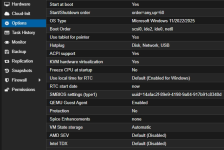
Screenshots of hardware & options settings below

1764338721269.png

1764338727702.png
 
A lot of assigned cores and VM drives on local-lvm. Can you post more details about the host (hardware, storage setup, drive models, etc.)?
 
A lot of assigned cores and VM drives on local-lvm. Can you post more details about the host (hardware, storage setup, drive models, etc.)?
Of course,

its a dell PowerEdge R6715:
AMD EPYC 9475F 48-Core Processor
4 x U.2 PM9A3 3.84TB presented to proxmox in a raid 5 virtual disk
8 x 32gb 6400 DDR5
 
Based on that sleepy-looking flat-line cpu usage during out of hours, I'd check for any power/sleep/hibernation settings (which should not exist anyway in a Windows Server) including those for other peripherals such as the NW adapter.
 
Side note: RAID5 (either hardware or ZFS based) is never a good choice for vstorage.

I would check any power saving settings within the VM (as @gfngfn256 already mentioned) and power saving/throttling in the BIOS (c-States etc.).
 
Based on that sleepy-looking flat-line cpu usage during out of hours, I'd check for any power/sleep/hibernation settings (which should not exist anyway in a Windows Server) including those for other peripherals such as the NW adapter.
sleep states / hibernate are all either disabled or unsupported so don't think it could be that, and i would expect to see mention of this in event viewer. could the behaviour in the graph be todo with the agent being unavailable?


to add what @cwt observed, all those 64 cores are licensed?
yep all licensed correctly.

Side note: RAID5 (either hardware or ZFS based) is never a good choice for vstorage.

I would check any power saving settings within the VM (as @gfngfn256 already mentioned) and power saving/throttling in the BIOS (c-States etc.).
What makes hardware or ZFS RAID a poor choice for VM storage? Does this still apply when using high IOPS NVMe drives compared to slower SSDs or HDDs?


No crashes since I disabled ballooning, though it hasn’t been long. The vm seems a touch more responsive (not that it was sluggish before) but I don’t have metrics to back it up, just feels a bit snappier.
 
What makes hardware or ZFS RAID a poor choice for VM storage?
Hardware RAID5 or ZFS RAIDZ is a poor choice for VM storage because it destroys the I/O characteristics virtual machines rely on.
VMs generate huge amounts of small, random, sync-heavy writes, and RAID controllers, parity overhead, caching layers and CoW mechanisms interfere with proper flush/commit behaviour. The hypervisor loses control over barriers and write ordering, leading to latency spikes, instability and poor performance.

ZFS on top of LVM = worst case: double caching, double metadata, double write amplification.
Result: slow, inconsistent, unpredictable I/O.

Fast NVMe doesn’t magically fix this. NVMe only raises the ceiling, but the architectural problems remain. High IOPS drives + broken layering still equal high latency and wasted performance.

In short: best performance on separated RAID sets either with mirrors or striped mirrors. For the host itself 2 small enterprise grade SSDs in a mirror are usually more than sufficient.
 
  • Like
Reactions: UdoB