Unable to connect to web interface or SSH, but ping works

jrmoulckers

New Member
Nov 7, 2025
4
0
1
TL;DR
I have been struggling with my fresh Proxmox installation on a dedicated server from my Windows workstation when trying to connect via SSH or Web GUI.

I have tried all of the checks and solutions I have seen so far on other guides here, and tried to get Copilot/ChatGPT to help me (just gave generic solutions).

Quite new to PVE/Linux world, but I have some exposure thru tech/homelabbing.

Bottom line:
  • I am only able to access PVE physically through its host console
  • I can ping PVE at its 192.168.4.111 from my workstation
  • I can ping my workstation at its 192.168.4.222 from PVE
  • Both commands return HTML executing on PVE host:
    • curl -k https://192.168.4.111:8006/
    • curl -k https://localhost:8006/
  • I cannot access the web interface at https://192.168.4.111:8006/ from my workstation
  • SSH hangs from my workstation: ssh root@192.168.4.111
Troubleshooting (Server):
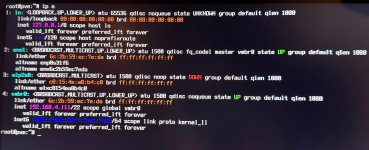
  • ip a output:1762558164155.jpeg
  • ifdown vmbr0 and ifup vmbr0 does not change the interface's IP
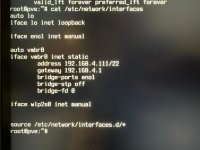
  • /etc/network/interfaces contents:1762558375657.jpeg
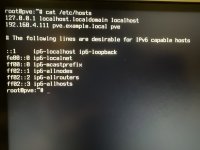
  • /etc/hosts contents:1762559435941.jpeg
  • I have tried changing the network mask to /24, despite my Workstation displaying /22, but this did not affect anything after restarting networking and reboot
  • (As above) PVE receives HTML when running curl at either IP or localhost
  • I've tried stopping and disabling the firewall: pve-firewall stop systemctl disable pve-firewall
  • I've tried adding the file /etc/default/pveproxywith the following contents:
    • LISTEN 0.0.0.0
  • Every file change I have restarted the respective service and/or the host
  • PVE is connected to internet, and can ping 8.8.8.8 and curl google.com, etc.
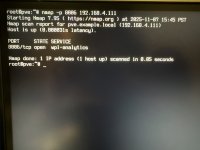
  • nmap -p 8006 192.168.4.111 output:1762559454518.jpeg
  • I have tried restarting both pveproxy, pve-cluster and pvedaemon services
  • journalctl -f shows no errors or warnings, and shows proper service startup
  • I have also tried some commands like ss, with grep on port 8006, and I can see pings and acks during ssh and webpage requests, so I feel like the ack is not making it back to my workstation??
Troubleshooting (Workstation):
  • (As above) Ping works, SSH and Web GUI do not
  • curlhangs and fails
  • CLI connection results:
Test-NetConnection -ComputerName 192.168.4.111 -Port 8006
ComputerName : 192.168.4.111
RemoteAddress : 192.168.4.111
RemotePort : 8006
NameResolutionResults : 192.168.4.111
MatchingIPsecRules :
NetworkIsolationContext : Private Network
IsAdmin : False
InterfaceAlias : Ethernet 2
SourceAddress : 192.168.4.222
NetRoute (NextHop) : 192.168.4.1
TcpTestSucceeded : True
  • There were some issues with being unable to ping the server before, but I de-prioritized Tailscale's interface metric (see Network Details below), which resolved the conflicting interface
  • As far as I can tell, there are no outbound firewall rules blocking anything from Windows
Troubleshooting (Router):
  • I have restarted my network multiple times
  • I have tried unassigning IP addresses, removing reservations, clearing them by resetting, etc.

Here is my hardware setup:
  • Server: Proxmox 9.0.3 on dedicated Dell Precision Tower
  • Workstation: Windows 11 on another rig
  • Network: Eero 6 (EeroOS 7.x.x)
Network details:
I have both my server and workstation wired into one of the Eero units, which is connected wirelessly as an extender of the main Eero router (if this matters)
I have Eero reserving IP addresses for each device:
Server: 192.168.4.111
Workstation: 192.168.4.222
I have Tailscale installed on my workstation, but I have an InterfaceMetric defined to de-prioritize it under my active Ethernet interface:
Code:
InterfaceAlias    InterfaceMetric
Ethernet 2         5
...
Tailscale 50

My Ideas:
Eero may be treating my server as a public route???
Eero could be blocking traffic to a suspicious port (8006) without SSL???

I have been able to access the GUI before, but as soon as I started reserving IP addresses on the physical hosts - I had already reserved successfully for VMs and LXCs - and made a fresh installation, this issue came up.

Thanks in advance! Tried to be as thorough as possible to cover all bases
 
Last edited:
Welcome to the forum, jrmoulckers!

I can see that you've made quite much troubleshooting and have described it, which is good :-).

I don't know Tailscale nor Eero, so I won't be able to help with them.

My suggestion is starting with a very basic setup, with the least possible elements involved and verifying whether it works. If yes, then adding in steps elements of your setup.

According to the description, both the workstation and the PVE are in the same network (in the network addressing meaning), i.e., they don't require a router to see each other.

So the most basic setup is: connect the workstation directly to the PVE using one ethernet cable. No Eero, no router, no Tailscale etc.
Then check if it works.
If yes, then the culprit is in the rest of the infrastructure, not in the PVE.
If not, replace the ethernet cable. Still not? Then the PVE and the workstation will have to be inspected.
 
Last edited:
  • Like
Reactions: Johannes S
Thanks for your response! I am unable to ping when connecting the two directly via ethernet. PVE states no route is found, and the Windows workstation just states “Destination host is unreachable”. I’m pretty new to most networking concepts so I’m not totally sure about where to go from here.
 
Hi,

Can you provide more information about your setup ?

Like :
- Your LAN configuration of your router (screenshot ?)
- Your workstation IP configuration (with ipconfig /all for example)

Best regards,
 
  • Like
Reactions: Johannes S
Thanks for your response! I am unable to ping when connecting the two directly via ethernet. PVE states no route is found, and the Windows workstation just states “Destination host is unreachable”.
I don't remember: has your PVE a static address, or from DHCP?
If it had it from DHCP, then at the moment it can't get it of course.
You must set its address manually.
And to be sure: do the LEDs in network cards light up / blink?

Edit: yes, in the second screenshot we can see static. But what about the workstation?
 
Last edited:
Hi,

Can you provide more information about your setup ?

Like :
- Your LAN configuration of your router (screenshot ?)
- Your workstation IP configuration (with ipconfig /all for example)

Best regards,
Here's my LAN configuration:
Gateway eero IP Address: 192.168.4.1
IPv6: Enabled
DHCP & NAT: Automatic
LAN Subnet: Managed and hidden, but it's 255.255.252.0

Here's my IP configuration for the workstation:
ipconfig /all

Windows IP Configuration

Host Name . . . . . . . . . . . . : MyDesktop
Primary Dns Suffix . . . . . . . :
Node Type . . . . . . . . . . . . : Hybrid
IP Routing Enabled. . . . . . . . : No
WINS Proxy Enabled. . . . . . . . : No
DNS Suffix Search List. . . . . . : [REDACTED]

Ethernet adapter Ethernet 2:

Connection-specific DNS Suffix . :
Description . . . . . . . . . . . : ASIX USB to Gigabit Ethernet Family Adapter
Physical Address. . . . . . . . . : [REDACTED]
DHCP Enabled. . . . . . . . . . . : Yes
Autoconfiguration Enabled . . . . : Yes
IPv6 Address. . . . . . . . . . . : [REDACTED]
Temporary IPv6 Address. . . . . . : [REDACTED]
Link-local IPv6 Address . . . . . : fe80::bc08:5473:a9d5:adec%23(Preferred)
IPv4 Address. . . . . . . . . . . : 192.168.4.222(Preferred)
Subnet Mask . . . . . . . . . . . : 255.255.252.0
Lease Obtained. . . . . . . . . . : [REDACTED]
Lease Expires . . . . . . . . . . : [REDACTED]
Default Gateway . . . . . . . . . : 192.168.4.1
DHCP Server . . . . . . . . . . . : 192.168.4.1
DHCPv6 IAID . . . . . . . . . . . : [REDACTED]
DHCPv6 Client DUID. . . . . . . . : [REDACTED]
DNS Servers . . . . . . . . . . . : 192.168.4.1
[REDACTED]
NetBIOS over Tcpip. . . . . . . . : Enabled

Ethernet adapter vEthernet (Default Switch):

Connection-specific DNS Suffix . :
Description . . . . . . . . . . . : Hyper-V Virtual Ethernet Adapter
Physical Address. . . . . . . . . : [REDACTED]
DHCP Enabled. . . . . . . . . . . : No
Autoconfiguration Enabled . . . . : Yes
Link-local IPv6 Address . . . . . : fe80::29c3:aecf:86c0:24cf%47(Preferred)
IPv4 Address. . . . . . . . . . . : 172.19.160.1(Preferred)
Subnet Mask . . . . . . . . . . . : 255.255.240.0
Default Gateway . . . . . . . . . :
DHCPv6 IAID . . . . . . . . . . . : [REDACTED]
DHCPv6 Client DUID. . . . . . . . : [REDACTED]
NetBIOS over Tcpip. . . . . . . . : Enabled

Ethernet adapter vEthernet (WSL (Hyper-V firewall)):

Connection-specific DNS Suffix . :
Description . . . . . . . . . . . : Hyper-V Virtual Ethernet Adapter #2
Physical Address. . . . . . . . . : [REDACTED]
DHCP Enabled. . . . . . . . . . . : No
Autoconfiguration Enabled . . . . : Yes
Link-local IPv6 Address . . . . . : fe80::f4f2:f7c7:482d:df77%58(Preferred)
IPv4 Address. . . . . . . . . . . : 172.26.0.1(Preferred)
Subnet Mask . . . . . . . . . . . : 255.255.240.0
Default Gateway . . . . . . . . . :
DHCPv6 IAID . . . . . . . . . . . : [REDACTED]
DHCPv6 Client DUID. . . . . . . . : [REDACTED]
NetBIOS over Tcpip. . . . . . . . : Enabled

Wireless LAN adapter Wi-Fi 2:

Media State . . . . . . . . . . . : Media disconnected
Connection-specific DNS Suffix . :
Description . . . . . . . . . . . : TP-Link Wireless USB Adapter
Physical Address. . . . . . . . . : [REDACTED]
DHCP Enabled. . . . . . . . . . . : Yes
Autoconfiguration Enabled . . . . : Yes

Wireless LAN adapter Local Area Connection* 13:

Media State . . . . . . . . . . . : Media disconnected
Description . . . . . . . . . . . : Microsoft Wi-Fi Direct Virtual Adapter #5
Physical Address. . . . . . . . . : [REDACTED]
DHCP Enabled. . . . . . . . . . . : Yes
Autoconfiguration Enabled . . . . : Yes

Wireless LAN adapter Local Area Connection* 14:

Media State . . . . . . . . . . . : Media disconnected
Description . . . . . . . . . . . : Microsoft Wi-Fi Direct Virtual Adapter #6
Physical Address. . . . . . . . . : [REDACTED]
DHCP Enabled. . . . . . . . . . . : Yes
Autoconfiguration Enabled . . . . : Yes

Wireless LAN adapter Wi-Fi 3:

Media State . . . . . . . . . . . : Media disconnected
Description . . . . . . . . . . . : TP-Link Wireless USB Adapter #2
Physical Address. . . . . . . . . : [REDACTED]
DHCP Enabled. . . . . . . . . . . : Yes
Autoconfiguration Enabled . . . . : Yes

Unknown adapter Tailscale:

Connection-specific DNS Suffix . : [REDACTED]
Description . . . . . . . . . . . : Tailscale Tunnel
Physical Address. . . . . . . . . : [REDACTED]
DHCP Enabled. . . . . . . . . . . : No
Autoconfiguration Enabled . . . . : Yes
IPv6 Address. . . . . . . . . . . : [REDACTED]
Link-local IPv6 Address . . . . . : fe80::1173:8a45:7c94:bd4%9(Preferred)
IPv4 Address. . . . . . . . . . . : 100.101.135.69(Preferred)
Subnet Mask . . . . . . . . . . . : 255.255.255.255
Default Gateway . . . . . . . . . :
NetBIOS over Tcpip. . . . . . . . : Disabled
Connection-specific DNS Suffix Search List :
[REDACTED]

Ethernet adapter Bluetooth Network Connection:

Media State . . . . . . . . . . . : Media disconnected
Description . . . . . . . . . . . : Bluetooth Device (Personal Area Network)
Physical Address. . . . . . . . . : [REDACTED]
DHCP Enabled. . . . . . . . . . . : Yes
Autoconfiguration Enabled . . . . : Yes
 
I don't remember: has your PVE a static address, or from DHCP?
If it had it from DHCP, then at the moment it can't get it of course.
You must set its address manually.
And to be sure: do the LEDs in network cards light up / blink?

Edit: yes, in the second screenshot we can see static. But what about the workstation?
Correction from my initial message on this subject, as PVE can actually ping the Windows workstation, but Windows cannot ping PVE. I had forgotten to set the Windows host to manual IPv4.
The PVE instance has a static address, and my workstation gets it from DHCP, but for direct ethernet connection to each other I manually set on Windows. The LED lights blink on both.
 
Please make sure you have connected this eth interface of Windows which has a static IP address 192.168.4.x.

Still can't ping PVE from Windows and vice-versa?

No firewall in PVE nor in Windows?
 
Hi,

You should use CODE (</>) tags to better readability.

What is the DHCP range of your router ?
Have you set a lease in your router to bind your PVE MAC address with 192.168.4.111 to avoid your DHCP to distribute this IP ?

Network-wise, all seems good and if all equipment is on the same switch (not connected through the router), next step should be to look at the switch.

Best regards,