DerekG's latest activity
-
DDerekG replied to the thread [SOLVED] AMD RX 7800/9070 XT vendor-reset?.Gemini is mixing old and new passthrough data, and it will never work following any AI's advice. I have passed through the AMD 780m GPU to Windows 11 and it requires a meticulous process to function correctly. Passthrough requires the correct...
-
DDerekG replied to the thread CT backup to PBS - Excess data causing very long backup window.For anyone else following this, I think I've got to the root of the problem. The issue is application specific, in that the CT app generates a 2.TB sparse file found by running the following command run inside the container: ~# find / -xdev...
-
DDerekG replied to the thread USB to SATA causing proxmox to crash after write.I guess you know that USB connected drives can be temperamental in ANY server system, that's why they are not recommended. You might be better off setting up the USB drive as a networked share and then bind mounting the share into the LXC, that...
-
DDerekG replied to the thread CT backup to PBS - Excess data causing very long backup window.Hi Chris, Thanks for your input, I used ncdu to check for the large sparse file but the only one I could find of anything like 2TB was the kcore file, which as 120TB & normal as far as I can tell. I did change this CT from unprivileged to...
-
DDerekG replied to the thread Planning a Proxmox Setup: Home Assistant OS, Pi-hole, Nextcloud, Game Servers & Shared Storage.That is not true, not lately anyway. They are not as good as Intel or NVidia, but that doesn't mean that it won't work. The writer states that it's a mini PC, so unless it can support an external eGPU that won't help.
-
DDerekG replied to the thread CT backup to PBS - Excess data causing very long backup window.I'll try that, but this can't possibly be due to the mount points, the logs state that they are excluded, the 2TB size doesn't correspond to any of the mounted shares. Plus if I run a manual backup to an SMB share this error doesn't occur, it...
-
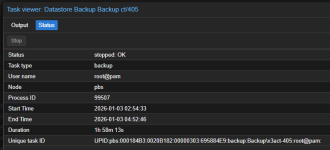
DDerekG replied to the thread CT backup to PBS - Excess data causing very long backup window.Ah, thank you, I didn't notice that task history. Here is the relevant logs: INFO: Starting Backup of VM 405 (lxc) INFO: Backup started at 2025-12-31 02:44:53 INFO: status = running INFO: CT Name: tunarr INFO: including mount point rootfs ('/')...
-
DDerekG replied to the thread old SATA drive to share media.You are welcome to try any of the multitude of LXC file servers, I just didn't have a good time with them myself (and got tired of working though the config only to find some part didn't work as I expected), especially with USB drives. In the...
-
DDerekG replied to the thread CT backup to PBS - Excess data causing very long backup window.Sorry, I don't know where to get the logs from the pve, the node is a member of a cluster.
-
DDerekG replied to the thread CT backup to PBS - Excess data causing very long backup window.Hi Impact, Details as per request: The backup log is way too large so here is the start, and the end I have already posted: 2026-01-05T05:03:01+00:00: starting new backup reader datastore 'Backup': "/backup" 2026-01-05T05:03:01+00:00: protocol...
-
DDerekG posted the thread CT backup to PBS - Excess data causing very long backup window in Proxmox Backup: Installation and configuration.This is s strange one for me and I hope someone can advise. Environment is updated to PVE9.1 & PBS 4.1 I have a CT with a 12GB root disk + 3x bind mounts on a Proxmox Host, on the same host I have another CT with 32GB root drive and 5x bind...
-
-
DDerekG reacted to Cha0s's post in the thread Pulse - a responsive monitoring application for Proxmox VE that displays real-time metrics across multiple nodes with
 Like.
Indeed it has improved since July. Back then I had the same experience. I tried it again today with 22 Nodes and 506 VMs and here's the CPU usage of the Pulse VM so far.
Like.
Indeed it has improved since July. Back then I had the same experience. I tried it again today with 22 Nodes and 506 VMs and here's the CPU usage of the Pulse VM so far. -
DDerekG replied to the thread Pulse - a responsive monitoring application for Proxmox VE that displays real-time metrics across multiple nodes.Maybe you should try the app again. I have it running in a CT, utilising 3% of 2 cores while monitoring an 80 device/services homelab. I think it's a great app and the only thing I don't like is that it spams the system logs of all the monitored...
-
DDerekG replied to the thread Looking for Advice on New Setup.I'm sorry, my comment is not meant to offend, but I think you have spent way too much time chasing specs. You are supposed to decide what it is that you want from the Proxmox environment and then spec the system around your requirements. You...
-
DFlashing the newest BIOS version (1.11.0 -> 1.30.0) fixed the issue with the kernel 6.17.4-1.
-
DDerekG replied to the thread CPU change.You might try upgrading the Intel CPU micro code in Proxmox in case the they are running an older or different versions. This might help: https://community-scripts.github.io/ProxmoxVE/scripts?id=microcode&category=Proxmox+&+Virtualization
-
DDerekG replied to the thread Considering Proxmox use case...doubts..I've had the unit since early Sept, it's fully loaded with 11 drives and using the 10Gbe networking. Running Windows 11 VM and a TrueNAS server. The only times it's been down is when I'm messing around with the configuration, but even that...
-
DDerekG replied to the thread Issues after upgrading to 6.17.4-1-pve.I can't say that as I have no experience with those controllers and no idea what devices you have connected on each. I would try to disable the Rombar one device at a time. Then look into firmware updates, rolling back the kernel to the earlier...
-
DDerekG replied to the thread Considering Proxmox use case...doubts..I can say that the WTR MAX is almost the perfect Proxmox node, lots of power in every aspect needed in a Proxmox node. I wish I could afford a 3 unit cluster. And Aoostar, although being relatively new to international sales, are fairly good...
-
DDerekG replied to the thread (Ideas?) Create custom reports for PVE VMs, configuration etc..I'll second that. It would be great to have a list of the relevant changes (for passthrough etc.) in case of rebuild after host hardware failure. Every one of my Proxmox nodes have different changes made over time, and they are not really...