DamienDye's latest activity
-
 DamienDye posted the thread rebranding a VM (smbios, boot logo, BGRT) and keeping it through upgrades in Proxmox VE: Installation and configuration.had a few people ask if they could put their own name on the VMs they sell so had a go and wrote it up, in my own time for something to do over the weekend. covers smbios1 and args for types 0/2/3/11 (serial from the vm name, sku from cores and...
 -
Can you please link the documentation article/part you have in mind? RTFM alone does not help anyone...
-
DamienDye reacted to JohnnieKF's post in the thread Clocksource error when live migrating VM with
 Like.
Since you haven't measured anything yet, I'd confirm there's a real problem before chasing the message. In the guest, run this before a migration and again straight after: chronyc tracking Watch System time and Last offset. If both stay small...
Like.
Since you haven't measured anything yet, I'd confirm there's a real problem before chasing the message. In the guest, run this before a migration and again straight after: chronyc tracking Watch System time and Last offset. If both stay small... -
DamienDye reacted to JohnnieKF's post in the thread Hello, I need to change the IP of one host for corosync network link0. with Like.
It should automatically pick up the changes without the need to restart corosync, but otherwise yes this is correct!
-
DamienDye reacted to JohnnieKF's post in the thread Hello, I need to change the IP of one host for corosync network link0. with Like.
That's great — just to confirm, can you ping the other hosts from each VLAN? Assuming they're all communicating, they should be able to sync a new version of the Corosync config between the hosts [0]. If you update ring0_addr for Host 1 and...
-
DamienDye reacted to JohnnieKF's post in the thread Can NUMA node be a reason for ESXi vs Proxmox Performance differences? with Like.
worth posting qm config alongside the numbers too
-
DamienDye replied to the thread Can NUMA node be a reason for ESXi vs Proxmox Performance differences?.whats you benchmark results so we know what we are talking about
-
DamienDye replied to the thread [TUTORIAL] PVE installed on top of an SDN VXLAN zone: terminal/Web UI stalls and "failed to set mtu to 1500".well am UK based and over provider connections I can get at least 2k mtu on private lines interconnects in DC are usually 9k in some its 12k even BT wholesale operates minijumbo but if there is a brain dead carrier blocking ICMP etc then yes...
-
DamienDye replied to the thread [TUTORIAL] PVE installed on top of an SDN VXLAN zone: terminal/Web UI stalls and "failed to set mtu to 1500".if you raise the raw mtu on the the current network you can then use 1500 mtu inside the vxlan tunnels. this should also mean that you don't have traffic issues and have to reduce the MTU on the nested instanced
-
DamienDye replied to the thread Optimizing Windows VM performance on older hardware - settings advice needed.actually there notes I have built over the last 25 years and when the notes where written windows 7 erah did remove it immediately
-
DamienDye replied to the thread Migration from DELL VxRail to Proxmox.Yes this is possible and we have been providing assistance as a partner. if you want to reach out to us the site is in my bio.
-
DamienDye reacted to t.lamprecht's post in the thread Proxmox Virtual Environment now available for 64-bit ARM (arm64)! with Like.
We are excited to announce the first release of Proxmox Virtual Environment with official support for a second CPU architecture: 64-bit ARM (arm64/aarch64). Until now, Proxmox VE was available for x86-64 (amd64) only. Proxmox VE 9.2 for arm64...
-
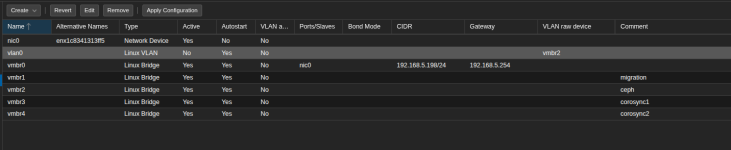
DamienDye replied to the thread [SOLVED] Feature Suggestion: Display "VLAN Raw Device" in Network Interface Overview.don't forget to mark this as solved.
-
DamienDye replied to the thread Moving from 3-node full-mesh SDN to a 6-node using switches.how have you created the mesh by hand or using the inbuilt SDN open fabric mesh note proxmox openfabric is the ISIS protocol not ospf because it's possible to turn the mesh into a ring while it's running what you need to do is move one cable...
-
DamienDye replied to the thread PVE Management IP on a SDN VLAN.am not sure this is the desired state you want a SDN network could be on any system supported as such you would be saying that having a system IP on a vTEP of vxnet should be supported too ? the SDN is meant to be an overlay network not the...
-
DamienDye replied to the thread Slow speed on second bridge.not much to go on here whats the logs say dmesg for example? what nic driver is it and whats it connected to in the system? are the nics on the same numa domain as the vCPU are you running EEE in the interface ? does it work faster without...
-
DamienDye replied to the thread [SOLVED] Feature Suggestion: Display "VLAN Raw Device" in Network Interface Overview.like this you mean you can just enable it on the columns selector by hovering over a menu field and click the drop down
-
-
DamienDye replied to the thread Tailscale in OMV-VM drives me crazy....couple of questions 1) you open media vault is successfully connected and active on your tailnet ? 2) is tailscaled running on the omv system 3) do you see the tailscale0 interface on the omv with the tailscale ip once we have determined...
-
DamienDye replied to the thread Optimizing Windows VM performance on older hardware - settings advice needed.you need a reboot for all windows setting changes, As nothing in windows applies cleanly since windows 7, so it will delete the file instantly on boot when it reads the setting as it boots because you can't deactivate a page while is running.
-
DamienDye replied to the thread Optimizing Windows VM performance on older hardware - settings advice needed.Try an out of the box windows then try a windows with these settings you will see the system responsiveness is night and day