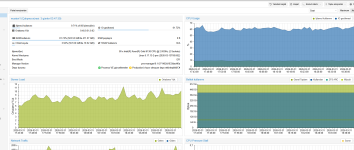
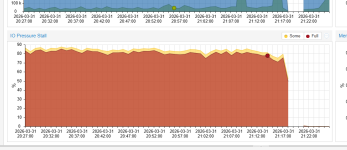
Applying pve-qemu-kvm 10.2.1-1 may cause extremely high “I/O Delay” and extremely high “I/O pressure stalls”. (Patches in the test repository

uzumo

Active Member
Apr 5, 2025
469
123
43
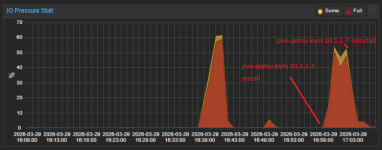
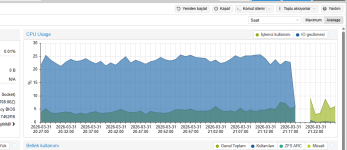
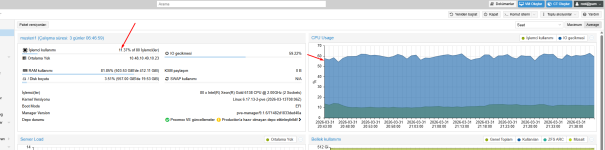
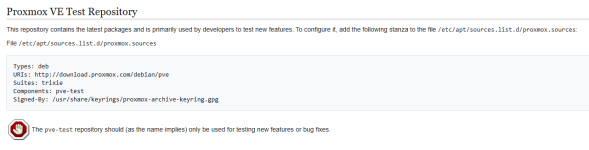
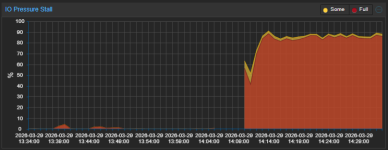
Applying patches to the Test Repository may have caused severe I/O delays and I/O pressure stalls.
nooo.png

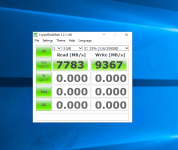
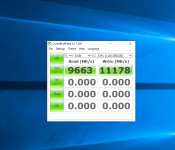
The I/O pressure star value has reached nearly 100, but I can't see the load when I run `zpool iostat 1`.

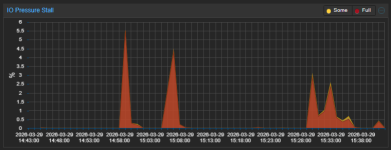
If you reinstall PVE using `proxmox-ve_9.1-1.iso`, the value drops to between 0 and 1 (or at most around 5), but the problem recurs when you apply the test repository.

If you reinstall PVE using `proxmox-ve_9.0-1.iso` and then apply the non-subscription repositories, this issue does not occur.
reinstall.png

I haven’t been able to pinpoint the cause yet because I don’t have time to reapply the patch right now due to other tasks, but I’ve decided to use the No-Subscription repository.

So far, after installing from `proxmox-ve_9.0-1.iso` and applying the following patch, the issue has not recurred.

Code:
proxmox-ve: 9.1.0 (running kernel: 6.17.13-2-pve)
pve-manager: 9.1.6 (running version: 9.1.6/71482d1833ded40a)
proxmox-kernel-helper: 9.0.4
proxmox-kernel-6.17: 6.17.13-2
proxmox-kernel-6.17.13-2-pve-signed: 6.17.13-2
proxmox-kernel-6.14: 6.14.11-6
proxmox-kernel-6.14.11-6-pve-signed: 6.14.11-6
proxmox-kernel-6.14.8-2-pve-signed: 6.14.8-2
ceph-fuse: 19.2.3-pve1
corosync: 3.1.10-pve1
criu: 4.1.1-1
frr-pythontools: 10.4.1-1+pve1
ifupdown2: 3.3.0-1+pmx12
intel-microcode: 3.20251111.1~deb13u1
ksm-control-daemon: 1.5-1
libjs-extjs: 7.0.0-5
libproxmox-acme-perl: 1.7.0
libproxmox-backup-qemu0: 2.0.2
libproxmox-rs-perl: 0.4.1
libpve-access-control: 9.0.5
libpve-apiclient-perl: 3.4.2
libpve-cluster-api-perl: 9.1.1
libpve-cluster-perl: 9.1.1
libpve-common-perl: 9.1.8
libpve-guest-common-perl: 6.0.2
libpve-http-server-perl: 6.0.5
libpve-network-perl: 1.2.5
libpve-rs-perl: 0.11.4
libpve-storage-perl: 9.1.1
libspice-server1: 0.15.2-1+b1
lvm2: 2.03.31-2+pmx1
lxc-pve: 6.0.5-4
lxcfs: 6.0.4-pve1
novnc-pve: 1.6.0-3
openvswitch-switch: 3.5.0-1+b1
proxmox-backup-client: 4.1.5-1
proxmox-backup-file-restore: 4.1.5-1
proxmox-backup-restore-image: 1.0.0
proxmox-firewall: 1.2.1
proxmox-kernel-helper: 9.0.4
proxmox-mail-forward: 1.0.2
proxmox-mini-journalreader: 1.6
proxmox-offline-mirror-helper: 0.7.3
proxmox-widget-toolkit: 5.1.8
pve-cluster: 9.1.1
pve-container: 6.1.2
pve-docs: 9.1.2
pve-edk2-firmware: 4.2025.05-2
pve-esxi-import-tools: 1.0.1
pve-firewall: 6.0.4
pve-firmware: 3.18-1
pve-ha-manager: 5.1.1
pve-i18n: 3.6.6
pve-qemu-kvm: 10.1.2-7
pve-xtermjs: 5.5.0-3
qemu-server: 9.1.4
smartmontools: 7.4-pve1
spiceterm: 3.4.1
swtpm: 0.8.0+pve3
vncterm: 1.9.1
zfsutils-linux: 2.4.1-pve1
 

Attachments

Last edited:
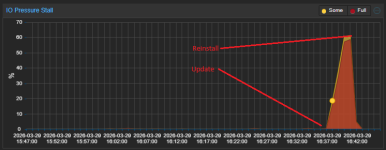
Further testing has confirmed that the issue recurs after applying this update…

Reinstalling the package with a specific version resolves the issue.

I wonder if they'll release a fix...

スクリーンショット 2026-03-29 164636.png


Code:
apt list --upgradable
libpve-common-perl/stable 9.1.9 all [upgradable from: 9.1.8]
pve-firmware/stable 3.18-2 all [upgradable from: 3.18-1]
pve-ha-manager/stable 5.1.3 amd64 [upgradable from: 5.1.1]
pve-manager/stable 9.1.7 all [upgradable from: 9.1.6]
pve-qemu-kvm/stable 10.2.1-1 amd64 [upgradable from: 10.1.2-7]
qemu-server/stable 9.1.6 amd64 [upgradable from: 9.1.4]

// update
apt-get dist-upgrade

// reinstall
apt reinstall pve-firmware=3.18-1
apt reinstall pve-qemu-kvm=10.1.2-7
apt reinstall qemu-server=9.1.4
apt reinstall pve-ha-manager=5.1.1
apt reinstall pve-manager=9.1.6
apt reinstall libpve-common-perl=9.1.8

At the very least, we have confirmed that this occurs simply by running the following in the Test Repository.

Code:
apt reinstall pve-qemu-kvm

pve-qemu-kvm_10.2.1-1.png

We have implemented the following workaround for this issue.
Since the issue does not occur with other patches, it is believed to be caused by pve-qemu-kvm/stable 10.2.1-1.

Code:
apt reinstall pve-qemu-kvm=10.1.2-7
apt-mark hold pve-qemu-kvm
apt-get dist-upgrade

I don’t think this is an environment-dependent issue, but I’ll list the environment just in case.

Code:
【CPU】Intel Core Ultra 7 265K
【MEM】 Crucial CP2K48G56C46U5 x4
【MB】Asrock Z890 Pro RS WiFi White (Latest BIOS 3.24 2026/2/5)
【PCIE 1 x16】PowerColor Hellhound Spectral White AMD Radeon RX 9070 XT 16GB GDDR6
【PCIE 2 x1】 USB
【PCIE 3 x4】 Broadcom HBA9500-16i
【PCIE 4 x4】 Intel X710-DA2
【M.2 Gen5 x4】 WDS200T4X0E-EC
 

Attachments

Last edited:
Good catch & testing.

I guess we will have to wait for others to chime in with similar findings on pve-qemu-kvm/stable 10.2.1-1

Maybe you should add "pve-qemu-kvm 10.2.1-1 " in the title thread for others to easily identify.
 
  • Like
Reactions: waltar and uzumo
Thank you OP for testing and workaround!

Same experiences on lesser hardware, small cluster of Dell Optiplex 7070. Unfortunately for me it coincided with research on zswap implementation so spent time eliminating that as a symptom first.

For me, applying workaround returned io state and cpu pressure graphs back to normal.

However I do wonder if its metric calculation and graphing rather than real pressure though - during my own testing with top, iotop etc I was finding no discernible difference in io delay or cpu pressure between the two versions even though the graphing was wildly inflated.
 
Last edited:
When an issue occurred in a PVE environment after applying a patch, I noticed that the graph displayed high values even when the load was not particularly high, as indicated by the `zpool iostat 1` command.
Therefore, I suspect that it is not the actual load but rather the values used in the displayed graph that differ depending on the version. However, since I do not know how to interpret this data, I am unable to investigate further.

*I thought the data related to the graph might be corrupted, so I reinstalled PVE, and the issue was resolved after the reinstallation.
However, when I applied the latest version of the package from the Test Repository, the issue recurred, so I was only able to determine that the package update was the cause.
 
Last edited:
  • Like
Reactions: waltar
Hi,
please share the configuration of an affected virtual machine qm config <ID>, your storage configuration /etc/pve/storage.cfg and output of zpool status -v.

There was a rewrite of the io_uring handling in QEMU 10.2. Could you try configuring your VM disks with aio=threads (Async IO in the Advanced options when editing the disk in the UI) instead and see what difference that makes? Shutdown and start of the VM or using the Reboot in the UI is necessary for the change to apply, restart within the VM guest is not enough.
 
Interesting. Here is mine for comparison. No zfs on this box all lvmthin. can find one if more results desired.

Initial findings after reinstalling pve-qemu-kvm 10.2.1-1, uplift of all Windows VMs to pc-q35-10.2 and flipping aio=threads on all disks. Proper shutdown and restart conducted of all VMs.
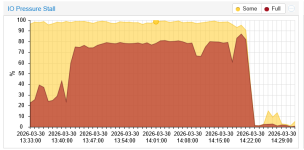
I found that CPU usage decreased in comparison to default aio, unsure why but that is what I see. However I/O delay bar on summary screen still shows high, 70%+, I/O pressure stall graph high.
This is in comparison to a <5% I/O delay under 10.1 without aio=threads. iotop on the console itself still shows similar stats to 10.1 Happy to give further logs.

Thank you for Proxmox!
EDIT to add IO pressure graph - missed the first part but we see it ramping up after 10.2 installed, uplifting q35 windows machines, reconfigure aio=threads restarting VMs. At 1340 all VMs are running and I wrote my findings. We then see an immediate drop after reverting to 10.1, reconfigure VMs back to original and restart. After 1429 all VMs are running.

1774877632686.png

I have included 2 different VM configs before reconfigure with aio=threads
a Debian machine which I understood to automatically follow latest q35 version.
a Server 2025 Core VM which has been uplifted from previous pc-q35-10.1

Linux Debian 13 VM
Code:
# qm config 224
agent: 1
balloon: 1536
bios: ovmf
boot: order=scsi0;ide2;net0
cores: 4
cpu: host
efidisk0: vm:vm-224-disk-0,efitype=4m,ms-cert=2023w,pre-enrolled-keys=1,size=4M
ide2: none,media=cdrom
machine: q35
memory: 4096
meta: creation-qemu=10.1.2,ctime=1769263447
name: DDLPM01
net0: virtio=BC:24:11:BD:D9:D3,bridge=vmbr0,firewall=1,queues=4
numa: 0
onboot: 1
ostype: l26
scsi0: vm:vm-224-disk-1,cache=writeback,discard=on,iothread=1,size=64G,ssd=1
scsihw: virtio-scsi-single
smbios1: uuid=ce3bcae9-0ea2-4309-9a35-80f994e73c4f
sockets: 1
tablet: 0
vmgenid: 4e03c807-9532-4c05-b996-78c895c05084

Windows Server 2025 Core
Code:
# qm config 121010
agent: 1
balloon: 1536
bios: ovmf
boot: order=scsi0;ide2;net0
cores: 2
cpu: x86-64-v3
efidisk0: vm:vm-121010-disk-0,efitype=4m,ms-cert=2023,pre-enrolled-keys=1,size=4M
ide2: none,media=cdrom
machine: pc-q35-10.2
memory: 4096
meta: creation-qemu=10.1.2,ctime=1763650869
name: DDADC01
net0: virtio=BC:24:11:C4:67:A1,bridge=vmbr121,firewall=1,queues=2
numa: 0
onboot: 1
ostype: win11
scsi0: vm:vm-121010-disk-1,cache=writeback,discard=on,iothread=1,size=50G,ssd=1
scsi1: vm:vm-121010-disk-2,cache=writeback,discard=on,iothread=1,size=10G,ssd=1
scsihw: virtio-scsi-single
smbios1: uuid=94208ed2-6c04-49f9-bf5d-764e1e17f2d7
sockets: 1
vmgenid: 7d67eceb-8de4-4a4e-9094-d478d4227cbf

/etc/pve/storage.cfg
Code:
# cat /etc/pve/storage.cfg
dir: local
        path /var/lib/vz
        content iso,snippets,vztmpl,backup
        prune-backups keep-all=1
        shared 0

pbs: mybackupserver
        datastore mybackupserver
        server 192.168.x.x
        content backup
        fingerprint <fingerprintgoeshere>
        prune-backups keep-all=1
        username root@pam

lvmthin: ct
        thinpool ct
        vgname vg1
        content rootdir

lvmthin: vm
        thinpool vm
        vgname vg2
        content images
 
Last edited:
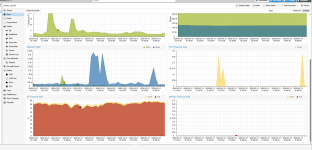
I'm in the same situation, I couldn't figure out why it was like this either. I'll try dropping all the virtual currencies to 10.1 tonight.

Screenshot_986.pngScreenshot_987.png
 
I can reproduce the issue locally and will look into it.
Glad to hear you can reproduce it. To provide more data: I have tested this across my entire rack of servers (multiple nodes), and the result is identical on every single one. They are all experiencing the same ~20-25% IO Delay since the 10.2.1-1 update.

As shown in the screenshot below, all these nodes were running perfectly before, and now they are all reporting this artificial IO pressure. Looking forward to the fix/patch!

A total of 47 servers are experiencing the same issue.

Screenshot_997.png
 
Last edited:
I can reproduce the issue locally and will look into it.
Excellent! Thing is, as alluded to previously, I dont actually think its increased io. I'm not the worlds best at iotop but I wasnt seeing any difference - only in the realtime bar i/o delay and the io pressure stall graph.

Good luck hunting, happy to test and/or give any other logs you might like from other machines as well as your own!
 
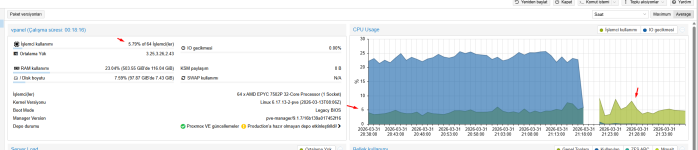
Quick update: I have just downgraded pve-qemu-kvm from 10.2.1-1 to 10.1.2-7 on my nodes, and I can confirm that all IO Delay and IO Pressure issues have completely disappeared.

Before the downgrade, I was seeing a constant 20-25% IO Delay even with high-performance NVMe drives. After the downgrade and a reboot, the IO Delay is back to normal (0-1%).

It seems clear that the 10.2.1-1 update introduced a regression in how IO pressure is reported or handled. I will stay on this version until a stable fix (like 10.2.1-2) is officially released for the Trixie repository.

Thanks for looking into this!


Screenshot_999.pngScreenshot_1000.png

Screenshot_1001.png
 
Excellent! Thing is, as alluded to previously, I dont actually think its increased io. I'm not the worlds best at iotop but I wasnt seeing any difference - only in the realtime bar i/o delay and the io pressure stall graph.

Good luck hunting, happy to test and/or give any other logs you might like from other machines as well as your own!

pve-qemu-kvm 10.2.1-1

Screenshot_973.png

pve-qemu-kvm 10.1.2-7

Screenshot_1001.png


There's a difference of more than 25%.
Not only IOPS but also CPU and, naturally, RAM usage has decreased.
 
Quick update: I have just downgraded pve-qemu-kvm from 10.2.1-1 to 10.1.2-7 on my nodes, and I can confirm that all IO Delay and IO Pressure issues have completely disappeared.

Before the downgrade, I was seeing a constant 20-25% IO Delay even with high-performance NVMe drives. After the downgrade and a reboot, the IO Delay is back to normal (0-1%).

It seems clear that the 10.2.1-1 update introduced a regression in how IO pressure is reported or handled. I will stay on this version until a stable fix (like 10.2.1-2) is officially released for the Trixie repository.

Thanks for looking into this!

<snip pics>

Inneresting! I did not have that occur on mine.
For sure the proxmox team will identify the reason why - lets remember this is a package published to test so those of us brave enough to use that will know the caveats. I reckon you might want to limit your 47 servers to a small subset exposed to the test repo but thats just me. Happy Proxmox!
 
  • Like
Reactions: djsami
Inneresting! I did not have that occur on mine.
For sure the proxmox team will identify the reason why - lets remember this is a package published to test so those of us brave enough to use that will know the caveats. I reckon you might want to limit your 47 servers to a small subset exposed to the test repo but thats just me. Happy Proxmox!

I've been using the test for two years and this is the first time something like this has happened to me.

Screenshot_1002.png


I will be downgrading this other cluster structure after 4:00 AM.


Screenshot_1003.png
 
I am writing this to express my deep frustration regarding the pve-qemu-kvm 10.2.1-1 update. I manage a massive infrastructure of over 1,200 nodes, and this untested update has caused significant distress across my entire operation.

I have spent the last two nights without sleep, monitoring spikes in IO Delay, CPU, and RAM usage that appeared immediately after this update. It is honestly disappointing to see a core package released to the Trixie repository with such a glaring regression that impacts real-world performance, not just "graphs."

After extensive testing and stress, I confirmed that downgrading to 10.1.2-7 resolved the issue on my clusters. In an enterprise-grade environment of this scale, we rely on the stability of these updates. Having to manually intervene across such a large fleet due to an avoidable bug is unacceptable.

I hope this serves as a wake-up call for more rigorous QA before pushing updates that handle core hypervisor functions. I am still recovering from the stress and lack of sleep this has caused.

Looking forward to a stable, properly tested fix soon.
 
Since I’m using a test repository, I can tolerate reinstalling the software to cover up the graph, but I certainly can’t revert the changes and run the test again (it would be painful to have someone see the graph, ask for an explanation, and file a report).

As long as we choose to use a test repository, I think these issues should be accepted.

However, I do feel that, as you say, we should have noticed this sooner, so I understand your frustration.

*Compared to the issue where text appears in the logs when booting up a resolved VM, this was a much more tolerable problem. Now I’m sleep-deprived. They really say some strange things. Since we have to submit work requests for hundreds of VMs, it takes a very long time.
 
Last edited:
  • Like
Reactions: beisser
@djsami thats why you dont use the test repository in production.
as the name implies it is a repository for testing things. its bleeding edge stuff.
1774984927551.png
if you need things to just work, use the enterprise repository, where only well tested releases can be found.

using test in production is playing with fire and you can only blame yourself if you get burned.
 
Last edited: