MS-A2 Minisforum (AMD Ryzen™ 9 9955HX + Radeon™ 610M) – The “I Finally Stopped Crying” Zero-Artifact iGPU Passthrough Thread

futiless

Renowned Member
From absolute hell to running weeks straight with zero green frames, zero Code 43, zero black screens – December 2025


After months of investing essentially all my free time to working the bugs out and getting proper passthrough working to the point I am mostly satisfied for the application. Along the way I was giving a great deal of help from Uzumo. As he commented and built upon here: https://github.com/isc30/ryzen-gpu-passthrough-proxmox/blob/main/README.md, concepts that go on to be expanded into the hookscript method as outlined in Uzumo's dialog here https://github.com/isc30/ryzen-gpu-passthrough-proxmox/issues/131#issue-3266798285.


Now I have been scolded for seeking help regarding roms here on Proxmox but Uzumo was happy to provide the link https://github.com/isc30/ryzen-gpu-passthrough-proxmox. That gave me a great starting point. My novice eyes overlooked the https://github.com/isc30/ryzen-gpu-passthrough-proxmox/tree/main/Tools section. Here you can find what we need to get iGPU roms extracted. I did however end up reaching out to Minisforum and they passed along the shall we call it official vbios. The GopDriver and vbios is critical for this method. Getting the right one is tricky and not designed for the end user obviously. I would like to see companies which boast support for Proxmox get this process along to the consumer in a less convoluted fashion as clearly this is what we are trying to accomplish. Though I digress, I love my finished product.


Presently I am really only using a few vm's:


  • PFSense Community Edition which receives passthrough from the two X710 Intel slots and a back plain bridge to the vm's. This vm automatically boots and acts as a great home lab router/ server.
  • I have installed a Mellanox ConnectX 4 I got for $50 USD on ebay and another for my PC.

It's been a couple months since I started out https://forum.proxmox.com/threads/p...passthrough-a-desperate-plea-for-help.172139/. Since then I have made quite a few changes on the original each one coming with a story I wont bore you with unless you ask.


Instead I was hoping to collect a few other folks who have the same configuration as me that could help me inhance. Heck even just reconsider aspects of it I really don't care but initally I just wanted to help others who have been reaching out inquiring what I am working with.


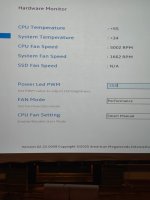
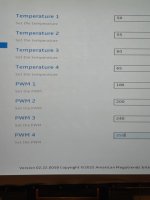
Granted this is a significantly different setup on the MS-A2 lowered power delidded processor which minisforum wants locked to 45watts if you read the guides on the support section for our product. It becomes evidently clear people with this setup have issues with heat. I did find ways to modify and mitgate with bios settings, custimzed fan stages with aggressive speeds after 65. Also I cleared the original phasechange compound and upgraded to the best rated phase change pad I could find. If you are interested I will find the details. I have an after market fan directed to it at low speed in the "homelab server room". I am now able to have default or higher power settings in the bios and not ever see temperatures exceed 60. Which you need to install Cockpit for Proxmox to give you a Debian alternative frontend to help in various ways and for us its all about the temperature.


I don't want to get to far off topic here as I do want to provide a guide for this hardware but you have to check out https://github.com/filebrowser/filebrowser! This makes the editiing of our server files much easier than any other way I can image. I even allows you to make bookmarks as URL directly to a file. Which in turn brings up an editor! This is a priceless edition to debugging a wildly artifacting system that needs to be restarted hundreds and hunreds of times testing different settings. I also found a cgit project which literally runs automated backups every so many minutes on the tree structure for changes and you as the administrator can review and map out chronologically over time on a sort of giant map. Look I know how pathetic it is telling this to a community like this. But I intend my reader of this post to be almost as novice as me. Hence this is priceless knowledge as having quick access to the files is necessary.


Anyways enough about those seemingly abstract topics here is what I am using at the moment and Yes it is now zero artifacts for weeks. The real problem comes in when you 1) want to tweak to utilize power settings, as this setup essentially turns them off but if you essentially piss around enough you in theory could get them working too. Hence why I am making this thread to see if other wanted to dialouge about these igpu's and passthrough techniques. Not as though that hasn't been done before.. Its just that I have yet to see it done "right" per say, Myself included.


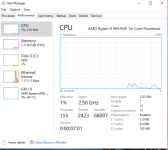
But heres the kicker I have got this setup to work flawlessly with stresstests of display @ 4k60p ; 4 x 4 ; downscaled in a grid 8k Japan video at 60p. For our system this is a great litmus test. If it is not setup correctly with the settings which essentially worked for others in the Ryzan lineup because in our case we need more tweaking for the buggs to be gone. I have a lot of bandwidth so this was fine for me. Essentially this would NOT work with the original setup with the hookscript and all. But now I can leave the system running for days on weeks. No flaws no jarred blackscreens, display driver crashes, green screens and on and on. All of which corrupt the working environment.


If you are admittedly a novice with OS's and you cant tell the nuance's here the signs are nerve racking and alarming to the point most would quit. However if you consider the way the frame buffer is a total mess when we have problems its wise to have a bootable wintousb. I found an incredible one so that we can boot our server test the hardware and get peace of mind back in order if your server is a mess with graphic artifacts or you need direct access for firmware updates like nvme drives for example. I cant STRESS ENOUGH the importance of never assuming that early artifacts will stay forever. (many times it was actually fixed with the configuration I had. But the drivers and system files had taken a serious beating from the previous attempt. Thus noticing the little signs such as if the screen blanks out even once. 2) The issues are all mendable with a safemode boot and driver wiping tools followed by a fresh installaion of the drivers.


Remaining bugs I haven’t touched because I’m exhausted and it’s Christmas season​


  1. power savings ASPM as I have them all disabled.
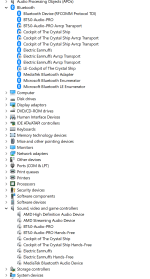
  2. After shutdown, switching to Ubuntu and then back to windows is not as clean as a fresh boot. I can't say there are artifacts anymore! So that is a major plus! I am passing though my aftermarket wifi 7 mediatek bluetooth and wifi. Then the same over in Ubuntu. but as you can see in the screenshot – lingering disabled devices that need to be re-enabled each boot. A pain but not the end of the line. Just something to consider and maybe help me overcome. That and the number power settings I had the disfortune of having to ultimately disable. Although I had it working for days like this it was ultimately just not reliable.

The exact files & VBIOS situation – EVERY detail because people keep asking​


Get our Gop Driver I posted here – save yourself the hassle of getting it if you are on 9955HX (others work but this is the type of thing were there is likely a better cleaner extract going around, also the bios version it was pulled from matters). So for us with artifacts and video issues it would be key to have the best foundation. Hence try mine sourced with https://github.com/LongSoft/UEFITool/releases/tag/A72 and posted here https://github.com/qemus/virtiso/releases.


You may notice my vbios has a different label in the following write up but that is because in the last month I heard back from Minisforum with what they said is a better one ?.. It is much larger in size like 128 kb. Whereas the majority of the vios post from the Ryzan like 80 percent had the same size like 43 kb or something .. Now I had 3 128 kb from the manufacturer, 1 I collected from tool which I shared and called it something that didnt fit into the rest nicely FOR THIS EXACT reason. I am not sure if it is correct. Now I am happy with the one I have but this is definitely worth consider.


If you have this exact MS-A2 (Ryzen 9 9955HX + Radeon 610M) and want to team up, share your hookscripts, fight over which 128 KB VBIOS is actually the golden one, get ASPM working reliably, fix the lingering Mediatek BT lingering crap, whatever – reply here.I’m done suffering alone. Let’s make this thing perfect together.


1764927328826.png:

There is lingering disabled devices that need to be re-enabled each boot. A pain but not the end of the line. Just something to consider and maybe help me overcome. That and the number power settings I had the disfortune of having to ultimately disable. Although I had it working for days like this it was ultimately just not reliable.

CONTINUED ON THE NEXT POST L
 
  • Like
Reactions: jefm and cedws
Windows conf

Code:
##args for args -cpu kvm=off,hv_vendor_id=proxmox'
##OCT22args -cpu 'host,hv_passthrough,level=35,-hypervisor,+svm,'
##args -device virtio-iommu-pci,bus=pcie.0,addr=1e.0,ats=on,caching-mode=on, -cpu 'host,hv_passthrough,hv_relaxed,hv_spinlocks=0x1fff,hv_vapic,hv_time,-hypervisor,+svm,+invtsc'
##args -device virtio-iommu-pci,bus=pcie.0,addr=1e.0,ats=on,caching-mode=on,aw-bits=48 -global virtio-iommu-pci.ats=on -global virtio-iommu-pci.caching-mode=on -global virtio-iommu-pci.aw-bits=48 -cpu 'host,hv_passthrough,hv_relaxed,hv_spinlocks=0x1fff,hv_vapic,hv_time,-hypervisor,+svm,+invtsc'
##args -cpu host,hv_passthrough,hv_relaxed,hv_spinlocks=0x1fff,hv_vapic,hv_time,-hypervisor,+svm,+invtsc -device virtio-iommu-pci,bus=pcie.0,addr=1e.0
#args -cpu 'kvm64,hv_passthrough,hv_relaxed,hv_spinlocks=0x1fff,hv_vapic,hv_time,-hypervisor,+svm,+invtsc'
#THESe are args from nov 07 artifacting args%3A -cpu 'host,hv_passthrough,hv_relaxed,hv_spinlocks=0x1fff,hv_vapic,hv_time,level=5,-hypervisor,+svm,+invtsc'
#THIS IS UZOMO proofed version args -cpu 'host,hv_passthrough,-hypervisor,level=35,+svm'
#args -cpu 'host,hv_passthrough,-hypervisor,level=35,+svm,'
#args BEST KNOWN NOT SO FOR VFIO LESS SYSTEM? -cpu 'host,hv_passthrough,hv_relaxed,hv_spinlocks=0x1fff,hv_vapic,hv_time,-hypervisor,+svm,+invtsc'
agent: 1
args: -cpu 'host,hv_passthrough,hv_relaxed,hv_spinlocks=0x1fff,hv_vapic,hv_time,-hypervisor,+svm,+invtsc,+kvm_pv_unhalt'
balloon: 0
bios: ovmf
boot: order=scsi0
cores: 16
cpu: host,flags=+nested-virt;+md-clear;-pcid;-spec-ctrl;-ssbd;+ibpb;+virt-ssbd;+amd-ssbd;+amd-no-ssb;+pdpe1gb;+hv-tlbflush;-hv-evmcs;+aes
efidisk0: local-zfs:vm-211-disk-0,efitype=4m,size=1M
hookscript: local:snippets/ryzen_igpu_reset.sh
hostpci0: 0000:01:00.0,pcie=1,romfile=9955HX.bin,x-vga=1
hostpci1: 0000:01:00.1,pcie=1,romfile=AMDGopDriver_164E_graniteridge_9955hx.rom
hostpci2: 0000:07:00.0,pcie=1
hugepages: 1024
ide0: local:iso/virtio-win-0.1.285.iso,media=cdrom,size=771138K
machine: pc-q35-10.1,viommu=virtio
memory: 32768
meta: creation-qemu=10.0.2,ctime=1760472552
name: Win11Corp25h2Nov13
net0: virtio=BC:24:11:8D:AF:BB,bridge=vmbr0,firewall=1,mtu=9000,queues=16
numa: 1
ostype: win11
scsi0: local-zfs:vm-211-disk-1,aio=io_uring,cache=writeback,discard=on,size=256G,ssd=1
scsi1: local-zfs:vm-211-disk-2,discard=on,size=432G,ssd=1
scsihw: virtio-scsi-pci
smbios1: uuid=eed56bbb-f7f4-496d-baf6-d7aa232af170
sockets: 1
tags: ssssss;win11
tpmstate0: local-zfs:vm-211-disk-3,size=4M,version=v2.0
usb0: host=1-2
usb1: host=5-1
usb2: host=2-1
usb3: host=3-2.4.4
usb4: host=4-2.1
vcpus: 16
vga: none
vmgenid: 3c2bc4a1-e8e1-4701-a1f1-c0660fa1277d

Ubuntu conf in QEMU-server folder under pve

Code:
# GPU Passthrough
#hostpci0%3A 0000%3A01%3A00.0,pcie=1,romfile=AMDGopDriver_9800x3d.rom,x-vga=1
#hostpci0%3A 0000%3A01%3A00.0,pcie=1,x-vga=1
##hostpci0%3A 0000 01 00 0,pcie=1,romfile=9955HX.bin,x-vga=1
#hostpci1%3A 0000%3A01%3A00.1,pcie=1
acpi: 1
agent: 1,fstrim_cloned_disks=1,type=virtio
args: -cpu 'host,kvm=off,hv_vendor_id=proxmox,hv_relaxed,hv_spinlocks=0x1fff,hv_vapic,hv_time'
balloon: 0
bios: ovmf
boot: order=virtio0
cores: 16
cpu: host,flags=+nested-virt;+md-clear;-pcid;-spec-ctrl;-ssbd;+ibpb;+virt-ssbd;+amd-ssbd;+amd-no-ssb;+pdpe1gb;+hv-tlbflush;-hv-evmcs;+aes
cpuunits: 2048
efidisk0: local-zfs:vm-333-disk-0,efitype=4m,pre-enrolled-keys=1,size=1M
hookscript: local:snippets/ryzen_igpu_reset.sh
hostpci0: 0000:01:00.0,pcie=1,romfile=vbios_SeanPull_164E_graniteridge_9955hx.bin,x-vga=1
hostpci1: 0000:01:00.1,pcie=1,romfile=AMDGopDriver_164E_graniteridge_9955hx.rom
machine: q35
memory: 32768
meta: creation-qemu=10.0.2,ctime=1758159885
name: Ubuntu2504
net0: virtio=BC:24:11:32:C8:DF,bridge=vmbr0,firewall=1,queues=12
numa: 1
ostype: l26
scsihw: virtio-scsi-pci
smbios1: uuid=415ad881-96c6-4ddd-9c4c-3e400745297e
sockets: 1
spice_enhancements: foldersharing=1,videostreaming=all
tags: ubuntu
tpmstate0: local-zfs:vm-333-disk-1,size=4M,version=v2.0
usb0: host=3-2.4.4
usb1: host=1-2
vcpus: 12
vga: none
virtio0: local-zfs:vm-333-disk-2,aio=io_uring,cache=unsafe,discard=on,iothread=1,size=600G
vmgenid: 34005779-aca5-4a5f-b7d5-c998f525cef1

ryzen_igpu_reset.sh
Code:
#!/bin/bash
phase="$2"
VMID="$1"

log() {
    echo "$(date '+%Y-%m-%d %H:%M:%S') - VM $VMID: $*" >> /var/log/pve/tasks/hookscript.log
}

if [ "$phase" = "pre-start" ]; then
    log "Unbinding GPU + Audio + Bluetooth"
    echo "0000:01:00.0" > /sys/bus/pci/drivers/amdgpu/unbind 2>/dev/null || true
    echo "0000:01:00.1" > /sys/bus/pci/drivers/snd_hda_intel/unbind 2>/dev/null || true
    echo "0000:07:00.0" > /sys/bus/pci/drivers/iwlwifi/unbind 2>/dev/null || true   # change iwlwifi if needed
    sleep 5
fi

if [ "$phase" = "post-stop" ]; then
    log "Rebinding GPU + Audio + Bluetooth"
    sleep 5
    echo "0000:01:00.0" > /sys/bus/pci/drivers/vfio-pci/unbind 2>/dev/null || true
    echo "0000:01:00.1" > /sys/bus/pci/drivers/vfio-pci/unbind 2>/dev/null || true
    echo "0000:07:00.0" > /sys/bus/pci/drivers/vfio-pci/unbind 2>/dev/null || true
    sleep 2
    echo "1" > /sys/bus/pci/devices/0000:01:00.0/reset 2>/dev/null || true
    sleep 3
    echo "0000:01:00.0" > /sys/bus/pci/drivers/amdgpu/bind 2>/dev/null && log "GPU rebound" || log "GPU bind failed"
    echo "0000:01:00.1" > /sys/bus/pci/drivers/snd_hda_intel/bind 2>/dev/null && log "Audio rebound" || log "Audio bind failed"
    echo "0000:07:00.0" > /sys/bus/pci/drivers/iwlwifi/bind 2>/dev/null && log "Bluetooth/WiFi rebound" || log "Bluetooth bind failed"
    sleep 2
    chvt 1 2>/dev/null; chvt 7 2>/dev/null
fi

etc/modprobe.d/vfio.conf

Code:
#options vfio-pci ids=1002:13c0,1002:1640 !!Artifacts  ASPM Project
options vfio-pci ids=1002:13c0,1002:1640 disable_vga=1
softdep amdgpu pre: vfio-pci
softdep snd_hda_intel pre: vfio-pci

etc/modprobe.d/zfs.conf might not work I have 3 x nvme an 96 gigs of RAM

Code:
options zfs zfs_arc_max=51539607552

/etc/default/grub *IMPORTANT: consider the 3 hugepages entries as they pertain to 96gigs of memory and moving larger blocks instand of many tiny. Read about this you may need to turn this down and adjust your vm's .conf.

Code:
# If you change this file or any /etc/default/grub.d/*.cfg file,
# run 'update-grub' afterwards to update /boot/grub/grub.cfg.
# For full documentation of the options in these files, see:
#   info -f grub -n 'Simple configuration'

GRUB_DEFAULT="0"
GRUB_TIMEOUT=2
GRUB_DISTRIBUTOR=`( . /etc/os-release && echo ${NAME} )`
#GRUB_CMDLINE_LINUX_DEFAULT="quiet splash amd_iommu=on iommu=pt default_hugepagesz=1G hugepagesz=1G hugepages=48"
GRUB_CMDLINE_LINUX_DEFAULT="quiet iommu=pt amd_iommu=on default_hugepagesz=1G hugepagesz=1G hugepages=32"
GRUB_CMDLINE_LINUX=""

# If your computer has multiple operating systems installed, then you
# probably want to run os-prober. However, if your computer is a host
# for guest OSes installed via LVM or raw disk devices, running
# os-prober can cause damage to those guest OSes as it mounts
# filesystems to look for things.
#GRUB_DISABLE_OS_PROBER=false

# Uncomment to enable BadRAM filtering, modify to suit your needs
# This works with Linux (no patch required) and with any kernel that obtains
# the memory map information from GRUB (GNU Mach, kernel of FreeBSD ...)
#GRUB_BADRAM="0x01234567,0xfefefefe,0x89abcdef,0xefefefef"

# Uncomment to disable graphical terminal
#GRUB_TERMINAL=console

# The resolution used on graphical terminal
# note that you can use only modes which your graphic card supports via VBE/GOP/UGA
# you can see them in real GRUB with the command `videoinfo'
#GRUB_GFXMODE=640x480

# Uncomment if you don't want GRUB to pass "root=UUID=xxx" parameter to Linux
#GRUB_DISABLE_LINUX_UUID=true

# Uncomment to disable generation of recovery mode menu entries
#GRUB_DISABLE_RECOVERY="true"

# Uncomment to get a beep at grub start
#GRUB_INIT_TUNE="480 440 1"

etc/kernel/cmdline

Code:
root=ZFS=rpool/ROOT/pve-1 boot=zfs quiet iommu=pt amd_iommu=on pcie_aspm=off
# removing pcie_aspm=off ubuntu wont boot

THE FOLLOWING 2 ARE ON THE WINDOWS HOST COMPUTER HOOKSCRIPT read about setting up the hookscript method in windows and eliminating your first error 43 and getting the display set to none in the Uzumo guides/my privous posts, etc..

1) file:///C:/Windows/System32/GroupPolicy/Machine/Scripts/Startup/RadeonStartupFix.bat

Code:
@echo off
setlocal enabledelayedexpansion

set LOGFILE=C:\Scripts\enable.log
echo [%date% %time%] Starting enable script >> %LOGFILE%

echo Enabling Display devices...
for /f "tokens=*" %%a in ('pnputil /enum-devices /class Display ^| findstr /c:"Instance ID"') do (
    set "id=%%a"
    set "id=!id:Instance ID: =!"
    set "id=!id: =!"
    if not "!id!"=="" (
        pnputil /enable-device "!id!" >nul 2>&1
        if errorlevel 0 (
            echo [%date% %time%] Enabled: !id! >> %LOGFILE%
        ) else (
            echo [%date% %time%] Failed to enable: !id! (errorlevel: %errorlevel%) >> %LOGFILE%
        )
    )
)

echo Enabling MEDIA devices...
for /f "tokens=*" %%a in ('pnputil /enum-devices /class MEDIA ^| findstr /c:"Instance ID"') do (
    set "id=%%a"
    set "id=!id:Instance ID: =!"
    set "id=!id: =!"
    if not "!id!"=="" (
        pnputil /enable-device "!id!" >nul 2>&1
        if errorlevel 0 (
            echo [%date% %time%] Enabled: !id! >> %LOGFILE%
        ) else (
            echo [%date% %time%] Failed to enable: !id! (errorlevel: %errorlevel%) >> %LOGFILE%
        )
    )
)

echo Enabling Bluetooth devices...
for /f "tokens=*" %%a in ('pnputil /enum-devices /class Bluetooth ^| findstr /c:"Instance ID"') do (
    set "id=%%a"
    set "id=!id:Instance ID: =!"
    set "id=!id: =!"
    if not "!id!"=="" (
        pnputil /enable-device "!id!" >nul 2>&1
        if errorlevel 0 (
            echo [%date% %time%] Enabled: !id! >> %LOGFILE%
        ) else (
            echo [%date% %time%] Failed to enable: !id! (errorlevel: %errorlevel%) >> %LOGFILE%
        )
    )
)

echo [%date% %time%] Enable script complete >> %LOGFILE%
endlocal

file:///C:/Windows/System32/GroupPolicy/Machine/Scripts/Shutdown/RadeonShutdownFix.bat

Code:
@echo off
setlocal enabledelayedexpansion

set LOGFILE=C:\Scripts\disable.log
echo [%date% %time%] Starting disable script >> %LOGFILE%

echo Disabling Display devices...
for /f "tokens=*" %%a in ('pnputil /enum-devices /class Display ^| findstr /c:"Instance ID"') do (
    set "id=%%a"
    set "id=!id:Instance ID: =!"
    set "id=!id: =!"
    if not "!id!"=="" (
        pnputil /disable-device "!id!" >nul 2>&1
        if errorlevel 0 (
            echo [%date% %time%] Disabled: !id! >> %LOGFILE%
        ) else (
            echo [%date% %time%] Failed to disable: !id! (errorlevel: %errorlevel%) >> %LOGFILE%
        )
    )
)

echo Disabling MEDIA devices...
for /f "tokens=*" %%a in ('pnputil /enum-devices /class MEDIA ^| findstr /c:"Instance ID"') do (
    set "id=%%a"
    set "id=!id:Instance ID: =!"
    set "id=!id: =!"
    if not "!id!"=="" (
        pnputil /disable-device "!id!" >nul 2>&1
        if errorlevel 0 (
            echo [%date% %time%] Disabled: !id! >> %LOGFILE%
        ) else (
            echo [%date% %time%] Failed to disable: !id! (errorlevel: %errorlevel%) >> %LOGFILE%
        )
    )
)

echo Disabling Bluetooth devices...
for /f "tokens=*" %%a in ('pnputil /enum-devices /class Bluetooth ^| findstr /c:"Instance ID"') do (
    set "id=%%a"
    set "id=!id:Instance ID: =!"
    set "id=!id: =!"
    if not "!id!"=="" (
        pnputil /disable-device "!id!" >nul 2>&1
        if errorlevel 0 (
            echo [%date% %time%] Disabled: !id! >> %LOGFILE%
        ) else (
            echo [%date% %time%] Failed to disable: !id! (errorlevel: %errorlevel%) >> %LOGFILE%
        )
    )
)

echo [%date% %time%] Disable script complete >> %LOGFILE%
endlocal

That’s literally everything I’m running right now Feel free to steal, improve, or roast – just don’t send me back to the green-screen dimension

PS : Merry Christmas ; if you need this and I helped like this post and commit to at least a reply or two regarding what you use and what might help. Thank you No comment is stupid everything is welcome.

PPS: IF YOU WANT the VBIOS from Minisforum I cant post it here so you will have to contact me. :) Cheers
 
Thank you and Merry Christmas to you as well @futiless . Incredible effort. I have the exact same MS-A2 that I bought with 64GB RAM in May thinking I will buy another 64GB in future. How naive, now that, that same stick is 3-4 times as expensive.

My usecase for iGPU passthru is for immich. Immich is hosted on an Alpine VM on proxmox. It has face detection and scene detection and can use some GPU love. 9955HX is mighty powerful CPU and immich is ok to process the pics and videos using CPU. But lately I have gotten into drone footage and so amount of videos have increased that require a little more help. Will tinker along with your helpful guide above and pop in if I need more help.
 
  • Like
Reactions: jefm and futiless
@futiless I too have the same exact MS-A2 with the 9955HX/610M GPU.
I am curious to try the vbios, can you post it or is it better to get it from Minisforum?
Also I don't understand why and where the GopDrivers are? Are they on the iso with the virtIO drivers? I seem to have 1285 already.

With your testing were you able to get a VM using the 610m at all? You ended up with artifacts?

edited ** I think you posted the wrong link to the vbios and Gop driver. It points to the qemu virtiso github.
I followed the same setup and added the startup and shutdown scripts for windows using gpedit.msc.
I dont have the Gop drivers so I dont have the pci line with the romfile for that but I have a romfile for the vbios.
I am always getting the code 43.
@uzumo Appreciate it if you can help.
 
Last edited:
Not sure what to say but Wow, congrats on the exhaustive effort documented by OP. I was trying to get this to go on an Aorus motherboard with an old MSI graphics not-GPU, managed to get that to pass through with Nouveu or something, and I was over the moon. I had a new Proxmox host passing through my prior Ubuntu install, all on a low-average desktop. However efforts with a Geforce RTX, an old EVGA gpu, even a Framework laptop all fell flat. My efforts are documented on this forum, somewhere....
Preparing to re-attempt with the RTX again on another board with Proxmox 9.1, letsgooo
 
  • Like
Reactions: futiless
amd_iommu=on

This will work whether it's present or not, but specifying the non-existent value “no” will only log that it doesn't exist.

So, it might be better to remove it in a tutorial.

The other content listed is excellent.

I think you posted the wrong link to the vbios and Gop driver. It points to the qemu virtiso github.

This is the URL. Probably fine with the default GOP.
https://github.com/isc30/ryzen-gpu-passthrough-proxmox/blob/main/AMDGopDriver.rom

It's better to get the vbios, but if it's temporary, I think using the one below is fine.

https://github.com/isc30/ryzen-gpu-passthrough-proxmox

> Create a vbios.c file in the host (proxmox) with the following contents:
> Expand `vbios.c`

> Get the vbios binary by compiling and running vbios.c:

> Move the vbios_*.bin vbios file to /usr/share/kvm/vbios_7xxx:

Since the vbios probably can't be widely distributed, you should get it from him via direct message or similar.

I followed the same setup and added the startup and shutdown scripts for windows using gpedit.msc.

If specified correctly, there shouldn't be an issue there. If the PVE host is stopped and restarted immediately, it works fine without this script just once, so it's unrelated to Code 43.

I dont have the Gop drivers so I dont have the pci line with the romfile for that but I have a romfile for the vbios.
I am always getting the code 43.

Specifying 0000:01:00.1 is mandatory. Therefore, you must add it by specifying the GOP.
It's better to get the GOP along with the VBIOS, but if it's incomplete, the one at the above URL should work.

I believe any device can display the screen at least once after launching PVE. Those equipped with 610M or Radeon Graphics can even be restarted.

Currently, issues are occurring with models such as the 780m. We are trying to resolve them using a new kernel and settings, though it is unclear if this will work.

Unnecessary content (may contain inaccurate descriptions)

Recent testing has revealed that some AMD iGPUs may operate using only the GOP driver (when not specifying the iGPU's VBIOS and using ROMBAR=0).
*dGPU devices such as the RX90xx have always worked without requiring explicit specification.
 
Last edited:
Well, with everything set as the above, I'm still getting the code 43 on VM startup.

@uzumo Can you please look over my config, see if you spot any issues?


windows 10 vm conf
Code:
args: -cpu 'host,hv_passthrough,hv_relaxed,hv_spinlocks=0x1fff,hv_vapic,hv_time,-hypervisor,+svm,+invtsc,+kvm_pv_unhalt'
bios: ovmf
boot: order=scsi0;net0;ide2
cores: 8
cpu: host,flags=+nested-virt;+md-clear;-pcid;-spec-ctrl;-ssbd;+ibpb;+virt-ssbd;+amd-ssbd;+amd-no-ssb;+pdpe1gb;+hv-tlbflush;-hv-evmcs;+aes
efidisk0: local-lvm:vm-101-disk-0,efitype=4m,ms-cert=2023,pre-enrolled-keys=1,size=4M
hookscript: local:snippets/ryzen_igpu_reset.sh
hostpci0: 0000:01:00.0,pcie=1,rombar=0,romfile=vbios_9950x.rom,x-vga=1
hostpci1: 0000:01:00.1,pcie=1,romfile=AMDGopDriver.rom
ide2: local:iso/virtio-win-0.1.285.iso,media=cdrom,size=771138K
machine: pc-q35-10.1
memory: 16384
meta: creation-qemu=10.1.2,ctime=1765075432
name: Win10
net0: virtio=BC:24:11:91:35:0E,bridge=vmbr0
numa: 0
ostype: win10
scsi0: local-lvm:vm-101-disk-1,iothread=1,size=300G
scsihw: virtio-scsi-single
smbios1: uuid=9cfe2721-7836-4c6b-be0c-50335eb44d59
sockets: 1
vga: none
vmgenid: ebb9f69e-39ba-4071-a876-764dc4277320

Code:
/etc/default/grub
GRUB_CMDLINE_LINUX_DEFAULT="quiet iommu=pt"

/etc/modules
vfio
vfio_pci
vfio_virqfd
vfio_iommu_type1

/etc/modprobe.d/vfio.conf
options vfio-pci ids=1002:13c0,1002:1640
softdep amdgpu pre: vfio-pci
softdep snd_hda_intel pre: vfio-pci
 
Code:
root@pve:~# qm start 101
/var/lib/vz/snippets/ryzen_igpu_reset.sh: line 11: /sys/bus/pci/drivers/amdgpu/unbind: No such file or directory
/var/lib/vz/snippets/ryzen_igpu_reset.sh: line 12: /sys/bus/pci/drivers/snd_hda_intel/unbind: No such file or directory
CPU flag 'nested-virt' resolved to 'svm'
error writing '1' to '/sys/bus/pci/devices/0000:01:00.0/reset': Inappropriate ioctl for device
failed to reset PCI device '0000:01:00.0', but trying to continue as not all devices need a reset

@uzumo
The issue now is when I start this config, the VM hangs. I cannot RDP into it. I will need to set display to standard vga to get into the vm.
I can tell the rom files are incorrect. My VM just hangs when I have them in the vm conf.
I tried to have only the vbios or AMDGopDriver only, VM doesnt boot.

I tried a 7945hx vbios from Minisforum, it caused my pve to reboot. I dont think it is correct vbios.
 
Last edited:
I manage to boot the VM without the code 43 error . However things are not right.
hostpci0: 0000:01:00.0,pcie=1,x-vga=1
hostpci1: 0000:01:00.1,pcie=1

CPU-Z and task manager does not show a gpu online. It is a false reading, even though device manager says 'device is working'.

No apps recognize the gpu so it isn't online actually.
 
args: -cpu 'host,hv_passthrough,hv_relaxed,hv_spinlocks=0x1fff,hv_vapic,hv_time,-hypervisor,+svm,+invtsc,+kvm_pv_unhalt'

I believe hv_passthrough includes all other settings starting with hv_.

Since I'm unsure if other options not starting with hv_ are also required, please remove them and configure using the following command:

Code:
qm set VMID -args '-cpu host,hv_passthrough,-hypervisor,+svm'

cpu: host,flags=+nested-virt;+md-clear;-pcid;-spec-ctrl;-ssbd;+ibpb;+virt-ssbd;+amd-ssbd;+amd-no-ssb;+pdpe1gb;+hv-tlbflush;-hv-evmcs;+aes

+nested-virt: Please remove this until it works.

+md-clear;-pcid;-spec-ctrl;-ssbd;+ibpb;+virt-ssbd;+amd-ssbd;+amd-no-ssb : There's no need to mitigate vulnerabilities. I don't think there's any point in configuring this for CPU generations.

+hv-tlbflush : I believe it's included in hv_passthrough, so it's not needed.
-hv-evmcs : For Intel CPUs

hostpci0: 0000:01:00.0,pcie=1,rombar=0,romfile=vbios_9950x.rom,x-vga=1

Do not specify rombar=0. You also do not need to include x-vga=1 until the configuration is complete.

Please configure using the following command.

Code:
qm set VMID -hostpci0 0000:01:00.0,pcie=1,romfile=vbios_9950x.rom
qm set VMID -hostpci1 0000:01:00.1,pcie=1,romfile=AMDGopDriver.rom

/etc/modules vfio vfio_pci vfio_virqfd vfio_iommu_type1

Please rewrite the following in the specified order and content.

Code:
vfio
vfio_iommu_type1
vfio_pci

/etc/modprobe.d/vfio.conf

For now, please try deleting it until code 43 is fixed.

/var/lib/vz/snippets/ryzen_igpu_reset.sh: line 11: /sys/bus/pci/drivers/amdgpu/unbind: No such file or directory /var/lib/vz/snippets/ryzen_igpu_reset.sh: line 12: /sys/bus/pci/drivers/snd_hda_intel/unbind: No such file or directory

I feel like the file is missing because of something you did.

Just recently, someone said something similar.
*He reinstalled PVE and got it back.


It's difficult to pinpoint exactly what it is.

Please save the results below to a file and attach it as a file.
*Do not paste it directly into the post. If you do something like that, I'll probably never see you again.

Code:
ls /sys/bus/pci/drivers/
cat /etc/modprobe.d/*
ls /usr/share/kvm/
 
Last edited:
@futiless I too have the same exact MS-A2 with the 9955HX/610M GPU.
I am curious to try the vbios, can you post it or is it better to get it from Minisforum?
Also I don't understand why and where the GopDrivers are? Are they on the iso with the virtIO drivers? I seem to have 1285 already.

With your testing were you able to get a VM using the 610m at all? You ended up with artifacts?

edited ** I think you posted the wrong link to the vbios and Gop driver. It points to the qemu virtiso github.
I followed the same setup and added the startup and shutdown scripts for windows using gpedit.msc.
I dont have the Gop drivers so I dont have the pci line with the romfile for that but I have a romfile for the vbios.
I am always getting the code 43.
@uzumo Appreciate it if you can help.

So you need to have Radeon split up vbios.bin (graphics / hdmi graphics audio) AMDGopDriver.rom like this :
1765416158395.png

This is not optional. Well I guess the PCI host position is optional but you can't use "All functions" with our hardware. In the links I have provided and in Uzumo's dialog regarding the hookscipt method. The GOP actual purpose is still strange and I admit I hardly understand how it is comprised. In essence it has specific filtered elements of the bios much like the vbios itself.

I have 2 variants of the vbios one handed to me from staff at Minisforum which I can't post here as it is not allowed due to policy. So just dm me your email and I will send it to you directly.

https://github.com/seanjsauve/ryzen...ain/AMDGopDriver_164E_graniteridge_9955hx.rom : I posted my extraction that I am using now.. with the long .rom name. My 9955hx vbios is actually there too but somehow not that visible.
 
  • Like
Reactions: uzumo
@futiless Thank you for the files. Yes I see the AMDGopDriver and the vbios now. I was looking for files with the names you had posted in your config.
@uzumo Something is screwed up with my install. I have reinstalled Proxmox to start clean again. I will configure it with what you posted above.

Question - is the Windows startup and shutdown bat files needed?
It is the hookscript and the rom and bin that are needed correct?

Question 2 - Do I install the Virt drivers from the ISO in windows?
 
Last edited:
Question - is the Windows startup and shutdown bat files needed?
It is the hookscript and the rom and bin that are needed correct?

The URL he mentioned is required.

Alternatively, something similar to that is also acceptable.

Configure the following settings in the Windows Local Group Policy Editor.
*You can use either “pnputil”, "RadeonResetBugFix", or “devcon”.
*devcon has been replaced by pnputil, but if devcon is working correctly, there is no need to change it.

  1. Press [Windows] + [R]
  2. In the [Run] window, type "gpedit.msc" and click OK.
  3. In the [Local Group Policy Editor] window, expand the following:
     [Computer Configration] - [Windows Setting] - [Script (Startup/Shutdown)]
  4. Double-click [Startup], then click [Add].
  5. In the [Add a Script] window, set the following in [Script Name], then click [OK].
Windows 11 Guest Startup Script (RadeonResetBugFix Alternative)

Code:
pnputil /enable-device /class Display /bus PCI /connected
pnputil /enable-device /class MEDIA /connected

* pnputil /enable-device /class MEDIA /connected may not be necessary, but just in case

  1. Double-click [Sutdown], then click [Add].
  2. In the [Add a Script] window, set the following in [Script Name], then click [OK].
Windows 11 Guest Shutdown Script (RadeonResetBugFix Alternative)
Code:
pnputil /disable-device /class Display /bus PCI /connected
pnputil /disable-device /class MEDIA /connected

* pnputil /disable-device /class MEDIA /connected may not be necessary, but just in case
 
Last edited:
I'll be honest I think that iGPU needs the vfio values. Or at least it seems as though mine does. It made it worse otherwise. Though I love how others are helping me work this down to optimal settings, for what is also MY config ;).

So let's work together and find the best values. I REALLY want anyone with my hardware Minisforum MS-A2 9955hx or similar to post their working configurations.

Now I also want everyone to consider that having issues with artificing. I found it helpful to follow the work in progress beta line here : https://fedorapeople.org/groups/virt/virtio-win/direct-downloads/upstream-virtio/. I am not certain this is helpful or not but it is what I am using after all.

Also when there is an issue with a horrible artifacts having the : 1765573371948.png. Setting really helps.
 
  • Like
Reactions: uzumo
Ok folks I just wanted to add one thing.

ASPM : all disabled : igpu only (disabled Re-Size BAR (I read it is not useful for integrated graphics).

Power limit setting Performance mode


AMD PBS : all Gen4 here for me.. ! Primary Video Adapter: IGD : special features disabled (no external video so not necessary).

AMD CBS:

NBIO: PSPP Policy: Performance
NBIO: GfX Configuration: dgpu disabled and UMA_SPECIFIED 8G
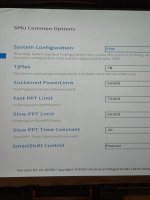
SMU Common Options :see picture USE CAUTIOUSLY AS THESE ARE MY WORKING VALUES.
 

Attachments

  • 17655762353401272761963577734985.jpg
    17655762353401272761963577734985.jpg
    425.1 KB · Views: 6
  • 1765576282578605487571708161582.jpg
    1765576282578605487571708161582.jpg
    399.4 KB · Views: 5
  • 17655766769383018165919106360806.jpg
    17655766769383018165919106360806.jpg
    492.9 KB · Views: 5
  • 17655767083117223516297537931037.jpg
    17655767083117223516297537931037.jpg
    484.5 KB · Views: 4
  • Like
Reactions: uzumo
@uzumo In many instructions on Proxmox modification for gpu passthrough, it recommends to blacklist the amdgpu.
I think this instruction only applies when a dgpu is used.

If the hookscript needs this directory, then /etc/modprobe.d/blacklist.conf cannot have "blacklist amdgpu".
When I removed this line, the amdgpu directory appeared after a reboot.

My blacklist.conf now has only this line:
blacklist radeon


Now the errors when I start the vm - I don't have a wifi connected so I don't have that device in the error below.
I don't understand the error "inappropriate iocctl for device".
Code:
/var/lib/vz/snippets/ryzen_igpu_reset.sh: line 13: /sys/bus/pci/drivers/iwlwifi/unbind: No such file or directory
error writing '1' to '/sys/bus/pci/devices/0000:01:00.0/reset': Inappropriate ioctl for device
failed to reset PCI device '0000:01:00.0', but trying to continue as not all devices need a reset
 
Oh, once I removed the blacklist for amdgpu my GPU appears in the Windows VM!
I believe now we have a proven way to get the igpu to work in Proxmox 9.1.0 on the Minisforum MS-A2 with 9955HX CPU and 610M iGPU.

1765580247969.png

A side note, the AMD Adrenaline driver app will give a "Oops error 195" when the app doesnt detect the igpu 610M.
 
Last edited:
  • Like
Reactions: uzumo
Hm I restarted the VM in windows and tried to qm stop and qm start the VM again, but the GPU is gone with code 43.

After some more reboots, I found that a reboot of Proxmox sets it right. I got my GPU back in the VM.

@uzumo Anyway to avoid having to reboot Proxmox?
 
Last edited:
First, while resolving Code 43 was the priority, I think it's better to bridge the gap between the current settings and the procedures he created, aiming for a complete reboot.

Align the various settings for vbios/gop/pve and the BIOS settings, then verify if the issue is resolved.