

I installed proxmox since 2 months. I can install my VM easily.
But I have a problem with the "local" storage size.
By default, proxmox creates two storages => local and local-lvm.
All of my VMs are on local and nothing is on local-lvm but the local size is 100GB.
The size available on "local-lvm" is 1.7 TB.
I search how extend "local" storage but I'm quiclky lost in the documentation.
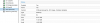
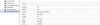
This is some screeshoot about my configuration:
But I have a problem with the "local" storage size.
By default, proxmox creates two storages => local and local-lvm.
All of my VMs are on local and nothing is on local-lvm but the local size is 100GB.
The size available on "local-lvm" is 1.7 TB.
I search how extend "local" storage but I'm quiclky lost in the documentation.
This is some screeshoot about my configuration:


