Partitioning approach for ceph cluster installation on single SSD drive

f1shboll

New Member
Sep 12, 2024
12
1
3
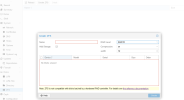
Hello folks, totally new to proxmox clustering and just recently got 2 mini pcs for a home lab. As I was setting up the ceph cluster installation when I got to creating the osd, i couldn't target any disks as the single 1TB SSD I have is in use by proxmox. I followed the default configs for setting up the proxmox for both of my PCs. I tried to do the ZFS pool approach too and i still couldn't find the disk.
1726217869741.png

I'm planning to do a re-install using the ISO and my question is:
  • Are there any ways to partition my single SSD drive in such a way that I could use the remaining partition for either ZFS or Ceph?
  • Or Do I need another drive to configure the storage cluster?

Apologies if I'm asking newbie questions as I'm very new to these storage clustering concepts.

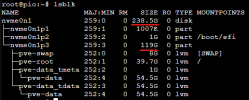
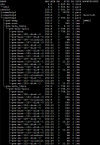
Below is a screenshot of my current partition
1726217834936.png
 
Last edited:
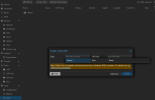
Seems like there's no way we can target unallocated partition of the disk to be inside a ZFS or Ceph pool. For the newbies like me whose searching this forum, hope this helped. You will need to get an external hard disk attached to your mini pc for storage cluster creation. I just did a reinstall on my 2nd mini pc with half of the space unallocated to try and install both ZFS and Ceph. Has about 120GB free space.
1726228924893.png

Was not able to create OSD for ceph or ZFS.
1726228990793.png
 
Last edited:
AFAIR you have to create the partition beforehand and while unused you can select it from the GUI. You can also use the CLI (make sure you pass the proper device/partition):

Code:
ceph-volume lvm create --bluestore --data /dev/nvmeXnYpZ [--crush-device-class CLASE]

BTW is very bad idea to use a two node cluster, specially for Ceph. Yes, even for a home lab ;) Try to get a third node asap and add it to the cluster. I you just want to practice, use nested virtualization and create a PVE + Ceph cluster using VMs in one PVE host.
 
  • Like
Reactions: f1shboll
Seems like there's no way we can target unallocated partition of the disk to be inside a ZFS or Ceph pool. For the newbies like me whose searching this forum, hope this helped. You will need to get an external hard disk attached to your mini pc for storage cluster creation. I just did a reinstall on my 2nd mini pc with half of the space unallocated to try and install both ZFS and Ceph. Has about 120GB free space.
View attachment 74641

Was not able to create OSD for ceph or ZFS.
View attachment 74642
I hope you didn't give up cause you're pretty close.

What I see is that you didn't create a partition from the free space, so that's why the ui didn't see it.

For this to work you'd have to make a nvme0n1p4 that is unused (currently in the picture, the partition table ends at nvme0n1p3), and after that ceph would be able to take it for its own use. (I can't confirm this works, I'm formatting my 2nd and 3rd nodes just to try this out)

As for how to make that empty partition, I usually use command line, but there is probably a gui way to do it too.